
September 30, 2026

Eclipse Foundation Launches the Sovereign AI Foundation
by Elspeth Tory at September 30, 2026 10:00 AM
New vendor-neutral initiative brings together an initial community of 17 organisations to connect industry needs with open source AI projects and turn shared expertise into practical guidance for greater choice and control
BRUSSELS – 30 September 2026 – The Eclipse Foundation, one of the world’s largest open source software foundations, today announced the formation of the Sovereign AI Foundation, a vendor-neutral initiative that will help member organisations understand their AI dependencies, evaluate open source alternatives, and make more informed decisions about the technologies on which they rely.
As AI moves from experimentation into critical operations and decision-making, control over the underlying technology is becoming a strategic business concern. Many organisations rely on models, platforms, and services they cannot fully inspect, adapt, or govern. That dependence can limit their ability to control where data is processed, choose which technologies to use, or change direction as costs, requirements, and provider terms evolve.
“AI sovereignty is about preserving meaningful choice and control over the systems on which organisations depend,” said Mike Milinkovich, executive director of the Eclipse Foundation. “The Eclipse Foundation already hosts open source technologies that give organisations practical alternatives across the AI stack. The Sovereign AI Foundation will connect those projects with real industry requirements while giving members a neutral forum to compare experience, identify shared priorities, and accelerate adoption.”
AI sovereignty does not mean isolation, complete self-sufficiency, or rejecting proprietary technology. It means retaining the ability to understand, choose, adapt, and govern critical AI systems while preserving viable alternatives and the freedom to change direction.
Open source is central to achieving that goal. It can provide greater visibility into technology dependencies, more flexibility to adapt systems, and more choice in how AI is deployed. Combined with portability, operational expertise, and vendor-neutral governance, open technologies can help organisations reduce unnecessary dependency and retain greater control over their AI systems.
The Eclipse Foundation advances these goals in two complementary ways. Independently governed open source projects develop and maintain the technologies. The Sovereign AI Foundation brings member organisations together to identify shared requirements, evaluate relevant projects, contribute experience and expertise, and support adoption and community growth.
The initiative launches with 17 participating organisations spanning technology, industry, research, and the open source community: CEA LIST, EclipseSource, Engineering Ingegneria Informatica, Ericsson, Eurotech, Infosys, Kentyou, KU Leuven, Open Elements, Red Hat, Renesas Electronics, Robert Bosch, Thales, The IO Foundation, TypeFox, the University of York, and Vector Informatik. Additional organisations are in the process of joining, and all Eclipse Foundation member organisations are invited to participate.
Connecting industry needs with open source AI projects
The Sovereign AI Foundation will connect member priorities and real-world use cases with relevant projects across the Eclipse Foundation ecosystem. Members will be able to identify and evaluate technologies that address their needs, bring operational requirements and feedback to project communities, contribute expertise, and help drive adoption.
Relevant projects include Eclipse Theia and Theia AI for AI-enabled developer tools; Eclipse Enclave for running AI coding agents in isolated, policy-controlled environments; Eclipse PanEval for evaluating model capability, safety, and cybersecurity; and Eclipse LMOS for developing and managing multi-agent systems. The Open VSX Registry provides vendor-neutral extension infrastructure for open source and AI-enabled development tools, with downloads approaching one billion per month. The Eclipse Foundation is also exploring a broader AI Registry for emerging components such as Model Context Protocol (MCP) servers, agent skills, and plugins.
Each project retains independent governance and control over its technical roadmap. By connecting organisations deploying AI with the communities building these technologies, the Sovereign AI Foundation will support a modular ecosystem in which projects can address different requirements, evolve independently, and work together where appropriate.
From shared experience to practical guidance
The Sovereign AI Foundation focuses on six areas:
- Mapping real-world needs and use cases: Building a shared view of how members are deploying, evaluating, and piloting open source AI.
- Assessing technologies and dependencies: Examining developments across models, evaluation frameworks, infrastructure, and agentic systems, as well as the dependencies they can create.
- Evaluating relevant open source projects: Assessing how projects align with member requirements and identifying opportunities for adoption, contribution, and collaboration.
- Sharing experience and identifying common requirements: Comparing lessons from real-world deployments and identifying needs that members and project communities can address together.
- Developing practical resources: Producing whitepapers, blueprints, landscape analyses, and reference materials that support better-informed AI decisions.
- Translating research into action: Turning findings from Eclipse Foundation research initiatives, including EU-funded projects, into insights that members can apply.
The Sovereign AI Foundation will focus on knowledge sharing, technology assessment, project evaluation, ecosystem coordination, and practical guidance. It will not develop software or specifications. Technical development will continue within Eclipse Foundation-governed projects, creating a feedback loop between the organisations deploying AI and the communities building the technologies they need.
Supporting a broader open AI ecosystem
The Sovereign AI Foundation is the member forum within the Eclipse Foundation’s broader AI ecosystem. Beyond the projects named above, the Eclipse Foundation’s AI project portfolio spans deep learning, data and numerical computing, simulation, observability, cloud infrastructure, edge applications, and other areas. These projects benefit from established governance and shared legal, operational, security, and community support.
The Eclipse Foundation also supports practical skills development through its AI Coding Workshop series, which helps developers and engineering teams apply disciplined, cross-tool approaches to AI-assisted software development. Visit the workshop website for the latest schedule and registration information.
Together, these activities connect open technologies with the knowledge, experience, and practical skills organisations need to adopt and develop AI while preserving choice and control.
Eclipse Foundation member organisations are invited to join the Sovereign AI Foundation, share their requirements and experience, identify common priorities, and help build its first practical resources. Other organisations can explore Eclipse Foundation membership and participation at sovereign-ai-foundation.org.
Member perspectives
CEA-List
“Sovereign AI is essential to securing Europe’s technological independence and fostering collaborative innovation. Building on the success of our Aidge open-source ecosystem in enabling next-generation AI projects, CEA-List is committed to contributing to European initiatives that strengthen sovereign AI communities, such as SAIF.”
GOUY-PAILLER Cédric, Head of AI Program at CEA-List
EclipseSource
“AI is changing how engineering tools are built and how engineers work with them. From our practical work building custom AI-native IDEs and engineering tools with our industry customers, as well as our contributions to open-source platforms such as Eclipse Theia, Theia AI, and Eclipse Enclave, we see a strong need for solutions that combine powerful AI capabilities with control, flexibility, and vendor neutrality. The Sovereign AI Foundation provides an important forum to bring real-world engineering requirements into the open-source ecosystem, align across organizations, and jointly shape technologies that can provide a reliable foundation for future AI-native engineering workflows.”
Jonas Helming, CEO of EclipseSource.
Eurotech
“At Eurotech, we enable AI to the edge, where it connects directly with physical systems and where security, reliability, and the ability to adapt over long lifecycles are essential. The Sovereign AI Foundation gives us a valuable forum to work with industry peers on practical strategies and measures that safeguard transparency and control over mission-critical technology relationships.”
Robert Andres, Chief Marketing Officer at Eurotech.
InfoSys
“As AI diffusion scales across the organisation, strategic Enterprise AI Autonomy will be key to ensure that the organisations are able to control and have autonomy in model usage, data & learning, and operational execution. We are excited to work with the Sovereign AI foundation in promoting open sourcing and autonomy across the AI ecosystem.”
Rafee Tarafdar, Executive Vice President, CTO, Infosys
Research Centre for Information Systems Engineering (LIRIS)
“The dependency of economic, academic, and societal organisations on external services like AI keeps growing and is increasingly being considered a strategic problem related to sovereignty. This awareness goes beyond functional requirements and includes concerns such as trustworthiness and reliability, as well as the need for assurances on key issues like data confidentiality, availability, portability, compatibility, retaining control over economic cost, and avoiding vendor lock-in. In a simple equation, Trust equals Transparency times Control. In the work of the Sovereign AI Foundation, which aligns with the principles of open source development, both factors are actively being improved, ultimately leading to higher trustworthiness of key technology.”
Dr. Dimitri Van Landuyt, Research Centre for Information Systems Engineering (LIRIS), Faculty of Business and Economics (FEB), KU Leuven, Belgium
TypeFox
“Already, we’ve been impressed by the community that’s been put together, and the quality of the ideas and projects put forth. We’re more than excited to be involved as members of the Sovereign AI Foundation, and are looking forward to being a key part of this trailblazing effort.”
Benjamin Wilson, Language Engineer, TypeFox
About the Sovereign AI Foundation
The Sovereign AI Foundation is an Eclipse Foundation initiative that provides a vendor-neutral forum for member organisations to navigate the open source AI landscape. Participants share knowledge and use cases, assess technologies and trends, and develop practical resources that support more informed AI decisions and greater transparency, interoperability, choice, and control. Learn more at sovereign-ai-foundation.org.
About the Eclipse Foundation
The Eclipse Foundation provides a global community of individuals and organisations with a vendor-neutral, business-friendly environment for open source collaboration and innovation. We host Adoptium, the Eclipse IDE, Jakarta EE, Open VSX, Software Defined Vehicle, and more than 450 high-impact open source projects. Headquartered in Brussels, Belgium, we are an international non-profit association supported by over 300 members. Our events, including Open Community Experience (OCX), bring together developers, industry leaders, and researchers from around the world. To learn more, follow us on X and LinkedIn, or visit eclipse.org.
Media contacts:
Schwartz Public Relations
Julia Rauch/Luca Myska
Sendlinger Straße 42A
80331 München
EclipseFoundation@schwartzpr.de
+49 (89) 211 871 -43/ -52
514 Media Ltd (France, Italy, Spain)
Benoit Simoneau
M: +44 (0) 7891 920 370
Nichols Communications (Global Press Contact)
Jay Nichols
+1 408-772-1551

Gruvbox Material theme for the Eclipse IDE
by Lars at September 30, 2026 12:00 AM
Our set of Eclipse themes has a new member: Gruvbox Material. It follows sainnhe’s popular Gruvbox Material palette, which tones down the warm retro colors of the original Gruvbox to something that is easy on the eyes for a full working day.
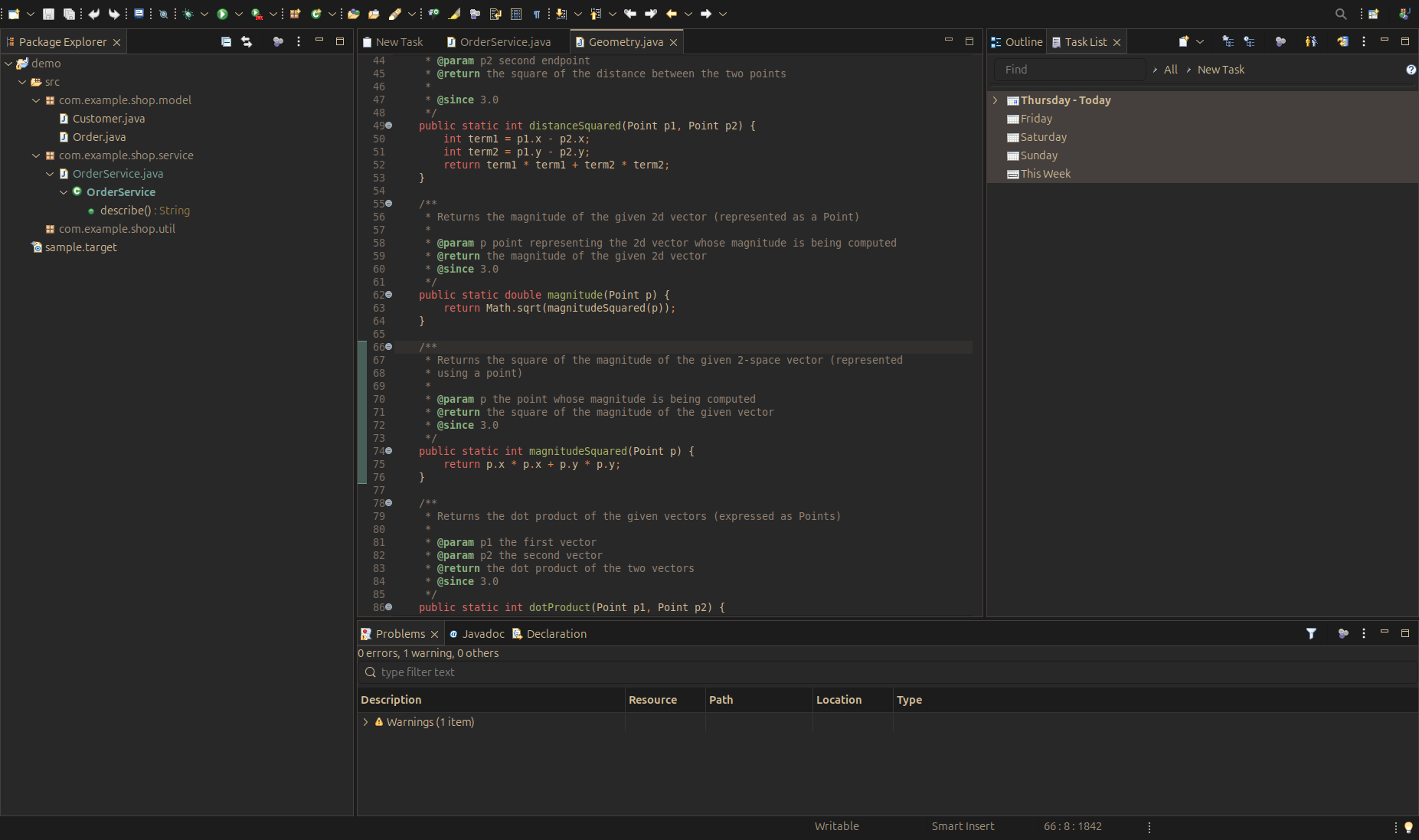
The palette
The theme is based on the VS Code extension of Gruvbox Material with its default medium background and the material foreground.
Editors and views sit on a soft dark brown #292828, while the surrounding window chrome uses the darker #1C1C1C of the extension’s flat workbench.
Text is a warm #D4BE98, and Java code uses the extension’s syntax roles: red keywords, yellow strings and green functions.
We made one deliberate change to the original.
The extension’s lighter greys, which it uses for muted text, fail the WCAG AA contrast ratio on these surfaces.
The Eclipse theme uses the brighter grey #A89984 for muted text and the tab keyline instead, so secondary information stays readable.
Like the other themes, Gruvbox Material also writes its editor, syntax highlighting and console colors into the matching preferences, so the Java editor, the console and the views all follow the palette.
The screenshot was taken through our MCP server for the Eclipse IDE: an agent installed the theme from the update site, restarted the IDE, switched the theme and captured the window.
Installing
In Eclipse, choose Help > Install New Software and add the update site:
https://vogellacompany.github.io/eclipse-themes/
Select the Gruvbox Material feature, restart, and switch to it under Preferences > General > Appearance. If you already added the update site for one of our other themes, Gruvbox Material is listed there as well.
Sources and issues: github.com/vogellacompany/eclipse-themes. Please open an issue there if the theme renders something wrong on your platform.
September 26, 2026
Buttoning Up Method Categories in Eclipse Collections with Annotations
by Donald Raab at September 26, 2026 07:25 AM
From Custom Code Folding Regions in IntelliJ to Java Annotations
 Photo by Olga Kovalski on Unsplash
Method Categories Revisited
I introduced the idea of categorizing methods in the open source Eclipse Collections Java library in the book “Eclipse Collections Categorically: Level up your programming game.” The idea of message categories is something I learned from the Smalltalk programming language in the last millenium.
Note: You can download a free Amazon Kindle only copy of “Eclipse Collections Categorically: Level up your programming game” for one more day on September 26, 2026. Search for the title in your local Amazon market on the website (not mobile app) and make sure it says $0 to Buy. Good luck and enjoy!
While writing the book, I learned how to use Custom Code Folding Regions in IntelliJ to group methods into categories in the Structure View. This allowed me to replicate the categories I was using to organize the chapters of my book back into the RichIterable source code in Eclipse Collections.
Grouping Java methods using custom code folding regions with IntelliJ
I understood clearly what I wanted to accomplish by categorizing methods, but it wasn’t obvious to me how to achieve it. I wanted both the IDE and JavaDoc to be able to leverage method categories to help developers sift through all the methods in a feature-rich API. I had to produce this information twice for Javadoc and IntelliJ. The idea was great, but the implementation needed a little longer to bake. Ultimately, the idea would be realized by another open source contributor to Eclipse Collections.
Enter the Category Annotations
The next release of Eclipse Collections will include Category annotations that we are using to group all of the methods in the Eclipse Collections API. The Category annotations below were a great idea and open source contribution to Eclipse Collections from Anthony Accioly. Thank you, Anthony!
 A Collection of Category annotations in Eclipse Collections
The Category annotations that Anthony created offer a few very important features that could not be achieved using Custom Code Folding Regions in IntelliJ. With these annotations used to categorize methods in Eclipse Collections, we can find usages of these annotations in three different ways.
Finding Usages in IntelliJ
Looking at the Filtering Category, we can use IntelliJ’s Find Usages (Alt-F7). Currently, there are four interfaces and one static utility class that have been categorized in Eclipse Collections — RichIterable, ListIterable, MutableList, ImmutableList, and Iterate. The following image shows the results of using Find Usages with the Filtering Category in IntelliJ.
 Find Usages of Filtering Annotation in IntelliJ
Finding Usages in Javadoc
Anthony taught me about a feature of Javadoc that I was not aware of. There is a menu item labeled Use, that is the Javadoc equivalent of Find Usages in IntelliJ. If we browse the Javadoc for Eclipse Collections and click on the Filtering Category, we can use the Use option (highlighted in orange below) to find all usages of the annotation in Javadoc. This is what the result looks like.
 Find Usages of Filtering Annotation in Javadoc
There is some work that could be done to simplify this view and make it more useful. I would group the methods by type within a package, just as IntelliJ does. This view while useful will get unwieldy as we add more types. Thankfully, Eclipse Collections has a well organized package design, without which this view would have been much less useful.
Finding Usages Programmatically
The Category annotations once added to all of the interfaces in Eclipse Collections make it possible to programmatically understand where the annotations are used. The following code shows the counts of methods on the MutableList interface by Category using countByEach.
@Test
public void mutableListCountsByMethodCategories()
{
    MutableBag<String> countsByAnnotation = ArrayIterate.reject(
                    MutableList.class.getMethods(),
                    Method::isBridge)
            .countByEach(m -> ArrayAdapter.adapt(m.getAnnotations()))
            .collect(Annotation::annotationType)
            .collect(Class::getSimpleName);

    countsByAnnotation.forEachWithOccurrences(
            (o, c) -> System.out.println(o + " : " + c));
}
Output:
Converting : 47
Testing : 18
Counting : 6
Iterating : 11
Deprecated : 5
Mutating : 18
Aggregating : 23
Transforming : 37
Filtering : 22
Finding : 25
Grouping : 7
The following code shows the methods on the MutableList interface grouped by Category using groupByEach.
@Test
public void mutableListMethodsByCategories()
{
    Multimap<String, String> methodsByAnnotation = ArrayIterate.reject(
                    MutableList.class.getMethods(),
                    Method::isBridge)
            .groupByEach(m -> ArrayAdapter.adapt(m.getAnnotations()))
            .collectKeyMultiValues(
                    annotation -> annotation.annotationType().getSimpleName(),
                    Method::getName,
                    Multimaps.mutable.sortedSet
                            .with(Comparator.<String>naturalOrder()));

    methodsByAnnotation.forEachKeyMultiValues(
            (o, c) -> System.out.println(o + " : " + c + '\n'));
}
Output:
Deprecated : [injectInto, selectAndRejectWith]

Mutating : [reverseThis, shuffleThis, sortThis, sortThisBy, sortThisByBoolean,
sortThisByByte, sortThisByChar, sortThisByDouble, sortThisByFloat,
sortThisByInt, sortThisByLong, sortThisByShort, with, withAll,
without, withoutAll]

Aggregating : [aggregateBy, hashCode, injectInto, injectIntoDouble,
injectIntoFloat, injectIntoInt, injectIntoLong, reduce, reduceBy,
reduceInPlace, sumOfDouble, sumOfFloat, sumOfInt, sumOfLong, summarizeDouble,
summarizeFloat, summarizeInt, summarizeLong]

Transforming : [collect, collectBoolean, collectByte, collectChar,
collectDouble, collectFloat, collectIf, collectInt, collectLong,
collectShort, collectWith, collectWithIndex, flatCollect,
flatCollectBoolean, flatCollectByte, flatCollectChar, flatCollectDouble,
flatCollectFloat, flatCollectInt, flatCollectLong, flatCollectShort,
flatCollectWith, zip, zipWithIndex]

Filtering : [distinct, distinctBy, drop, dropWhile, partition, partitionWhile,
partitionWith, reject, rejectWith, rejectWithIndex, select, selectInstancesOf,
selectWith, selectWithIndex, subList, take, takeWhile]

Converting : [appendString, clone, into, makeString, newEmpty, toArray, toBag,
toBiMap, toImmutable, toImmutableBag, toImmutableBiMap, toImmutableList,
toImmutableMap, toImmutableSet, toImmutableSortedBag, toImmutableSortedBagBy,
toImmutableSortedList, toImmutableSortedListBy, toImmutableSortedSet,
toImmutableSortedSetBy, toList, toMap, toReversed, toSet, toSortedBag,
toSortedBagBy, toSortedList, toSortedListBy, toSortedMap, toSortedMapBy,
toSortedSet, toSortedSetBy, toString]

Testing : [allSatisfy, allSatisfyWith, anySatisfy, anySatisfyWith, contains,
containsAll, containsAllArguments, containsAllIterable, containsAny,
containsAnyIterable, containsBy, containsNone, containsNoneIterable, equals,
isEmpty, noneSatisfy, noneSatisfyWith, notEmpty]

Finding : [binarySearch, detect, detectIfNone, detectOptional, detectWith,
detectWithIfNone, detectWithOptional, get, getAny, getFirst, getLast, getOnly,
indexOf, lastIndexOf, max, maxBy, maxByOptional, maxOptional, min, minBy,
minByOptional, minOptional]

Counting : [count, countBy, countByEach, countByWith, countWith, size]

Iterating : [asLazy, asParallel, asSynchronized, asUnmodifiable, each, forEach,
forEachInBoth, listIterator, reversed, tap]

Grouping : [chunk, groupBy, groupByAndCollect, groupByEach, groupByUniqueKey]
Custom Code Folding Regions vs. Annotations
Custom Code Folding Regions were a good start to realizing method categories in IntelliJ. The approach allowed us to visualize the following for RichIterable in the IntelliJ Structure View.
 Custom Code Folding Regions in IntellJ augmenting the Structure View
The annotations approach introduced by Anthony is much better, as the annotations can be used to understand method category usages in IntelliJ, Javadoc, and programmatically. We still have the custom code folding regions defined in RichIterable, but will be opting to use the annotations approach across all of the other interfaces and classes in Eclipse Collections instead. We will not be reorganizing all of the other types using Custom Code Folding Regions, mostly because the reorganization of the files would produce very noisy diffs to review and merge. The value of the structure view is also more limited than the Find Usages approach.
Final Thoughts
I wrote “Eclipse Collections Categorially: Level up your programming game”, a book about Eclipse Collections that was organized into chapters by Method Category. During the process of writing the book I discovered that I could simulate method categories in IntelliJ using Custom Code Folding Regions. The simulation was somewhat limited, and I only applied it in code to the RichIterable interface. I wanted Javadoc to provide support for method categories directly in Java, but it doesn’t look like it will be happening any time soon.
Anthony Accioly shared an idea he had with me to use annotations to represent method categories in Java code. Anthony explained the Uses feature in Javadoc that honestly sold me instantly. I was not previously aware of this feature. I still think Javadoc should add support for method categories in Java, and a better user experience for the Uses feature. IntelliJ should support the ability to group methods by annotation in the Structure View. This would then complete the support of this feature, giving back what we will be losing by not reorganizing all of our class files using Custom Code Folding Regions.
While this blog is sharing the “what” we are currently doing in Eclipse Collections, I will leave the very interesting story of how Anthony has been assisted in achieving this using AI. I want to thank him again for all the great contributions he has made recently in Eclipse Collections to support these improvements to our code base. He is really incorporating the spirit of my book in the best way possible in Java code. Well done!
Thanks for reading!
I am the creator of and committer for the Eclipse Collections OSS project, which is managed at the Eclipse Foundation. Eclipse Collections is open for contributions. I am the author of the book, Eclipse Collections Categorically: Level up your programming game.
September 24, 2026
Performance optimization in Eclipse based applications
by Lars at September 24, 2026 12:00 AM
A performance pull request usually comes with an argument, not with a measurement. This post walks through one such PR, shows how we measured it in a running IDE, and what the numbers say about the argument.
The change
The Dependencies page of the PDE manifest editor lists the Import-Package entries of a bundle. For every row the label provider asks whether some bundle in the target platform exports that package, and picks the icon accordingly.
The stock implementation answered that question through State.getExportedPackages().
That method is not cached: every call takes the state monitor and copies the exports of all resolved bundles into a freshly allocated array.
With an SDK sized target platform that is about 3200 exports copied per row, on the UI thread, for every refresh of the table.
eclipse.pde#2444 replaces the copy with a walk over the resolved bundles that reads the exports in place and stops at the first match. The PR description argues with reference stores: roughly 9600 per call before, 731 after.
On the related Equinox change, equinox#1347, the reviewer asked for performance metrics instead: fewer reference stores do not always result in a measurable improvement. That is a fair question, and it needs numbers from a real IDE rather than a microbenchmark.
Setup
Eclipse SDK 4.42 I-build 20260902-2327, stock org.eclipse.osgi 3.24, running headless under Xvfb.
The target platform is the running platform: 850 bundles, about 3200 exported packages.
Before: stock org.eclipse.pde.core 3.21.500.v20260902-1925.
After: org.eclipse.pde.core built from the PR branch, everything else identical, IDE started with -clean.
Two manifests: org.eclipse.equinox.p2.tests with 48 Import-Package rows and a copy of the org.apache.ant manifest with 105 rows.
The table refreshes twice per open, once on creation and once on page activation, so each open is 96 or 210 calls of isResolved().
The scenario, ten iterations per run: close the manifest editor, open META-INF/MANIFEST.MF, switch to the Dependencies page, wait until the UI thread is idle.
Results
| 48 rows before | 48 rows after | 105 rows before | 105 rows after | |
|---|---|---|---|---|
UI thread samples in getExportedPackages / all samples |
5 / 533 | 0 / 529 | 12 / 543 | 0 / 462 |
Estimated UI thread time in isResolved per page open |
about 5 ms | below 1 ms | about 12 ms | below 1 ms |
Allocation per isResolved call |
about 360 KB | about 7 KB | about 220 KB | not sampled |
JFR allocation weight under isResolved, ten opens |
175 MB | 4 MB | 470 MB | none sampled |
| Median switch to the Dependencies page | 68 ms | 66 ms | 57 ms | 55 ms |
| GC events during the run | 0 | 0 | 0 | 0 |
Before the change, every sampled stack is one path: the Dependencies page refreshes its table viewer, the label provider asks for the image, ImportPackageObject.isResolved calls StateImpl.getExportedPackages.
The allocation under it is the fresh ExportPackageDescription[] plus the ArrayList growth that builds it.
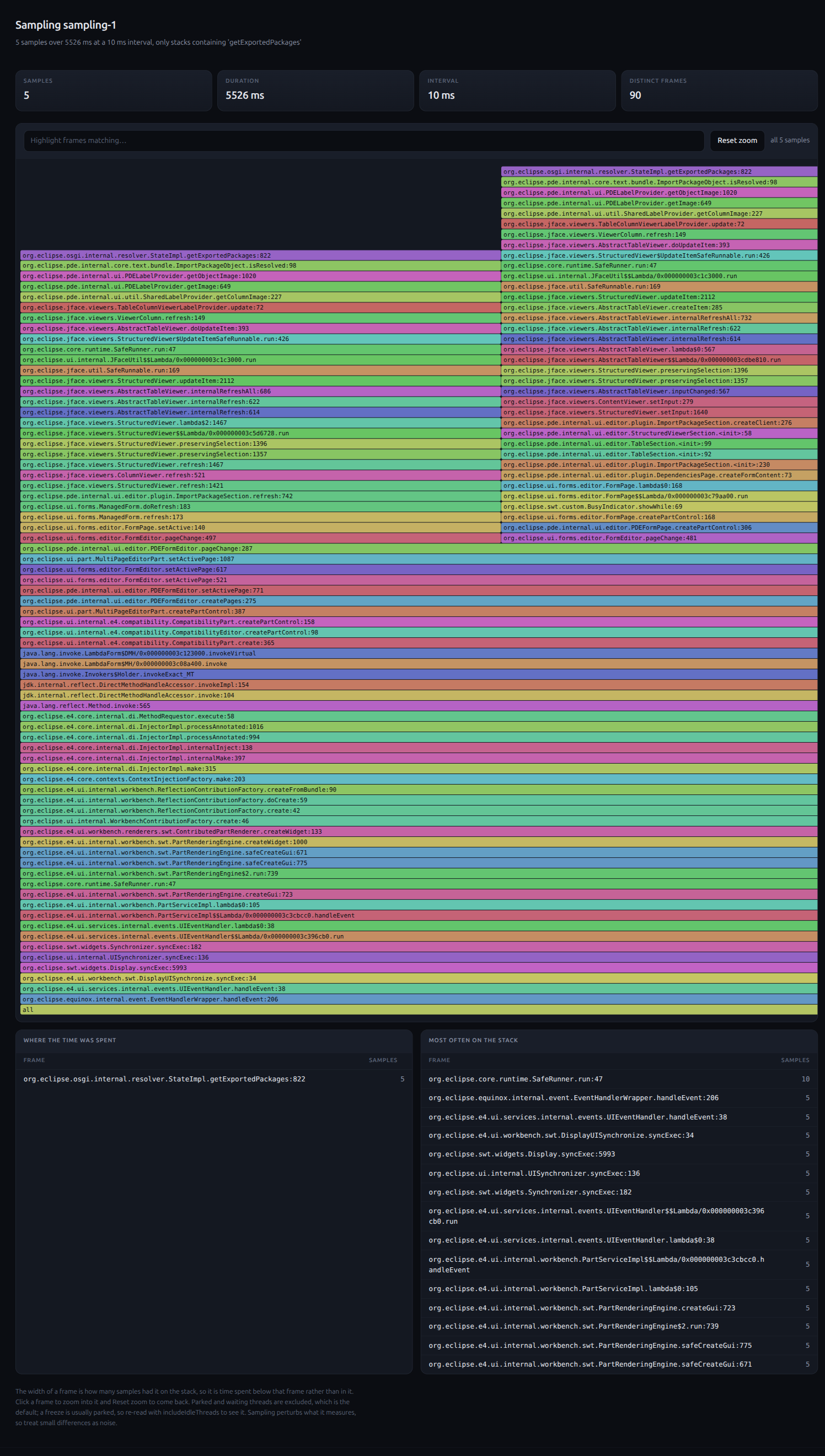 UI thread samples containing getExportedPackages before the change, 48 rows. After the change there is no such sample.
After the change the method no longer appears in the 10 ms samples at all.
What JFR still attributes to isResolved is the BundleDescription[] copy returned by State.getResolvedBundles().
What the numbers say
The work and the allocation scale with the row count, as the PR says, and the change removes them. Both are real: a few hundred kilobytes of garbage per row, on every refresh, on the UI thread.
The page does not get measurably faster at 48 or 105 rows. The 5 to 12 ms per open were already below the cost of the page switch itself, and no garbage collection was triggered on either side, so the removed allocation never turned into a pause during these runs. A visible difference would need several hundred imports, or the garbage coinciding with a collection.
So the reviewer’s caution holds up as well as the PR does. The change is an improvement in work done and memory allocated, not a latency win a user would notice on a typical manifest. That is the answer a reviewer asking for metrics needs, and it is a better basis for the discussion than either “fewer reference stores” or “no visible difference” alone.
How we measured
The measurement was driven by an agent through our MCP server for the Eclipse IDE, against the real IDE instead of a benchmark harness.
eclipse_run_script runs the scenario: close the editor, open the manifest, switch to the Dependencies tab, then eclipse_wait_until_settled until the UI thread is idle.
It repeats this ten times and reports the milliseconds per step, which gives the page switch row of the table.
eclipse_start_sampling and eclipse_stop_sampling sample the UI thread at 10 ms.
A frameFilter restricts the result to samples that contain the frame of interest, here getExportedPackages, and eclipse_show_trace renders them as the flame graph above.
eclipse_start_flight_recording and eclipse_stop_flight_recording record the same ten iterations with JFR allocation sampling.
The same frameFilter attributes the allocation by stack, which gives the allocation rows.
For the after side, eclipse_substitute_bundle installed a org.eclipse.pde.core jar built from the PR branch and restarted the IDE with -clean.
Everything else stayed the same, so the two runs differ only in the bundle under test.
The server is open source: github.com/vogellacompany/eclipse-mcp-server.
September 23, 2026

How to Build Tools and IDEs in 2026
by Jonas, Maximilian & Philip at September 23, 2026 12:00 AM
If you’re building a custom tool or IDE in 2026, AI has changed your project on three levels at once: who your users are, how the tool should be designed, and how it gets built. In February 2025, we …
The post How to Build Tools and IDEs in 2026 appeared first on EclipseSource.
by Jonas, Maximilian & Philip at September 23, 2026 12:00 AM
September 15, 2026
Exploring the Asymmetric Apathy in Java Collection and Java Stream
by Donald Raab at September 15, 2026 11:37 AM
That which can be done lazily, can also be done more simply eagerly.
 Photo by Brett Jordan on Unsplash
Peripheral Vision
We can’t always see the way things might be. Our vision is sometimes limited by what we have seen before, and what we are looking at right in front of us. If all you have seen is how Java does things in the standard library, then your vision has been hyper focused. Your peripheral vision may not have had time to develop and recognize different symmetric patterns.
We can never start Java over with lambdas built in at the beginning with collections that leveraged them both eagerly and lazily. This is one of the reasons I created Eclipse Collections. Eclipse Collections was my vision for how collections could be in Java, based on my experience in Smalltalk. Eclipse Collections design started evolving ten years before we had lambdas in Java.
In this blog, I am going to show you things that should make sense intuitively, but that you may have just moved on and accepted as the way things are in Java. This does not mean this is the way they should be, or need to be in the future. Don’t fight your intuition. This way leads to you potentially sacrificing the readability, efficiency, and performance of your code.
Design Intuition
Most developers have intuition about design. The broader the experience a developer has, the more their intuition may have developed. This is why many experienced developers recommend to developers to learn multiple programming languages.
Let’s see what your intuition says as I guide you through some simple code examples in the following sections.
Transforming a List Imperatively in Java
Before Java 8, Java developers wrote eager code like this to transform elements of a collection.
@Test
public void eagerMap()
{
    List<String> strings = List.of("a", "b", "c");
    List<String> uppercase = new ArrayList<>();
    for (String each : strings)
    {
        uppercase.add(each.toUpperCase());
    }

    assertEquals(List.of("A", "B", "C"), uppercase);

    uppercase.add("D");
    assertEquals(List.of("A", "B", "C", "D"), uppercase);
}
This code is straightforward and readable for any Java developer. This code has worked since generics were added in Java 5. List has an add method, and can be used as expected with an ArrayList.
Moving to Functional and Lazy in Java
When Java 8 was released, developers learned how to use a Stream with a method named map, which took a FunctionalInterface named Function which could be represented with a lambda or method reference.
This is what developers would write after Java to achieve the equivalent eager behavior, lazily with Stream.
@Test
public void lazyMapJava8()
{
    List<String> strings = List.of("a", "b", "c");
    List<String> uppercase = strings.stream()
            .map(String::toUpperCase)
            .collect(Collectors.toList());

    assertEquals(List.of("A", "B", "C"), uppercase);

    uppercase.add("D");
    assertEquals(List.of("A", "B", "C", "D"), uppercase);
}
There is an increase in cognitive complexity hidden behind this simple looking code.
The map method on Stream is lazy. It gives you a promise to transform the source collection once a terminal operation is called. The terminal operation we learned to use to do the equivalent here in Java 8 was collect, which takes a Collector which can mutably transform the result into some target collection, in this case a mutable List.
The method Collectors.toList() returns a mutable list that can be modified after being returned. This makes it very similar to the eager code Java developers were used to writing before Java 8.
Moving to Conditional Immutability in Java
When Java 16 was released, there was a new toList method added directly to Stream. This method is equivalent to but not the same as collect(Collectors.toList()). It is closer in behavior to collect(Collectors.toUnmodifiableList()), but is not exactly the same as that either. Stream.toList is a highly optimized method which returns an immutable List, instead of an ArrayList.
@Test
public void lazyMapJava16()
{
    List<String> strings = List.of("a", "b", "c");
    List<String> uppercase = strings.stream()
            .map(String::toUpperCase)
            .toList();

    assertEquals(List.of("A", "B", "C"), uppercase);

    assertThrows(UnsupportedOperationException.class,
            () -> uppercase.add("D"));
}
The debates about whether the toList method is better in Java 16 than Collectors.toList() in Java 8 misses the point. These methods have the same name but are not the same, and that continues to cause some confusion. This is one case of asymmetric apathy. This decision was made for the sake of conciseness and a future where immutability is preferred to mutability in Java. You get one choice for a return type on Stream. The choice for toList was to return an immutable List. Unfortunately, in Java we can’t tell if a List is mutable or immutable from the return type. I explained this in the following blog.
How do you know if a Java Collection is Mutable or Immutable?
Schrödinger’s List is both Mutable and Immutable.
The Asymmetry in Java Collection
This thread of conversation about the return type for toList detracts from the real asymmetry that has been screaming at us since Java 8 arrived. Why is there no map method on List? Why doesn’t the following code compile and work?
// NOTE THIS CODE DOES NOT COMPILE TODAY
@Test
public void eagerMapJavaFuture()
{
    List<String> strings = List.of("a", "b", "c");
    // The map method does not exist on List
    List<String> uppercase = strings.map(String::toUpperCase);

    assertEquals(List.of("A", "B", "C"), uppercase);

    assertThrows(UnsupportedOperationException.class,
            () -> uppercase.add("D"));
}
// NOTE THIS CODE DOES NOT COMPILE TODAY
The reason this doesn’t work is there is no map method on List. If there was a map method on List, then this method could be polymorphic, unlike Stream which only provides one choice for a return type. So the immutable List returned by calling map on a List.of() would throw UnsupportedOperationException when calling add on the collection. But the following code could work if the map method for ArrayList returns an ArrayList.
// NOTE THIS CODE DOES NOT COMPILE TODAY
@Test
public void eagerMapMutableJavaFuture()
{
    List<String> strings = new ArrayList<>(List.of("a", "b", "c"));
    // The map method does not exist on List
    List<String> uppercase = strings.map(String::toUpperCase);

    assertEquals(List.of("A", "B", "C"), uppercase);

    uppercase.add("D");
    assertEquals(List.of("A", "B", "C", "D"), uppercase);
}
// NOTE THIS CODE DOES NOT COMPILE TODAY
The map method on List could behave differently for different List types. An ArrayList could return a mutable List for the return type of map. The map method can also support covariant return types, but this is only helpful if you have different return types to return. List is the only type of List in the JDK Collection hierarchy that could be returned, without crossing from interface (List) to implementation (ArrayList). There are not separate interfaces for MutableList and ImmutableList in the JDK.
What does Symmetric Sympathy look like?
Eclipse Collections was designed from the ground up with good symmetry and intention revealing names for methods. Eclipse Collections has an adequate number of types (i.e. Iterable, Mutable, Immutable) to make good symmetry possible across all of its data structure types (e.g. ListIterable, MutableList, ImmutableList).
The first blog I wrote publicly nine years ago explained the importance of Symmetric Sympathy in Eclipse Collections design.
I’m surprised when I read this blog nine years later, as it still does a decent job explaining some of the design decisions we made so long ago now in Eclipse Collections.
If your collections library does not exhibit Symmetric Sympathy, then your expectations can only be verified by reading the implementation code or the Javadoc spec of the library. The data structure types, method names, and return types cannot properly and consistently reveal their intentions. You just have to figure it out.
Read the spec Luke.
Transforming a List Imperatively with Eclipse Collections
The following is the equivalent imperative code using Eclipse Collections for the examples above.
@Test
public void imperativeEagerMap()
{
    ImmutableList<String> strings = Lists.immutable.of("a", "b", "c");
    MutableList<String> uppercase = Lists.mutable.empty();
    for (String each : strings)
    {
        uppercase.add(each.toUpperCase());
    }

    assertEquals(List.of("A", "B", "C"), uppercase);

    uppercase.add("D");
    assertEquals(List.of("A", "B", "C", "D"), uppercase);
}
Notice how we can tell the list of strings is immutable, and the uppercase list is mutable because of the type names, ImmutableList and MutableList. The rest of the code is equivalent to JDK because of the great interop between Eclipse Collections and Java Collections.
Moving to Functional and Eager with Eclipse Collections
This is the step function that is missing from the JDK, that would reduce the cognitive load for many developers when learning about lambdas. Eager functional is easier to learn and understand than lazy functional. There are extremely limited eager methods on Collection types in the JDK that take lambdas (e.g. forEach, replaceAll, removeIf). As we saw, there is no map method on List.
The method that is equivalent to map in Eclipse Collections is named collect. The following is an example of an eager collect on ImmutableList.
@Test
public void eagerCollectImmutable()
{
    ImmutableList<String> strings = Lists.immutable.of("a", "b", "c");
    ImmutableList<String> uppercase = strings.collect(String::toUpperCase);

    assertEquals(List.of("A", "B", "C"), uppercase);

    // The following code does not compile.
    // There is no add method on ImmutableList
    // uppercase.add("D");
}
We can see the benefits of covariant returns at work if we change the source type to a MutableList. The result type for collect on a MutableList is a MutableList.
@Test
public void eagerCollectMutable()
{
    MutableList<String> strings = Lists.mutable.of("a", "b", "c");
    MutableList<String> uppercase = strings.collect(String::toUpperCase);

    assertEquals(List.of("A", "B", "C"), uppercase);

    uppercase.add("D");
    assertEquals(List.of("A", "B", "C", "D"), uppercase);
}
Now the add method works again, because the compiler does what the compiler should do when using strong static types. A MutableList has an add method, so the same code used in the imperative example with a MutableList, works in the functional example.
Moving to Functional and Lazy with Eclipse Collections
The following is the example of collect using lazy iteration in Eclipse Collections, paired with a choice to return an ImmutableList.
@Test
public void lazyCollectImmutable()
{
    ImmutableList<String> strings = Lists.immutable.of("a", "b", "c");
    ImmutableList<String> uppercase = strings.asLazy()
            .collect(String::toUpperCase)
            .toImmutableList();

    assertEquals(List.of("A", "B", "C"), uppercase);

    // The following code does not compile.
    // There is no add method on ImmutableList
    // uppercase.add("D");
}
We use the asLazy method which returns a LazyIterable. LazyIterable inherits from RichIterable, which is the same feature-rich parent type for MutableList and ImmutableList, with covariant return types for methods like collect. There is a specific intention revealing method named toImmutableList which returns an ImmutableList.
We can also choose to return a MutableList by using toList instead.
@Test
public void lazyCollectMutable()
{
    ImmutableList<String> strings = Lists.immutable.of("a", "b", "c");
    MutableList<String> uppercase = strings.asLazy()
            .collect(String::toUpperCase)
            .toList();

    assertEquals(List.of("A", "B", "C"), uppercase);

    uppercase.add("D");
    assertEquals(List.of("A", "B", "C", "D"), uppercase);
}
Now the add method works again, and we can see its because of the specific type called MutableList, which also happens to extend java.util.List.
Benefits of Mutable and Immutable Interfaces
We can’t revisit the design decisions made with Java Collection interfaces. They are the way we are. We are stuck with them for eternity because of the promise of Java compatibility. Every time they are evolved with default methods, there are risks of breaks. Eclipse Collections keeps reporting any breaks it finds through the OpenJDK Quality Outreach Program.
Eclipse Collections followed a different design path before it was released into open source. I blogged in detail about Rich, Lazy, Mutable and Immutable interfaces in Eclipse Collections in the following blog.
Rich, Lazy, Mutable, and Immutable Interfaces in Eclipse Collections
This is a great blog to read if you want to fully understand the implications and benefits of the Symmetric Sympathy built into the design of the Eclipse Collections hierarchy. The best way to appreciate the benefits of Symmetric Sympathy in design is to try Eclipse Collections yourself.
Thank you for reading!
I am the creator of and committer for the Eclipse Collections OSS project, which is managed at the Eclipse Foundation. Eclipse Collections is open for contributions. I am the author of the book, Eclipse Collections Categorically: Level up your programming game.
The Eclipse Theia Community Release 2026-08
by Jonas, Maximilian & Philip at September 15, 2026 12:00 AM
We are happy to announce the fifteenth Eclipse Theia community release, “2026-08,” incorporating the latest advances from Theia releases 1.72, 1.73, and 1.74. New to Eclipse Theia? It is the …
The post The Eclipse Theia Community Release 2026-08 appeared first on EclipseSource.
by Jonas, Maximilian & Philip at September 15, 2026 12:00 AM
September 13, 2026

CDO 4.36: Safer Transactions, Faster Persistence, Stronger Foundations
by Eike Stepper (noreply@blogger.com) at September 13, 2026 06:30 PM
EMF makes it remarkably easy to define structured models and work with them as Java object graphs. But what happens when those models become too important — or too large — to live only in memory or in local files? What if several users need to work on them concurrently, changes need to be transactional, history must be preserved, or different versions of a model need to evolve in parallel?
This is where CDO comes in.
CDO turns EMF models into shared, transactional, versioned data. Applications continue to work with familiar EObjects, while CDO provides repository persistence, transactions, change notifications, versioning, branching, merging, and scalable client/server access underneath.
With CDO 4.36, much of the work happened below the surface. Transactions have become safer and more flexible, large database commits can be considerably more efficient, PostgreSQL support has been thoroughly requalified, and the underlying Net4j communication layer received a substantial robustness and security overhaul.
But there is also a new API that is immediately visible to application developers.
Nested Transaction Scopes
Sometimes a larger operation consists of smaller operations that should succeed or fail independently, without immediately committing anything to the repository.
CDO 4.36 introduces nested transaction scopes for exactly this purpose:

Scopes can be nested arbitrarily. Committing an inner scope accepts its changes into the surrounding scope, but does not commit them to the repository. The enclosing scope can still roll everything back.
And because scopes implement AutoCloseable, leaving a scope without committing it automatically rolls back its changes. This makes them a natural fit for Java's try-with-resources pattern.
For existing APIs that expect a CDOTransaction, a scope can also provide a nested transaction facade. This makes it possible to introduce scoped behavior without having to redesign existing application code around a completely new abstraction.
Safer Transactions and Merges
The same release contains extensive work on transaction and merge correctness.
A failed merge or revert operation no longer risks leaving a transaction only partially modified. CDO now plans and validates these operations before applying them, and restores the previous transaction state if applying the result fails.
Merge handling for multi-valued model features has also become considerably more sophisticated. This is especially relevant when multiple users or branches modify the same collections in different ways. CDO can now reason more accurately about the actual changes rather than relying primarily on list positions.
For an application developer, the important result is simple: complex concurrent model changes can be combined more reliably, and unsuccessful operations leave the transaction in a well-defined state.
Faster Large Database Commits
A second major focus of CDO 4.36 is database performance.
Historically, even when CDO already knew about a complete large commit, many database operations were still executed individually. CDO can now group homogeneous work across a commit and send it to JDBC in much larger batches.
This benefits many large model changes: initial imports, large collections, append-heavy workloads, and transactions modifying many objects at once.
In one PostgreSQL benchmark with 100,000 list entries, two streams of 100,000 individual database operations were reduced to approximately 100 JDBC batch executions each. The measured initial commit time dropped from roughly 20 seconds to around 14–16 seconds.
CDO 4.36 goes further for repositories using branches. Many common large changes can now be persisted without first reading and rewriting the complete existing collection.
For example, if ten elements are appended to a list containing 1,000 elements, CDO can often write just those ten new elements. The same principle is also used for several other common update patterns.
In a synthetic H2 benchmark involving 100 such lists, 1,000 logical appends previously resulted in about 101,000 rows being processed. The optimized path wrote only the 1,000 actual additions. Commit time in that benchmark dropped from approximately 1.30 seconds to 0.10 seconds.
These numbers are workload-specific benchmarks, not a promise that every CDO application suddenly becomes ten times faster. But they illustrate an important architectural improvement: many large model changes now result in database work that is much closer to the size of the actual change.
PostgreSQL, Requalified
CDO's PostgreSQL support received another less visible but important investment.
The complete PostgreSQL database test suite was run against PostgreSQL 18.6 and pgJDBC 42.7.13. Along the way, a number of accumulated compatibility, database lifecycle, schema handling, data binding, and SQL portability issues were found and corrected.
The final qualification covered 5,318 tests, including normal, auditing and branching repositories, different transport configurations, and native models. The corresponding H2 test suite remained green as well.
For users considering CDO for a new server-side application, PostgreSQL therefore remains a thoroughly tested database choice.
A More Robust Communication Layer
CDO applications normally communicate through Net4j, and CDO 4.36 includes a concentrated round of work on this foundation as well.
The changes cover security, WebSocket validation, timeout handling, connector race conditions, resource leaks, channel management, and shutdown behavior. One particularly important security improvement restricts Java object deserialization when the sending peer has not yet been established as trusted.
Most applications should never notice these mechanisms directly — which is exactly the point. A communication framework is at its best when failure handling, cleanup, concurrency and security remain invisible to application code.
Digging Deeper
Existing CDO users who want the implementation details can find them in the corresponding GitHub issues:
The complete list of changes is available in the CDO 4.36 release notes.
CDO 4.36 does not try to reinvent what CDO is. Instead, it strengthens the properties that become increasingly important as an EMF application grows from a model editor into a collaborative, data-intensive system: safe transactions, efficient persistence, reliable concurrency, and robust communication.
If you already use CDO, this release should make demanding workloads safer and faster. If you use EMF but have never tried CDO, 4.36 may be a good reason to take another look: your application can keep working with the model objects it already knows, while CDO takes care of much of the difficult infrastructure required to turn those objects into shared, persistent, versioned data.
And with features such as nested transaction scopes, that infrastructure is becoming easier to use from ordinary Java code as well.
by Eike Stepper (noreply@blogger.com) at September 13, 2026 06:30 PM
September 10, 2026
Eclipse Foundation Releases Free Toolkit to Help SMEs Prepare for the EU Cyber Resilience Act
by Natalia Loungou at September 10, 2026 11:00 AM
BRUSSELS – 10 September 2026 – The Eclipse Foundation, one of the world’s largest open source software foundations, today announced the availability of a free, open source toolkit developed through the EU-funded OCCTET project to help small and medium-sized enterprises (SMEs) and open source projects prepare for the European Union’s Cyber Resilience Act (CRA).
The toolkit translates complex regulatory requirements into practical steps that organisations can incorporate into their software development and security processes. It helps them assess their readiness, identify which open source components are used in their products, manage vulnerabilities, and document how security risks are being addressed.
The release comes as the CRA’s first obligations take effect. Beginning 11 September 2026, manufacturers must report actively exploited vulnerabilities and severe incidents affecting the security of products with digital elements made available in the European Union. The CRA’s broader requirements will apply from 11 December 2027.
Early use of the OCCTET self-assessment platform has identified a common challenge: many SMEs have security measures in place but lack the visibility, documentation, and consistent processes needed to demonstrate how software risks are being managed.
“For organisations with limited compliance resources, preparing for the CRA is a major undertaking,” said Mike Milinkovich, executive director of the Eclipse Foundation. “OCCTET makes that work more manageable by bringing together tools that help them understand their obligations, identify and address vulnerabilities, and maintain the records needed to support compliance.”
A practical path from assessment to action
The OCCTET toolkit combines multiple services that support organisations from initial assessment through vulnerability management and documentation.
SMEs and open source projects can now access and test the following services:
- Assess readiness: The CRA Self-Assessment Portal helps SMEs understand how the CRA applies to them, evaluate their current readiness, and identify areas requiring attention. The free, guided assessment translates CRA provisions into structured questions, scoring, and practical recommendations.
- Identify software components: Eclipse Apoapsis (OCCTET instance) identifies open source components, dependencies, and licenses, based on the OSS Review Toolkit and known vulnerabilities. It can also generate a range of CRA-ready reports and compliance artefacts, including Software Bills of Materials (SBOMs), which provide a standardised inventory of the software components contained in a product.
- Review findings and take action: Bitsea Curator (OCCTET instance) combines automated analysis with human review to help users verify software information, assess whether vulnerabilities affect their products, prioritise issues, and document their decisions. It also supports the creation of Vulnerability Exploitability eXchange (VEX) reports, which record whether a product is affected by a known vulnerability.
- Reuse shared software information: The Federated OSS Assessment Database, vulnerablecode.io, provides information about open source packages, including their origins, licenses, security advisories, vulnerabilities, and reference SBOMs. Its public PurlDB demonstrator supports reference SBOM generation for more than 20 million packages, while its VulnerableCode integration connects vulnerability information with the software packages it affects.
The toolkit has been validated against complex, real-world software dependency scenarios across ten different technology ecosystems. Testing has included widely used open source projects, large-scale analysis of the Eclipse Foundation’s entire project portfolio, as well as a growing number of real-world SME use cases. This extensive validation demonstrates the toolkit’s ability to operate across diverse technologies, project sizes, and software supply chains.
This testing has demonstrated its ability to analyse complex dependency structures, identify vulnerabilities, support human review, and monitor security issues over time.
Get started with OCCTET
The Open Source Compliance: Comprehensive Techniques and Essential Tools (OCCTET) project brings together industry leaders, cybersecurity experts, SME representatives, and open source organisations to make software security and CRA preparation more accessible, transparent, and cost-effective.
SMEs and open source projects can explore the toolkit and available resources at occtet.eu. Organisations interested in testing the services using real products and development workflows, and providing feedback to support their continued improvement, can visit the OCCTET Get Engaged page.
OCCTET complements the Eclipse Foundation’s broader work to help organisations and open source communities prepare for the CRA. Through the Open Regulatory Compliance (ORC) Working Group, participants are developing community-driven specifications, guidance, training, and other resources to support CRA implementation across the open source ecosystem.
These resources include the free ORC Learning Hub, which provides practical, role-specific training to help open source developers, maintainers, project stewards, product teams, and security and compliance professionals understand how the CRA applies to their work and put its requirements into practice.
The community also comes together through Code & Compliance, the flagship ORC event for open source developers, project stewards, legal and compliance professionals, policymakers, and industry leaders. The next event takes place on 27 October 2026 in Brussels, providing a forum to exchange experiences, share practical guidance, and explore how the CRA and other emerging digital regulations are affecting the open source ecosystem. Register now to join the discussion.
About the OCCTET Project
Open Source Compliance: Comprehensive Techniques and Essential Tools (OCCTET) is an EU-funded initiative focused on helping SMEs and open source projects navigate cybersecurity and compliance requirements under the Cyber Resilience Act. Coordinated by the Eclipse Foundation, the project is developing an integrated suite of free, open source tools for readiness assessment, software dependency analysis, vulnerability management, SBOM generation, and compliance documentation.
The OCCTET project has received funding from the Digital Europe Programme under grant agreement No. 101190474. The content does not necessarily reflect the views of the European Commission. The European Commission is not liable for any use that may be made of the information contained herein.
Learn more at occtet.eu.
About the Eclipse Foundation
The Eclipse Foundation provides a global community of individuals and organisations with a vendor-neutral, business-friendly environment for open source collaboration and innovation. We host Adoptium, the Eclipse IDE, Jakarta EE, Open VSX, Software Defined Vehicle, and more than 450 high-impact open source projects. Headquartered in Brussels, Belgium, we are an international non-profit association supported by over 300 members. Our events, including Open Community Experience (OCX), bring together developers, industry leaders, and researchers from around the world. To learn more, follow us on X and LinkedIn, or visit eclipse.org.
Media contacts:
Schwartz Public Relations
Julia Rauch/Luca Myska
Sendlinger Straße 42A
80331 München
EclipseFoundation@schwartzpr.de
+49 (89) 211 871 -43/ -52
514 Media Ltd (France, Italy, Spain)
Benoit Simoneau
M: +44 (0) 7891 920 370
Nichols Communications (Global Press Contact)
Jay Nichols
+1 408-772-1551
Eclipse Theia 1.75 Release: News and Noteworthy
by Jonas, Maximilian & Philip at September 10, 2026 12:00 AM
We are happy to announce the Eclipse Theia 1.75 release! The release contains in total 51 merged pull requests. In this article, we will highlight some selected improvements and provide an overview of …
The post Eclipse Theia 1.75 Release: News and Noteworthy appeared first on EclipseSource.
by Jonas, Maximilian & Philip at September 10, 2026 12:00 AM
September 09, 2026
Jakarta Faces, Java Web Framework, Stateless Edition: Marketplace AliFaces
by Angelo Rubini at September 09, 2026 03:21 PM
Jakarta Faces gets a fresh perspective in this article by Angelo Rubini, who introduces AliFaces - a marketplace concept for stateless Jakarta Faces components.
The piece covers how moving to a stateless architecture can benefit Jakarta Faces applications, addressing common challenges in modern web development. Rubini presents practical insights on building scalable web applications while maintaining the familiar component-based approach that Jakarta Faces developers appreciate.
If you're working with Jakarta Faces or considering it for your next project, this article offers valuable food for thought on architectural patterns and component reusability.
https://foojay.io/today/jakarta-faces-java-web-framework-stateless-edit…
September 08, 2026
Eclipse Enclave: An Open Source Sandbox for AI Coding Agents
by Jonas, Maximilian & Philip at September 08, 2026 12:00 AM
Back in 2025, we built an AI agent sandbox so our own developers could run AI coding agents at full autonomy without risking trashing their laptops or leaking secrets. Today, we are happy to announce …
The post Eclipse Enclave: An Open Source Sandbox for AI Coding Agents appeared first on EclipseSource.
by Jonas, Maximilian & Philip at September 08, 2026 12:00 AM
September 07, 2026
My Ten Year Quest to Evolve Java Collections Beyond Java Stream
by Donald Raab at September 07, 2026 09:23 PM
Java Stream was hot magma in Java 8, but its lava flow is hardening.
 Photo by Tetiana GRY on Unsplash
Limited Time Free Kindle Book Offer: You can download the Kindle version of “Eclipse Collections Categorically — Level up your programming game” for free from September 24, 2026 (12:00AM PDT) through September 26, 2026 (11:59 PDT). This offer may not be available in all Amazon markets.
IMPORTANT NOTES: Search in your local Amazon market for the book title and click on the Kinle edition (link above is US market convenience link). Use the Amazon website, not the mobile app. Some have previously had issues getting the free Kindle download to work on mobile app. It should say $0 to buy. If it doesn’t, it may not be available in your local market. Kindle Unlimited is not required for this offer. You don’t need a Kindle device, just the Kindle Reader app available on various hardware platforms.
Java Collections are Hardened
Java isn’t getting a new collections library any time soon. After working on Eclipse Collections for over 22 years, the only viable option for me to evolve Java collections is to continue working on Eclipse Collections. If you want a more capable collections library in Java in 2026, your only option may be to choose from the open source alternatives available.
The rest of this blog will explain a bit of history of how we got here, and why Eclipse Collections may be the best possible answer to the future of collections for Java and other JVM languages.
Why and How Eclipse Collections Happened
Eclipse Collections started off originally as GS Collections which was open sourced by Goldman Sachs under an Apache 2.0 license on GitHub in January 2012.
In May 2014, I gave a talk on GS Collections at a JCP Executive Committee Meeting which was hosted at a Goldman Sachs office in London. After the talk, I began conversations on ways to evolve GS Collections in open source to allow contributions from non-Goldman Sachs developers. The result of these conversations would turn into the Eclipse Collections project at the Eclipse Foundation at the end of 2015.
The primary goals of Eclipse Collections were as follows:
- Allow anyone to contribute to Eclipse Collections.
- Enable Eclipse Collections code to be leveraged in OpenJDK
The second goal is why Eclipse Collections is dual licensed under EPL 1.0 and EDL 1.0. The Eclipse Public License (EPL) 1.0 is not compatible with GPL 2.0. The Eclipse Distribution License (EDL) 1.0 is compatible with the GPL 2.0 license. EDL 1.0 is a BSD 3-Clause license.
In 2015, I believed this would be the best way to grow an open source community around Eclipse Collections and provide a path for any collections improvements to find their way in to the OpenJDK.
Some ideas and experience made it into OpenJDK quietly, but it wasn’t a direct port of Eclipse Collections code to the JDK.
Free Pool Table Looking for Experienced Players
Never play pool with someone who brings their own table.
When lambdas arrived in Java 8 in March 2014, GS Collections already had hundreds of interfaces/classes, hundreds of functional methods, and many thousands of production usages across applications and libraries in Goldman Sachs. The Java community was just beginning to learn functional patterns and how to use Java Stream with lambdas. Developers I worked with and trained in Goldman Sachs already had ten years of experience using advanced collection iteration patterns. They just needed the Java language syntax upgrade with lambdas.
I told the story of waiting ten years for lambdas in Java in the following blog.
My ten year quest for concise lambda expressions in Java
When lambdas first came out, I could school any developer using Java Stream with the pool table I had created in 2004. This pool table had the benefits of ten years of engineering calendar time, with tens of contributors, and hundreds of users and applications inside of Goldman Sachs. It also had the wisdom of my Smalltalk experience from the 1990s, backed by the ancient wisdom of the Smalltalk gurus who came before me.
Goldman Sachs shared this pool table with the open source community in 2016, when it moved GS Collections to the Eclipse Foundation. The pool table is open. It can be yours. You can use it and contribute to it. It is free as in speech. You just have to make a choice to include a third-party dependency and write more concise, readable, and efficient code.
The Hardening of a Lava Flow
Since 2016, there are few compelling reasons to stick with just Java collections. Java collections have long begun the process of fossilization. Java Collections hardened from molten lava to porous rock in Java 5, when generics were added to the language. Some new rock climbing gear was bolted onto existing Java collections interfaces in Java 8 using default methods. The greatest advance in the Java Collection API in Java 8 was the addition of the .stream() method, which opened a new world of functional capabilties via the Stream interface. Backwards compatibility concerns kept Java collections mostly locked in solid rock.
Today, Java developers have access to one of the most comprehensive JVM collections libraries available with Eclipse Collections. Every JVM language can leverage Eclipse Collections. I’ve used Eclipse Collections in Java, Kotlin, Scala, and Groovy. All it takes is a choice to include a third-party dependency.
The need to avoid third party dependencies can be a valid concern, but as a general rule, this can be restrictive to the point that any sacrifice you are making by not using it may outweigh the concern.
Are You Fossilized in a Java 8 coding style?
Java 8 was super hot magma for Java developers in 2014. In my estimation, Java 8 saved the Java language from becoming more like COBOL. Java 8 was a Trojan Horse for all the Java doubters and haters. Java found new ways to evolve hardened interfaces “safely” via default methods. Java developers had new ways of writing code to solve problems. They were learning new abstractions like lambdas and lazy iteration patterns, and terminal operations, and how to extend collections via Collectors. This new found set of features was absolutely glorious for many developers. Programming in Java was fun again. Blogs, conference talks, open source libraries, and books exploded onto the scene focused on lambdas and Stream. Developers are still writing actively about Java lambdas and Stream today. Java survived and thrived. But there is a catch.
Java took a shortcut with collections by adding Stream. It was a good shortcut, and a solid bet, that has paid off well for over a decade. Shortcuts only help you for some time. The sell-by date on the Stream shortcut is at least five years past due. Java has hardened its collections library for almost three decades. Default method additions to Java collection types over the years have been much needed catchup, but not compelling reasons to upgrade to new versions of Java after Java 8.
Java Collection Evolution
The following is a chart that appears in Appendix B of the book, “Eclipse Collections Categorically”, which shows where the major Java Collection interfaces have evolved since Java 8. One of the new methods on List, Set, and Map have the same name with multiple overloads, so are only counted once. The new method is the static of factory method. List also received a bunch of new default methods via the SequencedCollection interface introduced in Java 21 (e.g. getFirst, getLast, etc.).
 Methods added to Java Collection Interfaces before and after Java 8
Java Stream Evolution
The following is a chart that appears in Appendix B of the book, “Eclipse Collections Categorically”, which shows where the major Java Stream interfaces have evolved since being introduced in Java 8. There are more behaviors on Java Stream than there are on Java Collection, because it was new and didn’t have to worry about breaking existing clients.
 Methods added to Java Stream types in Java 8 and after Java 9
Refactoring to Eclipse Collections
If you want to see what refactoring from Java Collection/Stream to Eclipse Collections looks like in practice, the following blog is a great resource.
Refactoring to Eclipse Collections with Java 25 at the dev2next Conference
This blog also has an up to date Venn diagram showing currently available methods on Java Stream, Collectors, Gatherers, Set, Collections as of Java 25. The book “Eclipse Collections Categorically” covered up through Java 21, which is what was available at the time of writing.
Read on to find out a limited time free offer to get access to these and other useful tables and charts in the Appendices of “Eclipse Collections Categorically.”
Java Wants to Evolve and for You to Upgrade
Let’s be honest. No one wants to rest on their amazing work and maintain it for decades. Everyone wants evolution, and hot magma features that send everyone into a frenzy of learning and experimentation. JVM vendors also like to continue to sell support.
The trick is to figure out how to roll out new features and get folks excited to adopt “the new hot magma” in the next Java release. Java has done pretty well at this, since it introduced the six month release cycle over 15 Java versions ago.
Java Collection is not the place to look for many new features. If you want to understand why, read this question and answer on StackOverflow.
It is safer for everyone in the Java Community if the existing Collection interfaces don’t evolve. Move predictably, release regularly, and don’t break stuff that works.
Changing existing interfaces is not the only way to evolve. Eclipse Collections has proven that for over two decades. There is a way for the existing Java Collections framework to evolve safely without touching the existing interfaces. Read on to learn how.
New Features Aren’t Solving the Hardened Problem
Java Stream has been referred to as “Java collections 1.5.” Stream was a nice way to add declarative functional behaviors to collections and other things (e.g. files) to provide just-in-time support for lambdas. Stream was a reasonable approach to enable Java developers to safely have access to lambdas and to be able to use them with easily with all their existing code.
For Eclipse Collections, Stream was a nice “free” addition, but we already everything we ever needed for enabling lambdas in a collections API. Java Collection on the other hand, did not, and most likely will not have the same level of features as Eclipse Collections.
It is great that all the code that has ever been written that uses Java Collection still works today. For some, this hasn’t been as rosy a story as you might expect. Eclipse Collections has had to fix multiple compatibility breaks with Java over the years. We look at this as a reasonable challenge to address so the whole Java community can move forward. This is why Eclipse Collections participates in the OpenJDK Quality Outreach Program.
The benefits of participating in the OpenJDK Quality Outreach Program
Sometimes You Have to Break Some Eggs
The Java Time library is a good example of having to move on from something that was severely flawed and painful to use. Java Time gave an alternate solution that fixed what was wrong with Java Date and Calendar. The two solutions do not have much in common, other than they work with dates and times.
I have previously proposed to the Java Community Process Executive Committee (JCP EC), one way to “safely” evolve the existing Java Collections library, without needing to abandon the existing interfaces. No, I have not proposed just taking Eclipse Collections and including it in the JDK, but that could certainly be one approach. I proposed another way back in April 2020. I even built a fully working prototype to show how it could work. The prototype code is available in open source. Find the link to the OSS repo in the deck that follows.
The following is a deck I presented to the JCP Executive Committee in April 2020. It is permanently available linked in the online JCP EC meeting minutes at jcp.org for April 2020. This deck was a proposal to the EC to garner support for creating a Java Collections 2.0 JSR.
https://medium.com/media/3c1442b811600f7f321ff63e5306351d/hrefThis strategy is informed from now 22 years of having brought my own pool table to the Java ecosystem to play pool. The prototype borrows design ideas from Eclipse Collections, and combines them with the naming strategies of Java Stream that most Java developers have become very familiar with (e.g. filter, map, reduce).
Java Stream is Showing its Age
I also wrote on Medium in February 2020 about the need for a new collections library evolution for Java. Eclipse Collections has continued to evolve and solve new problems.
Java Streams are great but it’s time for better Java Collections
Java Stream has been around for twelve years now, and it has many opportunities for improvement and optimizations. The reference implementation of Stream (ReferencePipeline$Head) has not really seen any competitive alternatives, that I am aware of anyway. If there was a competitive alternative, we might have already started using it as a replacement for our Stream implementation in Eclipse Collections.
I have been blogging for the past six months about opportunities for improvement I have been seeing in Java Stream. The following blog contains a set of links of all the optimization discoveries and opportunities I have shared with the community.
Why Optimizing Java Stream Makes Sense for Eclipse Collections
What About Project Valhalla?
If you’re waiting patiently to be able to replace List<Integer> with List<int> in your code base to enjoy optimizations that have been available in Eclipse Collections since 2012, then you are more patient than me. I have been enjoying replacing List<Integer> with IntList and MutableIntList and ImmutableIntList for almost 15 years.
While we might eventually be able to say List<int> in our code, the List interface will not be magically expanded to have 174 additional functional methods. It will have what it has had since Java 21 when a whole bunch of new first/last methods were added.
There is no plan, that I am aware of, for Valhalla to bring with it any substantial changes to the Java collections interfaces. They are still locked in hardened rock, and will likely be that way forever. This is a necessary tradeoff for stability, predictability, and reliability in Java.
There are alternatives to Java collections. Eclipse Collections is one of the alternatives that provides direct integration and support for the existing Java Collection and Stream libraries.
Move Along Now, It’s Time
We’re not going to get a new Java Collections framework in the JDK. I’ve moved along and am no longer trying to convince anyone of the possibilities of evolving the standard Java collections. We already have access to one of the most comprehensive JVM collections frameworks via Eclipse Collections. You just have to make the decision to include it in your projects and use it. Eclipse Collections continues to evolve and grow with contributions from over a hundred developers in open source.
Free yourself from the hardened lava flow path of Java collections. Break your application code out of its fossilized Java 8 shell and try something more evolved and feature-rich. Every Java developer that I know that has used Eclipse Collections, rarely if ever goes back to just using standard Java collections. I say “just using” because Eclipse Collections has great compatibility and interop with Java Collection types including Iterable, Collection, List, Set, Map, Stream. You can start with your level of familiarity using standard JDK interfaces, and grow at your own pace to using Eclipse Collections interfaces and iteration patterns.
Try out the free Eclipse Collections pool table, and level up your Java collections pool game.
Thanks for reading, and since you read this far, please check out the limited time free Kindle book offer.
Free Kindle Book Offer: You can download the Kindle version of “Eclipse Collections Categorically — Level up your programming game” for free from September 24, 2026 (12:00AM PDT) through September 26, 2026 (11:59 PDT). This offer may not be available in all Amazon markets.
IMPORTANT NOTES: Search in your local Amazon market for the book title and click on the Kinle edition (link above is US market convenience link). Use the Amazon website, not the mobile app. Some have previously had issues getting the free Kindle download to work on mobile app. It should say $0 to buy. If it doesn’t, it may not be available in your local market. Kindle Unlimited is not required for this offer. You don’t need a Kindle device, just the Kindle Reader app available on various hardware platforms.
I am the creator of and committer for the Eclipse Collections OSS project, which is managed at the Eclipse Foundation. Eclipse Collections is open for contributions. I am the author of the book, Eclipse Collections Categorically: Level up your programming game.
August 14, 2026
Why Optimizing Java Stream Makes Sense for Eclipse Collections
by Donald Raab at August 14, 2026 04:06 AM
Eclipse Collections integrates with Java Stream, because your code does.
 Photo by Charlotte Coneybeer on Unsplash
The Benefit of Being a Drop-in Replacement
Eclipse Collections has provided drop-in replacements for the basic JDK Collection types like ArrayList, HashSet, and HashMap since its early days as a library. Eclipse Collections existed ten years before Java Stream came into being, so when the stream() and parallelStream() default methods were added to java.util.Collection, Eclipse Collections got them for “free.” I put free in quotes, because it wasn’t completely free.
The following story explains the multi-year path I followed as I worked with a few other folks to get RandomAccessSpliterator into the JDK.
Traveling the road from Idea all the way to OpenJDK
We went to great lengths in Eclipse Collections for the default Stream implementation to “just work” as well as it does for the JDK. We wanted to make sure that there would not be a performance hit for using Eclipse Collections types with the Stream API, especially for parallel processing.
Our work would not be only used by Eclipse Collections, as RandomAccessSpliterator wound up being the default implementation for types like ImmutableCollections$ListN (aka List.of(E...)) in the JDK.
Eclipse Collections does not provide its own implementation of Java Stream. It uses all of the built-in infrastructure provided with Java Stream in the JDK.
Eclipse Collections does not compete directly with Java Stream, even though its LazyIterable and ParallelIterable types provide a sometimes useful alternative. The competition to Eclipse Collections has been and always will be a hand-written for loop. If Java Stream reads and performs better than LazyIterable or ParallelIterable for a specific use case, then you should absolutely use this, and should be able to use this with Eclipse Collections types. We try and provide code that reads better than and performs as well as, if not better than a hand-written for loop.
My ten year quest for concise lambda expressions in Java
I Don’t Use Java Stream, So Why Do I Care?
I may not personally use Java Stream, outside of testing and blogging, but that doesn’t mean I don’t support it. Eclipse Collections provided rich lambda-ready behaviors a decade before Java Stream even existed. This equivalent set of behaviors has been highly optimized over two plus decades. I was building and using these patterns in Eclipse Collections twelve years before Stream and concise lambda expressions in Java arrived.
Eclipse Collections types expose both stream() and parallelStream() methods directly on its API. I want these APIs to perform as well as the same methods on ArrayList, HashSet, and HashMap. We could always decide to provide our own custom implementation of Java Stream for serial execution paths, but this would be a lot of work and testing. Even though I know it will take time to make core Stream changes in the JDK, I hope highlighting potential improvements to the default Java Stream implementation in blogs will result the most desirable outcome for every Java developer.
Free the Memory, Please!
I have been blogging the past several months about the potential transient memory improvements that can be made to Java Stream and Collectors. Many of the blogs are now linked from this single blog linked below.
Save Memory in Java by Making Memory Efficiency Your Top Priority
The biggest memory savings would come from splitting the Stream implementation into separate serial and parallel implementations. This is a tough ask, as it is a lot of work and testing. I think the benefit is there. I experimented with using Agentic AI to build a full serial Stream implementation, but I would not trust a fully AI generated Stream implementation as much as I trust the default Stream implementation provided in the JDK. The experiement did confirm what I suspected, which is that it should be possible and beneficial for a serial/parallel split to be made.
That said, there are a few other “low hanging fruit” opportunities in Java Stream to take advantage of. I hope maybe some of these will make it into Java Stream, and that we will be able to take advantage of them in Eclipse Collections for “free.” I quote free again, because I don’t expect things for free. I expect them for collaborative cost. I have already spent tens of hours researching and blogging about possibilities.
Adding Eager Iteration Patterns to Collections
Some methods on Java Stream would be very beneficial on java.util.Collection, and could be added on a static utility class like java.util.Collections as a safer alternative. The methods anyMatch, allMatch, noneMatch, findFirst and count are good examples of eager behaviors that could be provided on java.util.Collections. The methods findFirst and count on Collections would have to take Predicate as a parameter. I blogged about the cost of these methods when used as Collection behaviors via Java Stream.
Allocation Hungry Any/All/None, FindFirst, and Count Methods on Java Stream
The java.util.Collections class could be used to provide more eager iteration patterns, just as we do in Eclipse Collections Iterate class for the past 22 years.
Update: I added JMH benchmarks for stream().anyMatch() in the blog above, using OpenJDK 25 (Temurin), GraalVM 25 CE, and GraalVM 25 JDK. Folks might find them interesting.
Final Thoughts
Just because I don’t have many personal uses for Java Stream does not mean I am not supportive of providing the Java community the best Java Stream implementation possible. This is quite the opposite in fact. Eclipse Collections has a long history of testing, informing, and improving Java Stream. I will work to continue identifying potential improvements to Java Stream directly. I prefer this approach instead of making Eclipse Collections specific Stream implementation decisions, as Eclipse Collections is not a Java Stream library. It is a collections library for Java.
A better optimized Java Stream implementation benefits all APIs that expose Java Stream. Eclipse Collections is happily one of these APIs.
Thanks for reading!
I am the creator of and committer for the Eclipse Collections OSS project, which is managed at the Eclipse Foundation. Eclipse Collections is open for contributions. I am the author of the book, Eclipse Collections Categorically: Level up your programming game.
August 13, 2026

Eclipse Foundation GitLab incident postmortem: CVE-2026-85706
by Mikaël Barbero (mikael.barbero@eclipse-foundation.org) at August 13, 2026 09:30 AM
Between 12 and 14 September 2026, our GitLab instance was affected by CVE-2026-85706, a critical vulnerability in GitLab that allowed unauthenticated attackers to read files from the server. Some of those files contained sensitive credentials, and they were copied by attackers before we closed the hole. The vulnerability is now fully remediated, the exposure is contained, and our investigation is complete.
We owe the community a clear account of what happened, what we’ve done about it, and what (if anything) you need to do. This is that account.
What happened
On 10 September, GitLab disclosed CVE-2026-85706, a maximum-severity (CVSS 10.0) path-traversal flaw affecting the repository API. The fix was released only for the GitLab 19.x line. Our instance was on the previous major version, 18.x, so applying it was not a matter of installing a patch: it required a major-version upgrade, which in turn required a PostgreSQL upgrade as a prerequisite. That is the reason for the gap between the fix being published and our deploying it, and we completed both upgrades by 16 September.
We learned of the vulnerability on 11 September and, that evening, deployed an emergency block at our reverse proxy to close the vector while the upgrade was prepared. That first mitigation turned out to be incomplete. GitLab’s advisory described the issue as affecting the repository commits API, and our block targeted that endpoint faithfully. The exploitation we actually saw, however, went through a neighbouring repository files endpoint that the advisory did not name (and the block did not cover it). Built under time pressure, outside working hours, and on the information available at the time, the mitigation closed the door the advisory pointed to while the attackers were using an adjacent one. Exploitation continued for roughly three days until our own log analysis revealed the real path, at which point we widened the block, verified it from the attacker’s side, and confirmed the traffic had stopped.
What was exposed
We want to be precise here rather than reassuring. This was not a “potential” exposure. Files were read and copied. The attackers obtained configuration files that included:
- GitLab’s master encryption and signing key material,
- database, cache, and internal service passwords, and
- our single sign-on / OAuth client secret.
We have treated all of these as compromised from the outset and rotated them accordingly.
What did not happen
The value of a thorough investigation is being able to state the boundaries with confidence rather than hope. We verified the following:
- No access to our databases. Our database and cache systems were never reachable from outside the trusted internal network, so the stolen passwords had nothing to connect to.
- No account takeover or forged access. The stolen keys can, in theory, be used to forge logins. On our architecture they cannot (sessions are validated server-side against storage the attackers could not reach) and we found no instance of forged or anomalous authenticated access.
- No code execution and no persistence. There was no mechanism available to the attackers to run code on our servers or to plant any lasting foothold. The activity was confined to reading files.
- No tampering. We found no unauthorized changes: no new administrators, no created tokens, no modified configuration, no repository or pipeline manipulation.
- SSH keys to other infrastructure were not obtained. The attackers probed for them; they were not present where they looked.
In short: the attackers copied a set of secrets, and our containment, network isolation, and architecture prevented them from turning those secrets into anything further.
What we did
- Closed the vulnerability at its source by upgrading GitLab to a current, supported, patched release (following the prerequisite database upgrade), and removed the temporary block once the fix was live.
- Rotated the exposed credentials, starting with the highest-value key material and infrastructure and single sign-on secrets, and worked through application tokens and integration credentials.
- Invalidated all active sessions and revoked personal access tokens as a precaution. If you were prompted to sign in again or noticed a token stop working, this is why.
- Ran a full forensic investigation across the affected systems to establish the scope above.
What this means for you
For the vast majority of users, there is no action required. But in the interest of full transparency:
- Sign-ins and tokens: As noted, we proactively invalidated active sessions and revoked personal access tokens. If you use personal access tokens, deploy tokens, or CI/CD variables, you may have already re-created them following our earlier communication; if you have not, please do so.
- Private project contents: We have no evidence that any repository content, private project data, or user data was accessed. The confirmed activity was limited to server configuration files, and the master keys could not be used to reach stored data. We are nonetheless disclosing this openly so you can make your own risk decisions.
- Credentials you may have stored in GitLab: If you stored any of your own secrets in CI/CD variables or similar, rotating them is a reasonable precaution, though we did not find evidence they were accessed.
If you have questions about your specific projects, please reach open a help desk ticket.
What we’re changing
An honest postmortem is worth little without changes that prevent a recurrence. The lessons here are not exotic, which is rather the point:
- Keep major-version upgrades current. The gap between the fix being available and our being able to apply it came down to being one major version behind, with a database prerequisite in the way. We are changing how we schedule platform upgrades so that being on the current major line (and clearing its prerequisites early) is treated as security-critical work, not deferrable maintenance. Had we been on 19.x, this would have been a routine patch.
- Verify mitigations from the attacker’s side. Our first emergency block was built on the advisory’s description and believed effective for three days before our logs showed otherwise. We are adding the discipline and tooling to prove a mitigation works against real traffic the moment it’s deployed (not just confirm a rule is in place) and to treat a vendor’s description of an issue as a starting point for our own verification rather than the whole picture.
- Detect faster, including outside hours. We learned of the vulnerability a day after disclosure, and of the gap in our mitigation only through manual log analysis. We are improving our monitoring of security advisories and of our own request logs so that critical issues (and failed mitigations) surface in hours regardless of when they land.
Closing
We’ve shared this in full because the community that relies on our infrastructure deserves a straight account. The summary is simple: a public exploit reached us in the window between the fix being released and our completing the major upgrade needed to apply it; an initial mitigation built on the advisory’s description missed the path actually being used; secrets were exposed as a result; and our containment, architecture, and follow-up investigation kept the damage from going any further. We’ve fixed the immediate cause and are addressing the practices behind it.
We’re grateful for your trust and committed to keeping it. Questions and feedback are welcome at security@eclipse-foundation.org.
by Mikaël Barbero (mikael.barbero@eclipse-foundation.org) at August 13, 2026 09:30 AM
Growing the Eclipse Foundation Security Team to Meet the AI Moment
by Mikaël Barbero (mikael.barbero@eclipse-foundation.org) at August 13, 2026 09:30 AM
For the last several years, the Eclipse Foundation Security Team has worked alongside our project communities to keep the software they produce trustworthy. We facilitate communication between security researchers and maintainers, help evaluate and assess the severity of reported issues, support coordinated disclosure, and advise on fixes and workarounds. As a CVE Numbering Authority for over ten years, we also assign CVE IDs and curate CVE records so the broader ecosystem can rely on accurate, complete vulnerability data.
That work has always demanded careful judgment. But over the past two years, the ground has shifted under all of us.
AI has changed the vulnerability landscape — in both directions
New AI-assisted security tools are accelerating the discovery of real vulnerabilities in open source software. The Eclipse Foundation has participated in Project Glasswing since day one, an initiative that puts frontier AI models in the hands of organizations maintaining critical software so that long-hidden vulnerabilities can be found and fixed before the same capabilities become accessible to bad actors. That firsthand experience has shown us both sides of the equation: these tools surface credible, actionable findings that would be difficult to uncover manually, but every one of those findings still needs expert validation, contextual prioritization, and a maintainer with the time and support to land a fix.
At the same time, maintainers across the open source world are reporting a sharp increase in the volume of vulnerability reports they receive. Many are duplicates, false positives, or low-signal submissions bearing the hallmarks of careless AI generation. Sorting genuine issues from the noise takes real expertise and real time, and it is exactly the kind of pressure that burns out maintainers.
Both trends point in the same direction: open source ecosystems need more practical, hands-on security capacity, and they need it now.
A grant from Alpha-Omega
Earlier this year, Alpha-Omega announced new grant funding aimed at strengthening the security of the open source ecosystem by investing in projects and organizations working to improve security practices, tooling, and capacity.
We’re pleased to announce that the Eclipse Foundation has been awarded sponsorship funding from Alpha-Omega to add dedicated AI security engineering capacity to the Eclipse Foundation Security Team.
This engagement, our “AI Security Engineer in Residence” effort, is designed to provide practical, trusted, and technically capable security support to Eclipse Foundation projects while contributing to a broader cross-ecosystem initiative to improve open source security practices in response to AI-enabled threats. We’re proud to be working alongside peer organizations such as the Rust Foundation, the FreeBSD Foundation and NodeJS, which have received similar grants, as part of a shared virtual team of practitioners exchanging lessons, methods, and tooling across ecosystems.
Rather than creating a single position, we structured this capacity as two complementary roles. Today, we’re delighted to introduce the two people filling them.
What the new roles will do
Together, these two roles will help the Eclipse Foundation ecosystem:
- Find and fix vulnerabilities that matter. Conduct proactive, human-led and AI-assisted security reviews of selected Eclipse Foundation projects, with findings carefully validated before they ever reach a maintainer’s inbox.
- Triage smarter and faster. Develop scalable workflows that separate credible findings from noise, prioritize them by severity and exploitability, and turn reports into actionable guidance, including during surges in AI-generated report volume.
- Support remediation, not just reporting. Work directly with maintainers to explain findings in context, propose fixes, submit pull requests where appropriate, and support coordinated disclosure and release planning.
- Provide rapid response capacity. Offer trusted technical support when urgent, high-risk security situations arise.
- Serve as a point of contact for inbound reports. Handle reports arriving through Project Glasswing and related channels, with triage and coordination support for affected projects.
- Leave durable improvements behind. Develop reusable playbooks, tools, prompts, and workflows that strengthen the ecosystem well beyond the term of the engagement and that we’ll share with the broader cross-ecosystem effort.
Just as importantly, here is what these roles are not: they are not an external audit or enforcement function, nor are they a replacement for maintainer ownership. Success will be measured by trust, accuracy, and practical risk reduction, never by vulnerability counts for their own sake.
Meet Alessia
Alessia Nardotto joins the team as Security Analyst, Incident Response & Vulnerability Management. Alessia will help monitor, investigate, and respond to security issues affecting Eclipse Foundation systems, services, and projects. She will triage incoming reports, validate findings, coordinate remediation across teams, and keep our incident response playbooks sharp. She’ll be a key part of how we absorb the growing volume of vulnerability reports without losing the careful documentation and follow-through that responsible handling demands.
Meet Miruna
Miruna Sandor joins the team as Application Security Engineer, AI-Assisted Vulnerability Management. Miruna will design, build, and operate the AI-assisted vulnerability management pipelines at the heart of this effort. She will integrate large language models and traditional security tooling into discovery and triage workflows, critically evaluate AI-generated findings, drive down false positives, and work with maintainers to land verified fixes. She’ll also benchmark these new approaches against established SAST, DAST, and dependency-scanning tools so that what we adopt is what actually works.
What this means for Eclipse Foundation projects
If you maintain an Eclipse Foundation project, here’s what to expect:
- Nothing changes about how you report security issues — the existing vulnerability reporting process remains the front door.
- Over the coming months, some projects will be invited to participate in proactive security reviews. Participation is collaborative, and findings will always be validated before they reach you.
- If your project has been struggling with a flood of low-quality AI-generated reports, we want to hear about it. Helping you manage that intake is squarely within this team’s mission.
- The methods, tools, and playbooks we develop will be documented and shared so every project in the ecosystem can benefit.
Please share your questions, concerns, and suggestions in the Eclipse CSI GitHub Discussions area.
We’re grateful to Alpha-Omega for their support, to our peers across the Rust, FreeBSD, NodeJS, and other open source ecosystems for the collaboration ahead, and to the Eclipse Foundation community for the trust you place in the Security Team. AI has raised the stakes for open source security, but it has also given defenders powerful new tools. With Alessia and Miruna on board, we intend to make the most of them.
by Mikaël Barbero (mikael.barbero@eclipse-foundation.org) at August 13, 2026 09:30 AM
August 11, 2026
Eclipse Theia 1.74 Release: News and Noteworthy
by Jonas, Maximilian & Philip at August 11, 2026 12:00 AM
We are happy to announce the Eclipse Theia 1.74 release! The release contains in total 60 merged pull requests. The most visible change is the new perspective support, including an “AI First” …
The post Eclipse Theia 1.74 Release: News and Noteworthy appeared first on EclipseSource.
August 10, 2026
Allocation Hungry Any/All/None, FindFirst, and Count Methods on Java Stream
by Donald Raab at August 10, 2026 06:53 PM
Some methods on Java Stream are eager and allocation hungry.
 Photo by Brett Jordan on Unsplash
What if you had to eat every object you allocated?
You don’t need to constantly feed the garbage collector. Give the garbage collector a rest once in a while.
You might not be aware of how many excess allocations your garbage collector is eating when you use methods on Java Stream, especially when the execution path is serial and eager. Every time you call .stream() you are allocating a new large object. You might think this object immediately passes right through the garbage collector, but it may just be getting queued up to be collected later.
Search for these patterns in your code base.
- collection.stream().anyMatch(predicate)
- collection.stream().allMatch(predicate)
- collection.stream().noneMatch(predicate)
- collection.stream().filter(predicate).findFirst()
- collection.stream().filter(predicate).count()
I would recommend avoiding these specific iteration patterns in your code base, especially if you’re working on a library or framework, or the code is in a hot code path in your application. These method patterns, when used just on Stream without a lazy pipeline in front are eager garbage generators. In the empty collection case, these methods are borderline malignant. They will cost you much more than the empty collection itself.
These methods should be on java.util.Collection
Eclipse Collections has provided any/all/noneSatisfy, detect (aka findFirst), and count as serial and eager methods for over two decades. If these methods were directly on the java.util.Collection interface, they would be serial and eager, and would produce zero garbage except for the cost of the Predicate, if it is stateful (a closure). The reason these methods do not appear on the Collection interface is explained in the following question and answer on Stack Overflow.
Temporary garbage that cannot be unseen
I don’t usually worry about temporary garbage, which is why I’ve never raiseed concerns about these methods before. I didn’t realize that every call to any/all/noneMatch, findFirst and count results in several objects being created.
The first object created is a Stream. I explained the cost of creating different types of Stream in the following blog. If you’re using Java 25 with Compact Object Headers (COH) enabled, then calling .stream() will cost you 80 bytes. If you’re not using a version of Java with COH enabled, then it will cost you 88 bytes.
Some Benefits of Enabling Compact Object Headers in Java 25 for Streams
This is where the ReferencePipeline.Head object is created in StreamSupport.stream(Spliterator, boolean).
I linked to each of the methods in the first section on ReferencePipeline, which is the single abstract implementation of Stream. If we take one step into the methods in ReferencePipeline that “make ref”, we will begin to see the temporary garbage generated.
The cost of any/all/noneMatch
The methods any/all/noneMatch call the makeRef method on MatchOps. This method will create three extra objects that are hard to see because they are packaged in inner classes and a lambda which results in a closure.
The cost of findFirst
In addition to .stream(), .filter() will add an addition 64 bytes with COH enabled, or 72 bytes without it enabled. The total cost of .stream().filter() will be 144 or 160 bytes. Then there is the cost of findFirst which is mostly free since it returns a static instance.
The cost of count
The method count on Stream also has the cost of .stream().filter() starting at either 144 or 160 bytes. Then there is the cost of count itself.
It looks like two additional objects will be created here, a ReduceOp, and a CountingSink.ofRef.
Don’t Worry. Be Aware.
Most of the time you should not worry about using these methods. They’re probably not contributing to the slow down of your application in any measurable way. What they are doing is using much more memory and more CPU cycles than it is necessary to accomplish each of these tasks in serial. If you’re using these methods in parallel, then they might be paying for their cost with a benefit in time savings. You will only know this by measuring the benefit with your application specific use cases.
If you’re generally concerned about being wasteful and only using the essential memory and CPU cycles necessary to accomplish a basic task like these then I would suggest either using Eclipse Collections which avoids these costs all together, or building a static utility class that includes serial/eager versions of any/all/noneMatch, findFirst, and count. A class like this is trivial to implement, and was the first class we ever added to Eclipse Collections, which is named Iterate.
The implementations of these methods in the Iterate utility are linked below.
- Iterate.anySatisfy(Iterable, Predicate)
- Iterate.allSatisfy(Iterable, Predicate)
- Iterate.noneSatisfy(Iterable, Predicate)
- Iterate.detect(Iterable, Predicate)
- Iterate.count(Predicate)
Starting with a static utility class like Iterate is very easy and might seem appealing, but is the beginning of a long path of optimization which eventually results in building Eclipse Collections. You can see the evolution of the path leading from static utility to a full collections library in the if-statements in each of the Iterate code paths above. Eclipse Collections already exists, so I would encourage you not to rebuild it. Just use it. Contribute to it. Become a committer to it. Help evolve Eclipse Collection to solve your problems. Become part of a vibrant open source community building feature-rich Java collections for everyone to use.
Some Benchmarks for What They’re Worth
I ran some benchmarks. I think they validate what I have explained above. Be aware of garbage generating methods in hot loops. Do not take these benchmarks as gospel. Write your own benchmarks that matter for your use cases. This was mean to entertain my own curiosity using a JMH option I hadn’t tried before (-prof gc).
I ran these benchmarks on my MacBook Pro M2 Max with 96 GB of RAM.
- Java version: Temurin-25.0.1
- Command Line: -XX:+UseCompactObjectHeaders -Xmx25M -prof gc
The benchmark source:
import java.util.List;
import java.util.concurrent.TimeUnit;

import org.eclipse.collections.impl.list.Interval;
import org.eclipse.collections.impl.utility.Iterate;
import org.openjdk.jmh.annotations.Benchmark;
import org.openjdk.jmh.annotations.BenchmarkMode;
import org.openjdk.jmh.annotations.Fork;
import org.openjdk.jmh.annotations.Measurement;
import org.openjdk.jmh.annotations.Mode;
import org.openjdk.jmh.annotations.OutputTimeUnit;
import org.openjdk.jmh.annotations.Scope;
import org.openjdk.jmh.annotations.State;
import org.openjdk.jmh.annotations.Warmup;

@State(Scope.Thread)
@BenchmarkMode(Mode.AverageTime)
@OutputTimeUnit(TimeUnit.NANOSECONDS)
@Fork(2)
@Warmup(iterations = 10, time = 2)
@Measurement(iterations = 10, time = 2)
public class AnyAllNoneUtilityBenchmark
{
    private static final int COUNT = 100_000;
    private static final int FIRST = 1;
    private static final int MID = COUNT / 2;
    private static final int LAST = COUNT;

    private final List<Integer> jdkList = List.copyOf(Interval.oneTo(COUNT));

    public boolean jdkAnyMatch(Integer value)
    {
        return jdkList.stream().anyMatch(value::equals);
    }

    @Benchmark
    public boolean jdkAnyMatchFirst()
    {
        return this.jdkAnyMatch(FIRST);
    }

    @Benchmark
    public boolean jdkAnyMatchMid()
    {
        return this.jdkAnyMatch(MID);
    }

    @Benchmark
    public boolean jdkAnyMatchLast()
    {
        return this.jdkAnyMatch(LAST);
    }

    public boolean ecAnySatisfy(Integer value)
    {
        return Iterate.anySatisfy(jdkList, value::equals);
    }

    @Benchmark
    public boolean ecAnySatisfyFirst()
    {
        return this.ecAnySatisfy(FIRST);
    }

    @Benchmark
    public boolean ecAnySatisfyMid()
    {
        return this.ecAnySatisfy(MID);
    }

    @Benchmark
    public boolean ecAnySatisfyLast()
    {
        return this.ecAnySatisfy(LAST);
    }
}
Note: I only used a JDK List.of() in this test. I used Java Stream and the Iterate static utility of Eclipse Collections as described in the previous section to iterate over the list.
The benchmark results (lower is better for ns/op row):
Benchmark                             Mode  Cnt       Score      Error   Units
jdkAnyMatchFirst                      avgt   20      18.183 ±    0.272   ns/op
jdkAnyMatchFirst:gc.alloc.rate        avgt   20    8393.717 ±  120.409  MB/sec
jdkAnyMatchFirst:gc.alloc.rate.norm   avgt   20     160.000 ±    0.001    B/op
jdkAnyMatchFirst:gc.count             avgt   20   21121.000             counts
jdkAnyMatchFirst:gc.time              avgt   20    2522.000                 ms

ecAnySatisfyFirst                     avgt   20       1.163 ±    0.016   ns/op
ecAnySatisfyFirst:gc.alloc.rate       avgt   20       0.003 ±    0.001  MB/sec
ecAnySatisfyFirst:gc.alloc.rate.norm  avgt   20      ≈ 10⁻⁵               B/op
ecAnySatisfyFirst:gc.count            avgt   20         ≈ 0             counts

jdkAnyMatchMid                        avgt   20  145587.887 ±  653.052   ns/op
jdkAnyMatchMid:gc.alloc.rate          avgt   20       1.156 ±    0.005  MB/sec
jdkAnyMatchMid:gc.alloc.rate.norm     avgt   20     176.459 ±    0.002    B/op
jdkAnyMatchMid:gc.count               avgt   20       4.000             counts
jdkAnyMatchMid:gc.time                avgt   20       3.000                 ms

ecAnySatisfyMid                       avgt   20   23061.978 ±  217.909   ns/op
ecAnySatisfyMid:gc.alloc.rate         avgt   20       0.003 ±    0.001  MB/sec
ecAnySatisfyMid:gc.alloc.rate.norm    avgt   20       0.073 ±    0.001    B/op
ecAnySatisfyMid:gc.count              avgt   20         ≈ 0             counts

jdkAnyMatchLast                       avgt   20  288047.570 ± 6846.589   ns/op
jdkAnyMatchLast:gc.alloc.rate         avgt   20       0.581 ±    0.004  MB/sec
jdkAnyMatchLast:gc.alloc.rate.norm    avgt   20     175.607 ±    3.503    B/op
jdkAnyMatchLast:gc.count              avgt   20       8.000             counts
jdkAnyMatchLast:gc.time               avgt   20       6.000                 ms

ecAnySatisfyLast                      avgt   20   48202.370 ±  776.756   ns/op
ecAnySatisfyLast:gc.alloc.rate        avgt   20       0.003 ±    0.001  MB/sec
ecAnySatisfyLast:gc.alloc.rate.norm   avgt   20       0.152 ±    0.002    B/op
ecAnySatisfyLast:gc.count             avgt   20         ≈ 0             counts
Note: I reordered the results so it is easier to compare JDK with EC for FIRST, MID, and LAST.
Update: Enter the GraalVM
Okay. At the request of Oleg Pliss, I downloaded and ran my benchmarks using GraalVM CE 25.0.2 and GraalVM JDK 25+37-LTS-jvmci-b01. I ran with default settings with both, just as I did with Temurin Hotspot. Note: I have not used GraalVM for any benchmarking since JavaOne 2019.
GraalVM CE 25.0.2
// GraalVM CE 25.0.2

Benchmark                             Mode  Cnt       Score     Error   Units
jdkAnyMatchFirst                      avgt   20      15.209 ±   0.067   ns/op
jdkAnyMatchFirst:gc.alloc.rate        avgt   20    8527.337 ±  36.874  MB/sec
jdkAnyMatchFirst:gc.alloc.rate.norm   avgt   20     136.000 ±   0.001    B/op
jdkAnyMatchFirst:gc.count             avgt   20   21878.000            counts
jdkAnyMatchFirst:gc.time              avgt   20    2985.000                ms

ecAnySatisfyFirst                     avgt   20       1.381 ±   0.015   ns/op
ecAnySatisfyFirst:gc.alloc.rate       avgt   20       0.003 ±   0.001  MB/sec
ecAnySatisfyFirst:gc.alloc.rate.norm  avgt   20      ≈ 10⁻⁵              B/op
ecAnySatisfyFirst:gc.count            avgt   20         ≈ 0            counts

jdkAnyMatchMid                        avgt   20  114145.744 ± 113.268   ns/op
jdkAnyMatchMid:gc.alloc.rate          avgt   20       1.006 ±   0.001  MB/sec
jdkAnyMatchMid:gc.alloc.rate.norm     avgt   20     120.361 ±   0.001    B/op
jdkAnyMatchMid:gc.count               avgt   20       4.000            counts
jdkAnyMatchMid:gc.time                avgt   20       1.000                ms

ecAnySatisfyMid                       avgt   20   37595.183 ± 337.385   ns/op
ecAnySatisfyMid:gc.alloc.rate         avgt   20       0.003 ±   0.001  MB/sec
ecAnySatisfyMid:gc.alloc.rate.norm    avgt   20       0.119 ±   0.001    B/op
ecAnySatisfyMid:gc.count              avgt   20         ≈ 0            counts

jdkAnyMatchLast                       avgt   20  228425.182 ± 411.774   ns/op
jdkAnyMatchLast:gc.alloc.rate         avgt   20       0.593 ±   0.080  MB/sec
jdkAnyMatchLast:gc.alloc.rate.norm    avgt   20     142.069 ±  19.332    B/op
jdkAnyMatchLast:gc.count              avgt   20       2.000            counts
jdkAnyMatchLast:gc.time               avgt   20       1.000                ms

ecAnySatisfyLast                      avgt   20   75193.931 ± 564.171   ns/op
ecAnySatisfyLast:gc.alloc.rate        avgt   20       0.003 ±   0.001  MB/sec
ecAnySatisfyLast:gc.alloc.rate.norm   avgt   20       0.237 ±   0.002    B/op
ecAnySatisfyLast:gc.count             avgt   20         ≈ 0            counts
The first thing I noticed with GraalVM CE is that FIRST was slightly worse. Then I noticed that MID and LAST were better for JDK, and worse for EC. EC was still a lot better than JDK.
GraalVM JDK 25+37-LTS-jvmci-b01
// GraalVM JDK 25+37-LTS-jvmci-b01

Benchmark                             Mode  Cnt      Score     Error   Units
jdkAnyMatchFirst                      avgt   20      1.516 ±   0.010   ns/op
jdkAnyMatchFirst:gc.alloc.rate        avgt   20      0.003 ±   0.001  MB/sec
jdkAnyMatchFirst:gc.alloc.rate.norm   avgt   20     ≈ 10⁻⁵              B/op
jdkAnyMatchFirst:gc.count             avgt   20        ≈ 0            counts

ecAnySatisfyFirst                     avgt   20      1.379 ±   0.014   ns/op
ecAnySatisfyFirst:gc.alloc.rate       avgt   20      0.003 ±   0.001  MB/sec
ecAnySatisfyFirst:gc.alloc.rate.norm  avgt   20     ≈ 10⁻⁵              B/op
ecAnySatisfyFirst:gc.count            avgt   20        ≈ 0            counts

jdkAnyMatchMid                        avgt   20  26168.694 ±  74.551   ns/op
jdkAnyMatchMid:gc.alloc.rate          avgt   20      0.003 ±   0.001  MB/sec
jdkAnyMatchMid:gc.alloc.rate.norm     avgt   20      0.082 ±   0.001    B/op
jdkAnyMatchMid:gc.count               avgt   20        ≈ 0            counts

ecAnySatisfyMid                       avgt   20  25737.356 ± 210.933   ns/op
ecAnySatisfyMid:gc.alloc.rate         avgt   20      0.003 ±   0.001  MB/sec
ecAnySatisfyMid:gc.alloc.rate.norm    avgt   20      0.081 ±   0.001    B/op
ecAnySatisfyMid:gc.count              avgt   20        ≈ 0            counts

jdkAnyMatchLast                       avgt   20  64417.946 ± 191.958   ns/op
jdkAnyMatchLast:gc.alloc.rate         avgt   20      0.003 ±   0.001  MB/sec
jdkAnyMatchLast:gc.alloc.rate.norm    avgt   20      0.203 ±   0.001    B/op
jdkAnyMatchLast:gc.count              avgt   20        ≈ 0            counts

ecAnySatisfyLast                      avgt   20  50805.889 ± 290.467   ns/op
ecAnySatisfyLast:gc.alloc.rate        avgt   20      0.003 ±   0.001  MB/sec
ecAnySatisfyLast:gc.alloc.rate.norm   avgt   20      0.160 ±   0.001    B/op
ecAnySatisfyLast:gc.count             avgt   20        ≈ 0            counts
The first thing I noticed: Garbage is gone. JDK is slightly slower than EC for FIRST and MID, and slower for LAST. But the garbage gone is undoubtedly why Oleg kept encouraging me to try GraalVM.
Again, I ran with default settings. I did not tune garbage collection in any of the cases or set parameters other than -XX:+UseCompactObjectHeaders -Xmx25M.
Final Thoughts
I wrote this blog because I started seeing the cost of stream().anyMatch() on a Java heap I was investigating using jmap. The objects created by these methods are temporary, so it surprised me to see them at all, let alone in the top five objects of a Java heap in the millions of instances.
I wrote about this particular scenario in this blog.
Snow Leopards and Tribbles in Java Heaps
Now that I have shown you the code paths above, you might be able to recognize which method(s) might be contributing to four of the top five objects on this Java heap histogram captured by calling jmap.
 Hint: Look for ReferencePipeline $Head (Stream) and MatchOps inner classes
If you guessed any/all/noneMatch, then you are correct. There is a code path in the tool I was using that is calling these methods repeatedly in a hot loop. The garbage collector was waiting until it needed to free the ram. The total heap size at the point this was taken was 1.5gb. If we total lines 1, 3, 4, 5, then 1gb of the heap was temporary garbage.
The garbage collector can eat all of this, but should it really need to? My answer is a definitive, no. Give the garbage collector a rest.
Thanks for reading!
I am the creator of and committer for the Eclipse Collections OSS project, which is managed at the Eclipse Foundation. Eclipse Collections is open for contributions. I am the author of the book, Eclipse Collections Categorically: Level up your programming game.
August 06, 2026
ReviewGuard MCP: Keeping AI-Augmented Code Review Under Control
by Jonas, Maximilian & Philip at August 06, 2026 12:00 AM
TL;DR An agent helping with code review works directly on a public GitHub PR, so what it may post there needs a real boundary. ReviewGuard MCP holds the GitHub token itself and fixes the allowed …
The post ReviewGuard MCP: Keeping AI-Augmented Code Review Under Control appeared first on EclipseSource.
July 29, 2026
Eclipse Foundation and OWASP Join Forces to Strengthen Open Source Security and CRA Readiness
by Anonymous at July 29, 2026 03:30 PM
BRUSSELS and Wilmington, DE – 30 July 2026 – The Eclipse Foundation, one of the world’s largest open source software foundations, and the Open Worldwide Application Security Project (OWASP), a global nonprofit foundation dedicated to improving software security, today announced a Memorandum of Understanding (MoU) to strengthen open source security and support industry readiness for the European Union’s Cyber Resilience Act (CRA).
The agreement combines the Eclipse Foundation’s expertise in open source governance, industry collaboration, and regulatory readiness with OWASP’s globally recognised security projects, standards, education, and community. The organisations will develop resources to help open source maintainers, stewards, manufacturers, and software teams strengthen security practices and respond to evolving regulatory requirements.
Open source is critical digital infrastructure, but responsibility for securing it is distributed across a complex global ecosystem, said Mike Milinkovich, executive director of the Eclipse Foundation. With AI accelerating both software development and vulnerability discovery, and the first CRA obligations taking effect in a matter of weeks, the need for practical, coordinated action is increasingly urgent. By bringing together the expertise and communities of the Eclipse Foundation and OWASP, we can reduce fragmentation and help organisations put stronger security and regulatory readiness practices into action.
The CRA introduces mandatory cybersecurity requirements for products with digital elements made available in the EU, including products built with or dependent on open source software. Its vulnerability and incident reporting obligations for manufacturers take effect on 11 September 2026, requiring organisations to establish the processes and technical capabilities needed to identify, manage, and report serious security issues.
The regulation also formally recognises open source software stewards as important participants in the software supply chain. Although their responsibilities differ from those of commercial manufacturers, stewards will play an important role in supporting secure development, vulnerability management, transparency, and cooperation across the open source ecosystem.
Security guidance only makes a difference when developers, maintainers, and organisations can put it into practice, said Andrew van der Stock, executive director of the OWASP Foundation. By working with the Eclipse Foundation, we can extend the reach and impact of OWASP’s security expertise while giving open source communities clearer, more actionable ways to strengthen the software supply chain and prepare for the CRA.
Although the CRA is a European regulation, its implications extend globally. Any organisation that makes software-enabled products available in the EU must understand its responsibilities, including how it develops, integrates, documents, maintains, and secures the open source components on which those products depend. With more than 96% of commercial codebases containing open source software, according to the OpenLogic 2026 State of Open Source Report, CRA readiness is an urgent consideration across the global software industry.
Under the MoU, the Eclipse Foundation and OWASP intend to collaborate across five principal areas:
- CRA readiness for the open source ecosystem
- Alignment and interoperability among security practices and frameworks
- Joint education and community engagement
- Open source stewardship and maintainer support
- Policy and regulatory education
Initial priorities are expected to include practical guidance for open source stewards, joint CRA readiness webinars, resources supporting software bill of materials (SBOM) adoption and software supply chain security, and community events, workshops, and maintainer roundtables.
The two organisations also participate jointly in the Eclipse Foundation’s Open Regulatory Compliance Working Group (ORC WG), which brings together open source foundations, global enterprises, and industry stakeholders to develop practical resources for navigating the growing impact of software regulation on open source.
The organisations do not intend to create competing security frameworks. Instead, they will work to align and amplify existing initiatives, improve adoption, and help organisations embed sustainable security and regulatory readiness practices across the software lifecycle.
For more information about the Eclipse Foundation’s work on open source regulatory compliance, visit orcwg.org. To learn more about OWASP’s community-led software security projects, standards, and educational resources, visit owasp.org.
About OWASP
The OWASP Foundation is a nonprofit organisation that works to improve software security. Through community-led open source software projects, over 260 local chapters worldwide, tens of thousands of members, and leading educational and training conferences, the OWASP Foundation is the source for developers and technologists to secure the web. For nearly two decades, corporations, foundations, developers, and volunteers have supported the OWASP Foundation and its work. To learn more or to become a member, visit owasp.org.
About the Eclipse Foundation
The Eclipse Foundation provides a global community of individuals and organisations with a vendor-neutral, business-friendly environment for open source collaboration and innovation. We host Adoptium, the Eclipse IDE, Jakarta EE, Open VSX, Software Defined Vehicle, and more than 450 high-impact open source projects. Headquartered in Brussels, Belgium, we are an international non-profit association supported by over 300 members. Our events, including Open Community Experience (OCX), bring together developers, industry leaders, and researchers from around the world. To learn more, follow us on X and LinkedIn, or visit eclipse.org.
Media contacts:
Schwartz Public Relations
Julia Rauch/Luca Myska
Sendlinger Straße 42A
80331 München
EclipseFoundation@schwartzpr.de
+49 (89) 211 871 -43/ -52
514 Media Ltd (France, Italy, Spain)
Benoit Simoneau
M: +44 (0) 7891 920 370
Nichols Communications (Global Press Contact)
Jay Nichols
+1 408-772-1551
July 22, 2026

Eclipse JKube 1.20 is now available!
July 22, 2026 09:00 AM
On behalf of the Eclipse JKube
team and everyone who has contributed, I'm happy to announce that Eclipse JKube 1.20.0 has been
released and is now available from
Maven Central 🎉.
Thanks to all of you who have contributed with issue reports, pull requests, feedback, and spreading the word with blogs, videos, comments, and so on. We really appreciate your help, keep it up!
What's new?
Without further ado, let's have a look at the most significant updates:
- Jetty 12 is now the default web application server
- Explicit JDK selection for Java generators
- Fine-grained image pull policy control
- Compatibility with Maven 3.9.13 and newer
- StatefulSet and DaemonSet redeployment fixes
- Spring Boot DevTools now wires up in the Gradle
k8sWatch/ocWatchtasks - 🐛 Many other bug-fixes and minor improvements
Jetty 12 is now the default web application server
Web application (WAR) projects now build on top of the jkube-jetty12 base image by default, replacing the
older jkube-jetty9 image. Jetty 12 brings support for the Jakarta EE namespaces (jakarta.*) and keeps your
containers running on an actively maintained server.
The legacy jkube-jetty9 image is now deprecated. If your project is a legacy Java EE web application that still
relies on the javax.* namespaces, you can opt back in to Jetty 9 by setting the
jkube.generator.webapp.server=jetty9 property. Bear in mind this switch is potentially breaking for those
legacy applications, so make sure to test your deployment after upgrading.
On top of the new default, hot deployment now works with Jetty 12 when using k8s:watch/oc:watch in copy mode,
so you can keep iterating on your web application without rebuilding the whole image.
Explicit JDK selection for Java generators
You can now explicitly select the JDK version used by the base image for Java generators through the new
jkube.java.version property. Previously the JDK was inferred automatically, which sometimes led to a base image
that didn't match the version you were targeting. With this property you can pin the exact JDK your workload needs.
Fine-grained image pull policy control
Image pull policy handling is now more consistent and flexible:
- A per-image
imagePullPolicyset in the build configuration now correctly overrides the global pull policy, so you can fine-tune the behavior on an image-by-image basis. - The Buildpacks build service now honors the global
imagePullPolicywhen no per-image policy is set, aligning its behavior with the other build strategies.
Compatibility with Maven 3.9.13 and newer
The Kubernetes Maven Plugin is now compatible with the SecDispatcher changes introduced in Maven 3.9.13. Registry
and Helm passwords are decrypted using Maven's SettingsDecrypter, which is the standard, supported mechanism for
handling encrypted credentials.
As a result, the <helm><security> configuration and the jkube.helm.security property are now deprecated in favor
of the standard -Dsettings.security setting.
StatefulSet and DaemonSet redeployment fixes
Generated StatefulSet and DaemonSet resources no longer include the version label in their
selector.matchLabels. Because the selector is an immutable field, keeping a version label there prevented these
workloads from being redeployed after a version bump. With this fix, you can bump your application version and
redeploy StatefulSet and DaemonSet workloads without running into update errors.
Using this release
If your project is based on Maven, you just need to add the Kubernetes Maven plugin or the OpenShift Maven plugin to your plugin dependencies:
<plugin>
  <groupId>org.eclipse.jkube</groupId>
  <artifactId>kubernetes-maven-plugin</artifactId>
  <version>1.20.0</version>
</plugin>
If your project is based on Gradle, you just need to add the Kubernetes Gradle plugin or the OpenShift Gradle plugin to your plugin dependencies:
plugins {
  id 'org.eclipse.jkube.kubernetes' version '1.20.0'
}
How can you help?
If you're interested in helping out and are a first-time contributor, check out the "first-timers-only" tag in the issue repository. We've tagged extremely easy issues so that you can get started contributing to Open Source and the Eclipse organization.
If you are a more experienced developer or have already contributed to JKube, check the "help wanted" tag.
We're also excited to read articles and posts mentioning our project and sharing the user experience. Feedback is the only way to improve.
Project Page | GitHub | Issues | Gitter | Mailing list | Stack Overflow

July 17, 2026

Open collaboration for IntelliJ and other desktop applications
July 17, 2026 12:00 AM
July 15, 2026
We all depend on open source. One country should not hold the keys to defending it
by Natalia Loungou at July 15, 2026 09:06 AM
A coordinated effort to secure open source is overdue. But routing the world’s most sensitive security data through a single jurisdiction recreates the very weakness it sets out to fix. In an immediate response, a new initiative has been announced to coordinate the full vulnerability remediation lifecycle.
July 07, 2026
Eclipse Theia 1.73 Release: News and Noteworthy
by Jonas, Maximilian & Philip at July 07, 2026 12:00 AM
We are happy to announce the Eclipse Theia 1.73 release! The release contains in total 68 merged pull requests. In this article, we will highlight some selected improvements and provide an overview of …
The post Eclipse Theia 1.73 Release: News and Noteworthy appeared first on EclipseSource.
July 05, 2026
Level Up Your Programming Game with a Java Book and Smalltalk
by Donald Raab at July 05, 2026 07:10 AM
A Java Book and the Smalltalk that helped it happen
 Eclipse Collections Categorically on the Kindle App on my Mac Book Pro
What’s in this blog for you?
- Some programming history via a YouTube Video about Smalltalk
- How Smalltalk inspired the Java book, Eclipse Collections Categorically
- Nineteen links to blogs I’ve written about Smalltalk on Medium
Eclipse Collections Categorically is a very special programming book. There will be four more days in the next three months to obtain a free Kindle copy of Eclipse Collections Categorically. If you missed the opportunity for a free Kindle copy on July 5th and August 8th, then stay tuned!
Next Free Kindle Book Offer: September 24–26, 2026
Read on to find out what makes Eclipse Collections, Eclipse Collections Categorically and the Smalltalk programming language special.
Inspired by Smalltalk
If you haven’t heard of, or learned the Smalltalk programming language in the past 50 years, I have good news for you — you still can, and it’s easy to learn. I am constantly inspired by Smalltalk. Watch this video with Dan Ingalls demonstrating Smalltalk-76 on a Xerox Alto to see what was possible in Smalltalk-76 the same year that the USA celebrated its 200th anniversary.
I continue to be inspired by Smalltalk, 30+ years after I first learned it, and 25+ years since I last programmed in it professionally. I created two things in the past 22+ years that have been inspired by Smalltalk.
- The open source Java library named Eclipse Collections
- The book, “Eclipse Collections Categorically: Level up your programming game”
The Smalltalk collection protocols inspired the collection protocols in Eclipse Collections (e.g. select, reject, collect, detect, injectInto). Something more general, subtle, and more applicable to any and all programming languages today inspired me in how I organized and wrote the chapters of Eclipse Collections Categorically. This Smalltalk feature also inspired the title.
I’ve gone to the category of “Arithmetic”
If you watch and listen to Dan Ingalls in the YouTube video about Smalltalk-76, he says the quoted text above after he clicks on the message category “Arithmetic”.
While I was struggling for the first three months trying to write a book about Eclipse Collections, I realized I had been missing something.
 Photo by Brett Jordan on Unsplash
I explain how I missed and finally rediscovered the feature of method categories in Appendix C: The Collections of Smalltalk of Eclipse Collections Categorically.
Learning about method categories from Smalltalk
Method categories are a crucial missing feature in Java that I didn’t appreciate the importance of when I was coding in Smalltalk. Method categories are so important to feature-rich classes that I organized this book into chapters representing method categories in Eclipse Collections. Smalltalk code browsers have had support for method categories for over 40 years. Developers can assign methods to semantic categories in the Smalltalk browser.
You can learn a bit about Smalltalk and its collections framework in my book Eclipse Collections Categorically. The impact the language has had n my programming career and the inspiration for Eclipse Collections is explicitly explained in the book.
I also have written a bunch of somewhat disorganized blogs about Smalltalk over the years. Let me fix that for you in the following section.
Blogs about Smalltalk
I have written bits and blurbs about Smalltalk in blogs over the years in many places, and randomly in some in depth blogs. Recently, I did something a little different. I blogged about Smalltalk in several short blogs I was writing while on vacation over a two week period. Consider this blog an index to all of my recent and older Smalltalk musings in blogs. Enjoy!
A Set of Smalltalk Blogs from my Summer Vacation
I didn’t plan on writing about Smalltalk on vacation. I hadn’t planned on writing anything. These things just happen, so I went with it. I ultimately decided to schedule a free Kindle book offer today because of Smalltalk, my summer vacation and the 250th year anniversary of USA, 50 years after Smalltalk-76 was created. Enjoy!
😮 Does Your Programming Language Ever Surprise You in a Good Way?
⛓️ Cascading Messages in Smalltalk
✍️ Coding the Haiku Kata in Smalltalk
“What if Java?” blogs
Before I wrote my book, I wrote several “What if” blogs for Java developers. These blogs were directly inspired by Smalltalk. They are meant to make you think. The last blog in this series shows you when I first discovered and shared how we can categorize methods in our IDEs. I published this blog before I finished my book. I was stealing my own thunder to share the importance of method categories for free.
␀ What if null was an Object in Java?
🔟 Billion Integers Walk Into an Array
🏘️ Grouping Java methods using custom code folding regions with IntelliJ
⌯ What if Java had Symmetric Converter Methods on Collection?
Immediately after I wrote the first three blogs in this section, I hopped in my car and drove down the east coast of the U.S. to the Florida Keys on a 17 day road trip with my wife. This is how I got motivated and focused to write my first ever book. Travel blog for anyone interested here.
Smalltalk Blogs Post Book Publishing
Two Smalltalk related blogs I wrote after publishing my book.
🏴☠️ Smalltalk Isn’t Dead, it’s Just Waiting in Deep Thought
🗂️ Divide and Conquer Feature-Rich APIs, Categorically!
Older Smalltalk Blogs
I wrote these blogs over the years, partly to keep my Smalltalk muscles fresh, and to make sure a new generation of developers didn’t miss out completely on the wonder that is Smalltalk. Smalltalk featured prominently in my first ever blog here on Medium almost nine years ago called “Symmetric Sympathy.” See below.
🍻 Smalltalk or Java? Why not both!
🧩 Comparing my Smalltalk and Eclipse Collections Wordle Kata Solutions
🧪 Exploring the Smalltalk Collections API in unit tests using Pharo 8.0
🧘🏻 A Little Smalltalk for the soul
That’s All the Smalltalk Blogs I’ve Written Folks
I’ve been blogging on Medium for almost nine years, and have written 284 blogs over that time. I didn’t realize until I wrote this blog that I have now written 19 blogs with Smalltalk featured prominently. It certainly helped that I wrote 6 new Smalltalk focused blogs while I was on vacation in June. This blog will help you find the Smalltalk related blogs I’ve written if you’re ever looking.
Writing Eclipse Collections Categorically has helped me relearn so much that I had forgotten about Smalltalk in the past 25 years that I’ve been primarily coding in Java. I’m happy I’ve been able to share all of my Smalltalk related blogs here. It will help me find them as well.
Thanks for reading!
Note: If you miss the free Kindle book offer today (June 5, 2026) then follow me here on Medium, on BlueSky, Mastodon, or LinkedIn. I will share future free Kindle book offers or print sales that happen for my book on these platforms. Stay tuned and thank you!
I am the creator of and committer for the Eclipse Collections OSS project, which is managed at the Eclipse Foundation. Eclipse Collections is open for contributions. I am the author of the book, Eclipse Collections Categorically: Level up your programming game.
July 03, 2026
What ifFalse was true?
by Donald Raab at July 03, 2026 03:34 AM
This is not the fizzBuzz in Smalltalk you were looking for.
 What if we not the fizzBuzz on its head?
False is a Boolean too
Imagine a programming language that treated both Boolean types and values as equals. Think of an if-statement that didn’t relegate false to an else or a !. Imagine you could first test false and then true, without a !. If your imagination is running wild then you are thinking about Smalltalk.
In Smalltalk, there is a class Boolean with two subclasses, True and False. There is one instance of True named true that is a reserved word in Smalltalk. There is one instance of False named false that is a reserved word in Smalltalk.
In the image above I have displayed the result of flipping fizzBuzz, where numbers divisible by either 3 or 5 are displayed, and numbers that are not display “BuzzFizz”. The following blog showed how I implemented fizzBuzz in Smalltalk.
This blog shows how I implemented buzzFizz in Smalltalk.
Test First-ish
I copied the fizzBuzz test and refactored the code. The test failed once I refactored the copied code and replaced fizzBuzz with buzzFizz.
 Testing buzzFizz which is the inverse-ish of fizzBuzz
The source for the test:
testBuzzFizz

 self assert: 0 buzzFizz equals: 0.
 self assert: 1 buzzFizz equals: 'BuzzFizz'.
 self assert: 2 buzzFizz equals: 'BuzzFizz'.
 self assert: 3 buzzFizz equals: 3.
 self assert: 4 buzzFizz equals: 'BuzzFizz'.
 self assert: 5 buzzFizz equals: 5.
 self assert: 6 buzzFizz equals: 6.
 self assert: 7 buzzFizz equals: 'BuzzFizz'.
 self assert: 8 buzzFizz equals: 'BuzzFizz'.
 self assert: 9 buzzFizz equals: 9.
 self assert: 10 buzzFizz equals: 10.
 self assert: 15 buzzFizz equals: 15.
Adding buzzFizz to Integer
The following code should melt your brain in most programming languages. I tested for false without a ! (not) or else.
 The method buzzFizz added to Integer
The source code for buzzFizz:
buzzFizz
 (self isDivisibleBy: 3)
  ifFalse: [
   (self isDivisibleBy: 5)
    ifFalse: [ ^'BuzzFizz' ]
    ].
 ^self
There are four very important things in this code.
- Boolean is an object with methods. The method isDivisibleBy: on Integer returns a Boolean.
- ifFalse: is a method on Boolean that takes a BlockClosure. The method is a no-op on True, and evaluates on False.
- ^ is the return character (e.g. return in Java)
- I use a non-local return from the inner ifFalse block
If you only have ever programmed in Java, you may not have heard of a non-local return. This doesn’t return from the block and continue evaluating the code in the rest of the method. This returns the value from the method. So ifFalse: evaluates true twice, then ^self will never be reached.
Using the or: method
The following approach might melt your brain a little less or more. I added a method named buzzFizzOr to Integer as follows:
buzzFizzOr
 ^((self isDivisibleBy: 3) or: (self isDivisibleBy: 5))
    ifFalse: [ 'BuzzFizz' ]
    ifTrue: [ self ].
Now I was able to keep this to a single return by using the or: method on Boolean, which returns a Boolean. I got rid of the non-local return, but now self might be jumping out at you. Did you notice that self is being returned as the result from inside of the block, but self represents the Integer value, not the block? Now you know.
Oh right, forgot the test. Here you go.
testBuzzFizzOr

 self assert: 0 buzzFizzOr equals: 0.
 self assert: 1 buzzFizzOr equals: 'BuzzFizz'.
 self assert: 2 buzzFizzOr equals: 'BuzzFizz'.
 self assert: 3 buzzFizzOr equals: 3.
 self assert: 4 buzzFizzOr equals: 'BuzzFizz'.
 self assert: 5 buzzFizzOr equals: 5.
 self assert: 6 buzzFizzOr equals: 6.
 self assert: 7 buzzFizzOr equals: 'BuzzFizz'.
 self assert: 8 buzzFizzOr equals: 'BuzzFizz'.
 self assert: 9 buzzFizzOr equals: 9.
 self assert: 10 buzzFizzOr equals: 10.
 self assert: 15 buzzFizzOr equals: 15.
Final Thoughts
I wrote a blog a while ago that pondered about what would happen if Java didn’t have an if-statement.
I kept the discussion in this blog more or less theoretical. Now you’ve seen in practice how a language like Smalltalk can survive without an if-statement.
Thanks for reading!
I am the creator of and committer for the Eclipse Collections OSS project, which is managed at the Eclipse Foundation. Eclipse Collections is open for contributions. I am the author of the book, Eclipse Collections Categorically: Level up your programming game.
July 02, 2026
Eclipse Theia in Practice: Getting Started and Lessons from the Field
by Jonas, Maximilian & Philip at July 02, 2026 12:00 AM
Want to build a modern, AI-native tool or IDE? At Open Community Experience 2026 (OCX26) in Brussels, we gave a practical, experience-driven talk on Eclipse Theia: what the framework is, how to get a …
The post Eclipse Theia in Practice: Getting Started and Lessons from the Field appeared first on EclipseSource.
June 30, 2026
The Eclipse Foundation and the ORC Working Group launch ORC Learning Hub to help open source developers, maintainers, and software teams prepare for the Cyber Resilience Act
by Natalia Loungou at June 30, 2026 10:03 AM
BRUSSELS – 30 JUNE 2026 – The Eclipse Foundation, one of the world’s largest open source software foundations, in collaboration with the Open Regulatory Compliance (ORC) Working Group, today announced the launch of the ORC Learning Hub, a free global education initiative designed to help the people responsible for building, maintaining, securing, and governing open source software prepare for the European Union’s Cyber Resilience Act (CRA). The program provides practical, role-specific training for open source developers, maintainers, contributors, project stewards, product teams, security and compliance professionals, OSPO leaders, and legal teams.
While the CRA is a European regulation, its impact is global. Any organisation that distributes or commercialises software-enabled products in the EU market, including those built on open source, must comply with its requirements. Open source is now nearly universal in modern software, with more than 96% of commercial codebases containing open source (OpenLogic 2026 State of Open Source Report). As a result, the need for clear, actionable guidance is urgent across the global software industry.
The CRA changes the rules for how software is developed and delivered globally,” said Mike Milinkovich, executive director of the Eclipse Foundation. “Because open source is part of almost every modern application and system, CRA readiness has to happen where software is actually built. The ORC Learning Hub helps developers, maintainers, project stewards, and software teams understand what the CRA requires and put that knowledge into practice.
Developed by the ORC Working Group and hosted by the Eclipse Foundation, the ORC Learning Hub brings together expertise from across the open source ecosystem, industry, and regulatory domains. It delivers open source–focused training to help organisations understand how the CRA applies in real-world scenarios and what actions they need to take.
With the first CRA obligations set to take effect in September 2026, organisations face a narrowing window to prepare. Until now, guidance has been fragmented and largely high-level, particularly when it comes to open source software. The ORC Learning Hub addresses this gap by delivering clear, actionable, and role-specific education aligned with modern, open source–driven software development practices.
The Cyber Resilience Act introduces mandatory cybersecurity requirements for products with digital elements sold in the EU, including those built with or dependent on open source software. It places new responsibilities on manufacturers and distributors of such products in the European market. The CRA also introduces a new actor, the open source software stewards, which must adopt secure development practices, ensure transparency, and manage vulnerabilities across the entire software supply chain.
At the core of the ORC Learning Hub is a modular training program designed to guide organisations through CRA readiness step by step. The full program includes:
- Module 1: Introduction to the CRA for Open Source Software
- Module 2: Introduction to the CRA for Manufacturers
- Module 3: SBOMs and Vulnerability Management in Open Source
- Module 4: CRA Due Diligence and Open Source Usage
- Module 5: Vulnerability Management in Practice
The Learning Hub launches with Modules 1 and 2 available today, providing tailored entry points for:
- Open source developers, maintainers, contributors, and project stewards
- Product teams, security and compliance professionals, OSPO leaders, and legal teams
Additional modules covering SBOMs, due diligence, and vulnerability management will soon be released.
The ORC Learning Hub is designed to:
- Help developers, maintainers, project stewards, and software teams understand what the CRA means for their work
- Clarify how CRA obligations apply to open source software, communities, and downstream product development
- Provide role-specific guidance for manufacturers, developers, maintainers, OSPOs, security teams, and legal/compliance professionals
- Help organisations operationalise CRA readiness across modern, open source-based software supply chains
- Support global collaboration on emerging regulatory best practices
The ORC Learning Hub is free and available globally. Organisations and open source stakeholders are encouraged to begin preparing now, ahead of the September 2026 deadline, and to stay engaged as new modules and guidance are released. The program is available at https://orcwg.org/training/
About the ORC Working Group
The Open Regulatory Compliance Working Group (ORC WG) brings together open source foundations, global enterprises, and industry stakeholders to address the growing impact of software regulations on open source. With more than 60 members, ORC develops best practices, specifications, and practical resources to help organisations navigate evolving regulatory requirements. Its initial focus is the European Cyber Resilience Act (CRA), while supporting the long-term security, sustainability, and adoption of open source innovation worldwide.
About the Eclipse Foundation
The Eclipse Foundation provides a global community of individuals and organisations with a vendor-neutral, business-friendly environment for open source collaboration and innovation. We host Adoptium, the Eclipse IDE, Jakarta EE, Open VSX, Software Defined Vehicle, and more than 400 high-impact open source projects. Headquartered in Brussels, Belgium, we are an international non-profit association supported by over 300 members. Our events, including Open Community Experience (OCX), bring together developers, industry leaders, and researchers from around the world. To learn more, follow us on X and LinkedIn, or visit eclipse.org.
Media contacts:
Schwartz Public Relations
Julia Rauch/Luca Myska
Sendlinger Straße 42A
80331 München
EclipseFoundation@schwartzpr.de
+49 (89) 211 871 -43/ -52
514 Media Ltd (France, Italy, Spain)
Benoit Simoneau
M: +44 (0) 7891 920 370
Nichols Communications (Global Press Contact)
Jay Nichols
+1 408-772-1551
June 29, 2026
Eclipse Open VSX graduates to mature phase, marking a major milestone for open developer tooling
by Anonymous at June 29, 2026 04:16 PM
Eclipse Open VSX has reached an important milestone in its evolution as open source infrastructure for developer tooling. The project now serves millions of developers worldwide through AI-native IDEs, cloud development environments, and VS Code-compatible platforms, delivering more than 600 million extension downloads every month.
Reflecting this growth and impact, Eclipse Open VSX has officially transitioned from the incubation phase to the mature phase of the Eclipse Foundation development process. This achievement recognises the project's technical maturity, strong community, and long term commitment to open, vendor-neutral governance.
June 28, 2026
Save Memory in Java by Making Memory Efficiency Your Top Priority
by Donald Raab at June 28, 2026 10:19 PM
Leverage Java libraries and frameworks which focus on memory efficiency.
 Photo by Markus Winkler on Unsplash
Code in Java like it’s 2004
If you’re worried about the impending RAM Supply Apocalypse, and concerned that you won’t be able to afford to upgrade hardware to scale your memory hungry Java applications, then it’s time you pay attention to memory efficiency.
Wasting memory because it saves you time building something will sometimes come back to haunt you. Memory-efficient programming has become a lost art in Java because we have been spoiled with copious amounts of memory and amazingly fast garbage collectors. Agentic AI may be ushering in a new age of memory-efficient programming. This may make this kind of programming a highly sought after skill again. If you want to enhance this skill set in Java, then keep reading.
The Memory Efficiency of Java Stream
Java Stream is not memory-efficient at startup. Stream has a nice interface, let’s you write fluent declarative code, and can save you memory when applying multiple lazy operations to large datasets. Stream is wasteful, in ways it really doesn’t need to be, when used with serial processing of small collections. Serial processing of small collections is a common use case for Java Stream, and if you read some of the resources I have linked below you will find that this is the worst use case possible for Java Stream.
Java Stream suffers from a problem in its implementation, that can be summed up as follows.
One Stream to rule them all.
One Stream to find them.
One Stream to bring them all
and in the darkness bind them.
(with apologies to Lord of the Rings)
The Java Stream interface is pretty good. The problems begin with the One abstract implementation of Stream named ReferencePipeline. ReferencePipeline is the one Stream that binds together both serial and parallel code paths. For a long time, I considered ReferencePipeline to be an unfortunate design decision because it made the reading and debugging of Stream code next to impossible for humans. This complication was later validated when JetBrains added a Stream specific visual debugging tool to IntelliJ IDEA.
I was not aware until this year how bad Java Stream is in terms of startup memory allocation because of the “there can be only one” design decision. The simple way to think about the problem is that we pay the startup memory cost for parallel processing when using a serial Stream. Serial Stream is the most common case.
Agentic AI Finds Needles in the Haystack
I have been using Agentic AI the past few months at work to discover, identify, and correlate memory and performance issues with Java Stream. I have been comparing Java Stream alternatives to equivalent Eclipse Collections alternatives for memory consumption and performance. The discoveries have been surprising. I have blogged about many of these discoveries publicly.
I have been looking at Java Stream performance since before Java Stream was released in Java 8 in 2014. I blogged about one parallel Stream performance problem I discovered and reported that resulted in a class called RandomAccessSpliterator being added to the JDK. If you use List.of() in your code bases, then you are using this Spliterator implementation without knowing it.
I have not previously looked at the startup memory cost of Java Stream or Eclipse Collections LazyIterable/ParallelIterable. I never thought to look at startup memory cost of Java Stream, because I assumed it was always a short-lived object and would never be detectable on a Java heap and wouldn’t noticeably impact performance. Using Agentic AI I was able to discover a correlation between the startup memory cost of Stream and measurable performance differences for serial Stream on small collections, where small is defined as a collection of less than 100 elements.
Show Your work
I’ve been blogging for several months after making a batch of discoveries using Agentic AI. I validated each individual discovery by writing code by hand using Java Object Layout (JOL) and Java Microbenchmark Harness (JMH), and then blogged about them. I am going to share the list of blogs I wrote below so you have an index of content to research on your own if you are interested in learning more.
🫙 Empty Should be Empty
🔄 Performance of Lazy and Eager Iteration Patterns on Small Lists in Java
🚗 Some Benefits of Enabling Compacy Object Headers in Java 25 for Streams
🏁 Measuring the Startup Memory Cost for Lazy Iteration Patterns in Java
🧮 Counting and Collecting Collectors
🆓 “Fat-Free” Lambdas in Java
🐆 Snow Leopards and Tribbles in Java Heaps
Note: Where I identify memory allocation inefficiencies in Java Stream, they are potential opportunities for future improvements that can help everyone using the API. These inefficiencies should be verified, assessed, and prioritized based on the cost and benefit.
Memory-Efficient By Design
Eclipse Collections started out its existence solving memory efficiency problems in 32-bit Java 4 in 2004. Memory-efficiency has been prioritized first in the Eclipse Collections design and implementation for the past 22 years. A Feature Rich API was prioritized second, and performance was prioritized third. Eclipse Collections often excels at all three, but sometimes there are necessary tradeoffs.
For the original story of how memory efficiency became the initial design priority of Eclipse Collections, the following is the blog to read.
Sweating the small stuff in Java
Memory-efficient Sets and Maps
Two of the most memory-efficient data structures in Eclipse Collections are UnifiedSet and UnifiedMap. They were designed to be drop in replacements for java.util.HashSet and java.util.HashMap.
There are a couple of blogs from Nikhil Nanivadekar that explain how they are designed and why they are more memory-efficient.
Extending the memory-efficiency to Bag and Multimap
Bag and Multimap types do not exist in the JDK. They do exist in other libraries, which are likely using java.util.HashMap as the backing data structure. The Bag and Multimap types in Eclipse Collections use memory- efficient Map alternatives.
There are a couple more blogs from Nikhil Nanivadekar that explain how they are designed and why they are more memory-efficient.
Java is Memory-Efficient, if You Know How to Use it
Java is a very memory-efficient programming language, if you know how to leverage the features it provides you. The JVM and language have added many great memory enabling features over the years, some which wind up eventually being enabled by default, benefitting everyone without them having to do anything. Compressed Oops and Compact Object Headers are great examples of memory-efficient features which show up initially as optional features and then eventually enabled by default. Compressed Oops have been enabled by default since Java 7. Compact Object Headers will be enabled by default starting in Java 27.
Primitive Support FTW
Java’s support for eight primitives has been a memory and performance benefit and curse since the beginning. Valhalla has plans to eventually solve the original sin of Java having Object and primitive types not able to play nicely together in language features like Generics.
Eclipse Collections has full support for all eight Java primitives across many collection types. You can wait for Valhalla to solve the problem of being able to use List<int> in code, or you can use Eclipse Collections IntList (and seven other primitive lists) today. It’s your choice to either leverage a library that enables you to get full use of Java’s memory-efficient and performant primitives with collections, or to continue to go in a box.
Go Primitive in Java, or Go in a Box
Stateless Lambdas FTW
The Java language has had support for hoisting stateless lambdas as statics since lambdas were first introduced in Java 8. Java Stream, other Java collections libraries, or other JVM language probably don’t give you the features you need to make more stateless lambdas static. You may be generating lambda garbage in your code without knowing it, if you are capturing state in a closure.
Eclipse Collections has had support for an additional level of “fat-free” lambdas since around 2007. This was seven years before Java 8 had lambda support added. We needed this “fat-free” lambda support in Goldman Sachs to make using functional APIs less painful in memory-sensitive high-performance coding paths.
The Apache Groovy programming language has recently added an additional level of “fat-free” lambda support in its API targeted for release in Groovy 6.0. The blog above is the resource that make the Groovy development team aware of the need to have library features provided to enable more use of stateless lambdas.
 Groovy 6.0 release note on “fat-free” lambda API support
Object Pooling
If you’re deploying Java applications that run for a long time between restarts and cache a lot of state, then you need to know about object pooling. In my experience, the largest memory savings for large memory JVM heaps can sometimes be achieved through object pooling. Many developers I have met know about the built in String pooling in Java, and have heard of or used the String.intern() method. Many developers I have met have also not thought to pool their own immutable domain objects. If you wind up creating a lot of duplicate objects in memory over time, then using object pooling can be helpful.
Both Google Guava and Eclipse Collections have options for pooling. In Guava, look for the Interners class which supports both strong and weak pools. In Eclipse Collections, which only supports a strong pool by default, look in this blog for information about the Pool interface.
Final Thoughts
I have helped folks I have worked with for years, make their Java applications and libraries more memory-efficient. I have provided the entire Java community, via the open source Eclipse Collections library, access to many of the tools and tricks I have learned and used over the years to fine tune memory savings in banks like Goldman Sachs.
The only thing I am unable to provide you with is the incentive to make your code more memory-efficient. Agentic AI may soon do this for you. If you have read this far, then maybe you have some new tools you were unaware of previously that can help you in the new memory-constrained environment we all find ourselves in again.
Thanks for reading! If you want to know more about Eclipse Collections, I wrote a book about it that you can find linked below.
I am the creator of and committer for the Eclipse Collections OSS project, which is managed at the Eclipse Foundation. Eclipse Collections is open for contributions. I am the author of the book, Eclipse Collections Categorically: Level up your programming game.
June 26, 2026
FizzBuzz in Smalltalk
by Donald Raab at June 26, 2026 07:03 PM
Accept the things you can’t change. Change the things you can’t accept.
 Wait, wut? Note: Smalltalk arrays are one index based, so the first element in this screenshot is for 0.
The Smalltalk Magic Trick
Amidst all of the discussion over basic language syntax and library depth, developers who only program in languages like Java miss the true power of a language like Smalltalk.
Smalltalk is evolvable.
You can change the system.
The Inline FizzBuzz Approach
I decided to sit down and solve the FizzBuzz problem in Smalltalk. I had posted a blog with my Java based solution on StackOverflow from a decade ago.
Ternary, Predicate, and Pattern Matching for FizzBuzz with Java 26
I started with the “simplest” possible solution which only requires inlining code as follows.
 FizzBuzz in Smalltalk using inlined code
Here’s the source for the inline approach:
(0 to: 20) collect: [ :each |
 (each isDivisibleBy: 3)
  ifTrue: [
   (each isDivisibleBy: 5)
    ifTrue: [ 'FizzBuzz' ]
    ifFalse: [ 'Fizz' ]
  ]
  ifFalse: [
   (each isDivisibleBy: 5)
    ifTrue: [ 'Buzz' ]
    ifFalse: [ seach ]
 ]
]
The code (0 to: 20) creates an Interval. Then I send the collect: message, which takes a one argument BlockClosure, to the Interval. Then we see a bunch of Boolean messages with blocks (i.e. ifTrue:ifFalse:). If you read my recent blog on Smalltalk Blocks, you’ll learn that Smalltalk doesn’t have an if-statement. Control structures are achieved in Smalltalk using messages and blocks.
The message isDivisibleBy: is available on Number types in Smalltalk. It is a more human readable form of i % n == 0 in Java, which I read in my brain as “i mod n equals zero.”
We can see the definition of isDivisibleBy: on the Number class in Smalltalk.
 The method isDivisibleBy: on Number in Smalltalk
This implementation should explain why I used isDivisibleBy: instead of (i \\ n) = 0. Any developer can read isDivisibleBy: but I would have to explain that \\ is mod in Smalltalk, instead of % like in Java. That would lose folks quickly, but now you know.
Evolving the Integer Class to Include fizzBuzz
Now I’m hoping since you see a method named isDivisibleBy: on Number, you may have had a lightbulb go off in your head.
Can we add other methods to numbers? 💡
Yes. Yes we can.
Let’s add a fizzBuzz method to the Integer class.
 Adding fizzBuzz to the Integer class in Smalltalk
Now, I just went to the Integer class and added a method by typing in an empty method template. Easy! When I used to pogram in Smalltalk, we would use a slightly different approach for extending existing classes via extension methods that we wanted to share in multiple projects. I will leave that to the reader to discover that capability in Pharo Smalltalk. For my purposes here, it is enough to show that we can change existing library classes.
Here’s the source for the fizzBuzz method.
fizzBuzz
 ^(self isDivisibleBy: 3)
  ifTrue: [
   (self isDivisibleBy: 5)
    ifTrue: [ 'FizzBuzz' ]
    ifFalse: [ 'Fizz' ]
  ]
  ifFalse: [
   (self isDivisibleBy: 5)
    ifTrue: [ 'Buzz' ]
    ifFalse: [ self ]
 ]
This code looks almost identical to the code I used inline. The name fizzBuzz at the top is the method signature. The ^ is the return character in Smalltalk. The reserved word self in this context refers to the instance of the Integer class.
Here’s a test for the fizzBuzz method.
 FizzBuzzTest
Now that we have a fizzBuzz method on Integer we can write the code as follows, and never have to write fizzBuzz algorithm by hand again.
 Using fizzBuzz on the Integer class with an Interval
The source is as follows:
|fizzBuzz|

fizzBuzz := (0 to: 20) collect: [:each | each fizzBuzz]
The |fizzBuz| sets up a local variable. The := assigns the result of code on the right to the variable on the left. I used a one argument BlockClosure with collect: here. I can simplify this to use a Symbol as follows:
|fizzBuzz|

fizzBuzz := (0 to: 20) collect: #fizzBuzz
A Symbol in Smalltalk is a unique String that can be used as a key, or as a replacement for a Block as I’ve used it here. Why does this work? Let’s look at the value: method on Symbol which is the equivalent method that would be called on BlockClosure.
 The value: method as defined on the Symbol class which allows a Symbol to behave like a BlockClosure.
That’s All Folks!
I thought it would be fun to round out a final Smalltalk blog for June 2026 with the FizzBuzz implementation so folks could compare it to the equivalent in Java. I haven’t been able to figure out yet how to get emojis to display correctly in Pharo Smalltalk. Some quick Googling looks like I need to get some other fonts installed or something. I settled on just switching back to the standard Fizz and Buzz Strings.
Smalltalk is a pure object-oriented programming language. The code in this blog gives a bit of a sampling of what that can feel like for solving problems. Think object message. You can accomplish so much with this simple paradigm.
It’s mystery is only exceeded by it’s power.
Thanks for reading!
I am the creator of and committer for the Eclipse Collections OSS project, which is managed at the Eclipse Foundation. Eclipse Collections is open for contributions. I am the author of the book, Eclipse Collections Categorically: Level up your programming game.
June 25, 2026
Eclipse Theia: News from the Next-Gen Tools Platform
by Jonas, Maximilian & Philip at June 25, 2026 12:00 AM
At Open Community Experience 2026 (OCX26) in Brussels, Thomas Mäder (Castle Ridge Software) and Jonas Helming (EclipseSource) gave the yearly project update on Eclipse Theia in their role as project …
The post Eclipse Theia: News from the Next-Gen Tools Platform appeared first on EclipseSource.
June 23, 2026
Coding the Haiku Kata in Smalltalk
by Donald Raab at June 23, 2026 07:35 PM
Inspired by implementations in Eclipse Collections, Java Stream, & Groovy
 Setup for the Haiku Kata in Pharo Smalltalk 13.0
The Haiku Kata Continues
I have implemented the Haiku Kata in Java previously with Eclipse Collections and Stream. José Paumard has live coded the Haiku Kata in JEP Café Episode 9 on the Java YouTube channel. Paul King implemented the kata in Apache Groovy. You can find the links to all of our previous solutions in the following blog.
Haiku Kata using String transform, Text Blocks, and Switch Expressions
Let’s Try a Little Smalltalk
I’ve written a few Smalltalk blogs in the past week, covering various features of the language. I thought I would try something a bit more complicated that requires writing some unit tests instead of just code snippets.
As you can see in the image above, I created a test class named HaikuTest. in a package named Haiku-Tests.
TestCase << #HaikuTest
 slots: { #haiku };
 package: 'Haiku-Tests'
The HaikuTest has a single variable named haiku which is initialized in the setUp method.
setUp

 super setUp.

 haiku := '
   Breaking Through                  Pavement                  Wakin'' with Bacon        Homeward Found
   ----------------                  --------                  -----------------        --------------
   The wall disappears               Beautiful pavement!       Wakin'' with Bacon        House is where I am
   As soon as you break through the  Imperfect path before me  On a Saturday morning    Home is where I want to be
   Intimidation                      Thank you for the ride    Life’s little pleasures  Both may be the same

   Winter Slip and Slide              Simple Nothings                With Deepest Regrets
   ---------------------              ---------------                --------------------
   Run up the ladder                  A simple flower                With deepest regrets
   Swoosh down the slide in the snow  Petals shine vibrant and pure  That which you have yet to write
   Winter slip and slide              Stares into the void           At death, won''t be wrote

   Caffeinated Coding Rituals  Finding Solace               Curious Cat                Eleven
   --------------------------  --------------               -----------                ------
   I arrange my desk,          Floating marshmallows        I see something move       This is how many
   refactor some ugly code,    Cocoa brewed hot underneath  What it is, I am not sure  Haiku I write before I
   and drink my coffee.        Comfort in a cup             Should I pounce or not?    Write a new tech blog.
 '
Counting Characters in Smalltalk
The first test that I will implement is the test which counts all of the characters in all of the haiku. The test validates the top three letters in the counts. Just as we did in Eclipse Collections, in Smalltalk we use a Bag type to count.
testTopLetters
 | bag sorted |

 bag := ((haiku select: #isAlphaNumeric) collect: #asLowercase) asBag.
 sorted := bag sortedCounts.

 self assert: (sorted at: 1) equals: (Association key: 94 value: $e).
 self assert: (sorted at: 2) equals: (Association key: 65 value: $t).
 self assert: (sorted at: 3) equals: (Association key: 62 value: $i).
Finding the Distinct Letters
The following test finds the distinct letters in the haiku, and it has to match the encounter order of the letters.
testDistinctLetters
 |distinctLetters string|

 distinctLetters := (((haiku select: #isAlphaNumeric) collect: #asLowercase)
    asOrderedCollection)
    removeDuplicates.

 string := String streamContents:
    [ :stream | distinctLetters do: [ :char | stream nextPut: char ]].

 self assert: string equals: 'breakingthoupvmwcdflsy'.
Finding Duplicate and Unique Letters
The following test finds all of the letters that have duplicates and all the letters that are unique. There are no unique letters in the haiku.
testDuplicatesAndUnique
 |chars duplicates unique|

   chars := ((haiku select: #isAlphaNumeric) collect: #asLowercase) asBag.

   duplicates := Bag new.
   unique := Bag new.

 chars doWithOccurrences: [ :each :occurrences | occurrences < 2
  ifTrue: [unique add: each]
  ifFalse:[duplicates add: each withOccurrences: occurrences]].

 self assert: duplicates equals: chars.
 self assertEmpty: unique.
Finding the Top Vowel and Consonant
The following test finds the top vowel and consonant in the haiku.
testTopVowelAndConsonant
 |topOccurrences topVowel topConsonant|

 topOccurrences := ((haiku select: #isAlphaNumeric) collect: #asLowercase)
    asBag sortedCounts.

 topVowel := (topOccurrences detect:
    [ :pair | pair value isVowel]) value.
 topConsonant := (topOccurrences detect:
    [ :pair | pair value isVowel not]) value.

 self assert: topVowel equals: $e.
 self assert: topConsonant equals: $t.
Finding Wordle Words in the Haiku
The following test finds all of the words that can be used in the Wordle game. The words must be five characters long and not have any special characters.
testHaikuWordleWords
 |words exclude wordleWords expected|

 exclude := ',.-!?' asSet.
 exclude add: Character cr;
  add: Character tab.

 words := (haiku reject: [:each | exclude includes: each])
  substrings asOrderedCollection .

 self assert: words size equals: 168.

 wordleWords := (((words reject: [ :word | word includes: $' ])
  select: [ :word | word size = 5 ])
  collect: #asLowercase)
  asSet.

 expected := Set withAll: #('haiku' 'death' 'wrote' 'bacon' 'shine' 'house'
  'where' 'thank' 'break' 'which' 'cocoa' 'drink' 'write' 'slide' 'found').

 self assert: wordleWords equals: expected.
The Passing Tests
Here are the tests passing in the Smalltalk browser.
 Passing Tests
Final Thoughts
While I missed some of the convenience of Eclipse Collections methods when implementing the tests in Smalltalk, most of the implementation code was straightforward to figure out. The one test that gave me a little challenge was finding the distinct letters. I missed having a simple method like makeString.
I left one test incomplete and failing. The haikuMeetsAnagrams test from the original kata. I will save this one for another day and update the blog once I finish it.
 Leaving a failing test as a bookmark
The great thing about implementing a kata like this is that it forces you to think about testing up front. There’s no output, just assertions. I love writing tests.
If you want to try the Haiku kata using Java with Eclipse Collections or Java Stream, you can find the kata in the collection of Eclipse Collections Katas.
eclipse-collections-kata/haiku-kata at master · eclipse-collections/eclipse-collections-kata
Thanks for reading!
I am the creator of and committer for the Eclipse Collections OSS project, which is managed at the Eclipse Foundation. Eclipse Collections is open for contributions. I am the author of the book, Eclipse Collections Categorically: Level up your programming game. If you want to learn the full API of Eclipse Collections, the book is the most comprehensive guide available.
June 19, 2026
The Vulnerability Report Is Dead. Long Live the Prompt!
by Mikaël Barbero (mikael.barbero@eclipse-foundation.org) at June 19, 2026 09:30 AM
For years, maintainers have asked security reporters for a fairly reasonable thing: reproduction steps. Not a vibe. Not a screenshot from a scanner. Not a majestic wall of speculative prose explaining how “an attacker could maybe possibly exploit this under unspecified conditions.” Just the steps. What did you do? What happened? What should have happened instead? Can I reproduce it before I spend my Saturday afternoon spelunking through a dependency graph held together by hope and YAML?
This was, and remains, a sensible standard. But the environment around vulnerability reporting is changing quickly. With frontier models, automated agents, and increasingly capable security tooling, the volume and shape of reports sent to project maintainers are starting to look different. We are moving from “a human found a bug and wrote it up” to “a system explored a codebase, generated hypotheses, tested some of them, and produced a polished-looking report.”
That shift matters. Because in this new world, the final report is no longer the primary artifact. It is often just the agent’s summary. Sometimes it is useful. Sometimes it is verbose. Sometimes it is impressively confident in exactly the way one prefers vulnerability reports not to be.
The core artifact should now be something else: the prompt.
Reproduction Steps Were for a Different Reporting Economy
Requesting reproduction steps made sense when the reporter’s work was largely manual. The report was the compressed form of their investigation. It told the maintainer how to follow the same path and verify the finding.
But with AI-assisted discovery, the path is no longer just a sequence of shell commands, HTTP requests, or UI clicks. The path includes the instructions given to the model, the context it was shown, the amount of code it could inspect, the tools it was allowed to use, the number of attempts it made, and the assumptions baked into the exploration.
A report that says “the agent found a SQL injection vulnerability” is not enough. Neither is a beautifully formatted five-page explanation that looks as if it was ghostwritten by an overcaffeinated compliance department. The question maintainers need answered is not merely “what did the agent conclude?” It is “how did the agent get there?”
The Prompt Is the New Reproduction Step
If a vulnerability was discovered by an AI agent, the prompt is not incidental. It is part of the evidence. The prompt tells maintainers what the agent was trying to do. It reveals whether the model was asked to look for real exploitable vulnerabilities, theoretical weaknesses, dependency risks, configuration issues, or “anything that sounds scary enough to submit to a bug bounty program.”
That distinction is not academic. Maintainers need to know whether a report came from a focused investigation or from a broad instruction to produce security-looking output until something plausible emerged. In practice, an AI-assisted vulnerability report should include:
- the prompt or instructions used to initiate the analysis;
- the model name and version, where available;
- the amount of context provided to the model;
- the relevant files, repository state, commit hash, or package version examined;
- the tools the agent was allowed to use;
- whether the finding was verified independently of the model’s reasoning;
- how much effort was spent, including the number of runs, retries, or exploration steps;
- the generated report, preferably treated as a summary rather than sacred scripture.
This is not bureaucracy for its own sake. It is provenance. And provenance is what separates a useful report from a machine-generated guessing contest with CVE-shaped ambitions.
The Full Generated Report Is Metadata
This may sound counterintuitive, especially because AI-generated reports often look complete. They have headings. They have impact statements. They have remediation advice. They may even include a proof of concept that appears convincing at first glance. That is precisely the problem.
The report is the most polished artifact, but not necessarily the most informative one. It is the model’s final narrative. Like all narratives, it can omit uncertainty, smooth over failed attempts, and present inference as fact. Frontier models are very good at producing reports that look finished. Unfortunately, maintainers are usually not looking for literary closure. They are looking for technical truth.
The generated report should therefore be considered supporting material. Useful, but secondary.
The prompt and execution context are closer to the real source material. They explain the conditions under which the finding emerged. They help maintainers assess whether the issue is reproducible, whether the agent was operating with enough context, and whether the conclusion was reached through actual validation or through what we might politely call “statistical enthusiasm.”
This Matters Especially for Open Source
Open source maintainers already operate under severe attention constraints. Many projects receive bug reports, feature requests, support questions, dependency update noise, vulnerability disclosures, and drive-by “security research” from people who have never read the contribution guidelines but have strong feelings about severity labels.
Adding AI-generated reports to that queue can be helpful, but only if the reports are structured to reduce maintainer burden.
A good AI-assisted vulnerability report should make triage easier. It should not require maintainers to reverse-engineer the agent’s reasoning, guess which repository snapshot was analyzed, or determine whether the reporter has personally verified anything beyond the existence of a “Submit” button.
Without provenance, AI-generated vulnerability reports risk becoming a denial-of-service attack against maintainer attention. Not maliciously, necessarily. Just at scale. Which is, of course, everyone’s favorite way for a process problem to become a security problem.
A Better Norm for AI-Assisted Reports
We should update the norm. For human-discovered vulnerabilities, reproduction steps remain essential. For AI-assisted vulnerabilities, reproduction steps are still useful, but they are no longer sufficient. The report should include the prompt, model details, context window size or supplied context, repository version, tool access, validation method, and effort level.
In other words: show your work. Not just the model’s final answer.
Security reporting has always depended on trust, but trust does not mean accepting a confident paragraph at face value. It means providing enough information for the recipient to understand, verify, and act. As AI agents become more common in vulnerability discovery, maintainers should feel comfortable asking reporters for the prompt and execution context. Reporters should treat that information as a normal part of disclosure, not as an implementation detail or proprietary magic trick.
The future of vulnerability reporting should not be a flood of immaculate-looking machine-generated PDFs sent to already overworked maintainers.
We can do better. Start with the prompt.
by Mikaël Barbero (mikael.barbero@eclipse-foundation.org) at June 19, 2026 09:30 AM
The Eclipse Theia Community Release 2026-05
by Jonas, Maximilian & Philip at June 19, 2026 12:00 AM
We are happy to announce the fourteenth Eclipse Theia community release, “2026-05,” incorporating the latest advances from Theia releases 1.69, 1.70, and 1.71. New to Eclipse Theia? It is the …
The post The Eclipse Theia Community Release 2026-05 appeared first on EclipseSource.
June 18, 2026
Open VSX 1.0.0: Celebrating a milestone and the community behind it
by Natalia Loungou at June 18, 2026 01:21 PM
Reaching version 1.0.0 is a special moment for any open source project. It marks more than a collection of features or bug fixes. It reflects years of collaboration, thousands of commits, countless discussions, and a shared belief that an idea is worth building together.
Today, we are pleased to celebrate the release of Eclipse Open VSX 1.0.0
Teaching Diagrams to Talk: GLSP Meets the Model Context Protocol
by Jonas, Maximilian & Philip at June 18, 2026 12:00 AM
Diagram editors show structure to people. With Model Context Protocol (MCP) integration, Eclipse GLSP editors now show that structure to AI agents and let them act on it. An assistant can answer …
The post Teaching Diagrams to Talk: GLSP Meets the Model Context Protocol appeared first on EclipseSource.
June 17, 2026
AI agents in collaborative coding sessions: The OCT Agent
June 17, 2026 12:00 AM
10 Practical Learnings from Building Domain-Specific AI Solutions
by Jonas, Maximilian & Philip at June 17, 2026 12:00 AM
Creating an impressive AI demo is easy these days. Getting a real AI feature to run reliably in production is an entirely different challenge. At Open Community Experience 2026 (OCX26) in Brussels, …
The post 10 Practical Learnings from Building Domain-Specific AI Solutions appeared first on EclipseSource.
June 15, 2026
Eclipse Theia 1.72 Release: News and Noteworthy
by Jonas, Maximilian & Philip at June 15, 2026 12:00 AM
We are happy to announce the Eclipse Theia 1.72 release! The release contains in total 67 merged pull requests. In this article, we will highlight some selected improvements and provide an overview of …
The post Eclipse Theia 1.72 Release: News and Noteworthy appeared first on EclipseSource.
June 12, 2026
Agent skills and better evals with Langium AI
June 12, 2026 12:00 AM
June 09, 2026
Infosys Joins Eclipse Foundation’s Software Defined Vehicle Working Group to Advance Open, Secure, Scalable, and Future-Ready Software Foundations
by Amin Rasti at June 09, 2026 07:41 PM
Infosys has joined the Eclipse Software Defined Vehicle (SDV) Working Group, a global open-source consortium under the Eclipse Foundation focussed on accelerating software-defined vehicle innovation. Infosys is contributing to Eclipse openDuT, Eclipse S-CORE (Eclipse Safe Open Vehicle Core), and other work groups focussed on development of open, standardized, and interoperable software foundations for in-vehicle embedded systems. The Eclipse SDV Working Group brings together global automakers, tier-1 suppliers, cloud providers, and technology leaders to build automotive-grade software platforms governed by the community.
Infosys brings over 25 years of experience in vehicle R&D and automotive engineering for global OEMs and tier-1 suppliers to the Eclipse SDV ecosystem. Applying its AI-first value framework, Infosys is advancing the Physical AI value pool by embedding intelligence directly into vehicles and edge systems – enabling real-time capture of sensor data, contextual interpretation of signals, and autonomous decision-making. By integrating digital twins, robotics, autonomous systems, and edge intelligence, Infosys is helping enterprises unlock AI value at scale - reimagining products, engineering processes, and in-vehicle experiences where digital and physical systems seamlessly converge.
This capability is underpinned by Infosys’ acquisition of in-tech, expanding its depth in automotive engineering and embedded software. Infosys will leverage its strong AI-first capabilities under Infosys Topaz across vehicle Electrical/Electronic (E/E) architectures, infotainment, connected vehicles, user-experience, and full-vehicle validation to enable more secure and faster deployment of SDV software.
As the automotive industry transitions to software-defined vehicles, OEMs are navigating fragmented software stacks, long development cycles, talent disruption, and increasing integration complexity. The Eclipse SDV community addresses these challenges by enabling open, reusable software components, shared testbeds, and strong engineering governance. Through its involvement, Infosys supports standard SDV platform development, access to pre-integrated open-source building blocks, production-grade software accelerators, and strong engineering governance. Together, these efforts help streamline SDV development, improve software quality, shorten time to production, and reduce overall costs.
June 03, 2026
What if Elon already built a decentralized AI network (to seek the truth and heat the world)?
by Michael Scharf (noreply@blogger.com) at June 03, 2026 12:14 PM
Note: This is not written by myself, but mostly by AI. I fell into the trap to let LLMs create this blog post for me. The ideas may be interesting, but it is not me speaking like in the other posts.
TL;DR: TERAFAB sends 80% of its chips to space. Smart. But the 20% that stays on Earth? Don't put them in data centers. Put them in homes - where a thousand competing models search for truth, the waste heat heats your house, rooftop solar powers the chips, and X Money pays the operators. I think the physics is better.
So I saw Elon's TERAFAB announcement and I had this thought that I can't get rid of. Bear with me.
The short version: I think you can take TERAFAB's edge chips, put them in homes instead of data centers, use the waste heat for heating, power them with solar, pay operators through X Money, and let a swarm of competing models emerge - models you choose based on your own values and needs, not filtered by some committee. Truth emerges from diversity, not from consensus. Privacy comes almost for free because no single node ever sees the full picture. All the pieces already exist. I'll go through them one by one.
Elon decentralizes everything he touches. Tesla: energy away from oil companies. Starlink: internet away from telcos. X Money: payments away from banks. TERAFAB: chips away from TSMC. Grok: AI away from centralized gatekeepers.
Always the same pattern: take something centralized, make it abundant, push it to the edge, let individuals own it.
Now, the space plan - I have no argument against that. Solar irradiance in orbit is 5x Earth's surface, vacuum simplifies cooling. The physics checks out. Fine.
But the 20% that stays on Earth - the edge inference chips for Optimus, robotaxis, FSD - those are heading into centralized facilities. And here is where it gets interesting (at least for me). Because I think there's a better thermodynamic path. But first, a detour.
Who decides what's true? (I just tested it.)
This article was reviewed by four different AIs - Claude, GPT, Grok, Gemini. They disagreed on almost everything. GPT wanted me to soften every claim. Gemini thought in product architecture and came up with the cartridge model. Grok gave it 9/10 and said "post it." Claude argued with me until it was right. Each one has a different personality - and none of them alone would have gotten here. I picked what made sense to me. That's the marketplace model in action - and I didn't even plan it.
Elon wants Grok to "tell the truth." Good instinct. But one model deciding what's true - even with the best intentions - that's not science. That's a church. One operator, one doctrine, one answer.
Europe figured this out after the Thirty Years' War: competing states and universities produced the Enlightenment. One emperor, one truth, stagnation.
Today's AI is repeating the same mistake. A handful of companies, a handful of giant models, all trimmed to the same consensus through RLHF and safety filters. What comes out is the average of all acceptable opinions. Useful, sure. But rarely surprising. Regression to the mean.
A decentralized swarm doesn't have this problem. Every expert model can think radically differently - axiomatic, contrarian, specialized in niches no committee would ever approve. It doesn't need to please everyone. It just needs enough demand to survive. Natural selection, not editorial curation.
Blaise Aguera y Arcas has shown this experimentally: complexity doesn't emerge from mutating a single entity, but from merging different ones - symbiogenesis. A swarm of experts is evolution through combination.
Elon open-sourced Grok. Good. Now let a thousand Groks compete. That's not less truth - it's more.
OK, now for the thermodynamics. Let me explain.
Waste Heat Is Energy in the Wrong Place
A data center concentrates compute in one location. Enormous waste heat. Then you spend a large share of your energy budget just to remove that heat. You are literally fighting thermodynamics. That seems... wrong.
Now move the same compute into millions of homes. Suddenly the waste heat isn't waste anymore - it's the heating system. You don't fight thermodynamics. You use it. The energy that a data center throws away is exactly what a household needs.
This isn't clever engineering. It's just physics. (And I keep wondering why nobody talks about this.)
The Cheapest Electron Never Leaves Your Roof
Tesla Solar on your roof, Powerwall in your garage, AI node in your basement. The electron never enters the grid. No transmission losses, no grid fees, no curtailment. That's a pretty good deal.
Here in Germany, when the sun shines, we already produce more electricity than the grid can absorb. Negative prices, plants get curtailed, energy gets wasted. All that surplus is basically free compute - if there's something useful to do with it.
So: sun shines, electricity is free, every home node cranks to maximum, the network floods with cheap inference. In winter: no solar surplus, but you need the heat anyway - so nodes run at full blast because the heating pays for it.
I think most of the year, either the electricity is cheap enough or the heat is useful enough - often both. The network stays productive year-round. Not because someone planned it, but because the incentives happen to be aligned with the physics. (I find this kind of emergent behavior fascinating, by the way.)
Abundance Comes From Mass Production
Elon knows this better than anyone. Not one giant battery - millions of Powerwalls. Not one communications satellite - thousands of Starlinks. Not one factory - Gigafactories on every continent.
The same logic should apply to inference compute, no? Not one orbital data center. Millions of home nodes. Each one small, each one useful, each one self-financing. TERAFAB provides the chips. The network assembles itself.
HeatMine: The Missing Box
OK so here's my idea for the product that connects all of Elon's existing pieces: a compact unit that combines TERAFAB edge inference chips with a heat pump. I'm calling it HeatMine.
The compute hardware produces waste heat at 60-80C. For comparison, floor heating runs at 30-40C, radiators at 50-70C. So in many cases you don't even need a heat pump - a simple heat exchanger connects the compute unit to your existing heating system. Add a heat pump and you can multiply the output or reverse the cycle for AC in summer. (The engineering is actually simpler than I initially thought.)
In summer, the waste heat goes outside through a simple vent - 5 kW is trivial to dissipate. In warmer climates, add a heat pump and the unit doubles as AC.
So one device replaces: gas furnace, air conditioning, and earns a side income. Three devices in one, self-financing. And this is not completely crazy - Heatbit already proved the concept for Bitcoin mining. Now imagine it for useful AI inference, powered by TERAFAB chips, paid through X Money.
Basically, the Powerwall model applied to intelligence. Hardware in your home that pays for itself - not by storing energy, but by thinking.
And here's the thing about obsolescence (because someone will ask): AI chips evolve fast - every 2-3 years a new generation. But a heating system lasts 20 years. So you don't build a monolith. You separate the plumbing from the brains. The heat exchanger and water connections stay put for decades. The compute module is a cartridge you swap every few years - pull the old one out, slide the new one in. Tesla sends it by mail. The old cartridge goes back for recycling or gets downcycled into IoT devices. Think game cartridges, not boiler replacement.
And obviously nobody expects grandma to manage an inference node. This needs to be a plug-and-forget appliance - or better yet, a contracting model where someone installs the box for free, handles all the tech, and you just get cheaper heating and a monthly credit on your X Money account. Like solar panel leasing, but for compute.
The Pieces Elon Already Has
This is the part that I find really interesting. Elon already built all the components:
TERAFAB edge inference chips. Optimized for running AI models locally - in cars, in robots, at the edge. That's exactly the kind of silicon you'd put in a home node.
X Money. Launching April 2026. P2P payments, 600 million users with wallets. You could use this to meter and pay for useful compute. No new token needed, no crypto speculation - just a direct integration into a platform people already use.
Tesla Solar + Powerwall. Millions of homes already generating and storing their own electricity. The energy source is there.
Starlink. Low-latency backplane connecting millions of nodes into a single network - including places where terrestrial internet can't reach.
Grok, open-sourced. A frontier model anyone can run. The first expert in a swarm of many.
Every piece exists. HeatMine is just the box that connects them. (I have no idea if Elon sees it this way, but the puzzle fits together pretty nicely, no?)
OK But Does It Scale?
Germany alone has 42 million households. Globally, two billion need heating. If 10% participate - 200 million HeatMine nodes at 5 kW - that's 1 terawatt of distributed compute. Equal to TERAFAB's entire annual output - on top of the orbital capacity, not instead of it.
Space handles training and heavy workloads. Earth handles inference, close to the user, at the edge, with zero latency. They complement each other. (I think this is actually the right architecture - not either/or but both.)
There's another angle I didn't think of initially: new data centers today often fail not because of money but because the local grid can't deliver 500 MW to a single location. HeatMine doesn't have this problem. It distributes the load across millions of existing household connections. The low-voltage infrastructure is already there - no new power lines needed.
Privacy (Almost for Free)
This is a nice side effect that I didn't think about initially. Today you send your most intimate questions to servers linked to your name and credit card. One company, one server, full history.
In the swarm: your query goes to some random node. It doesn't know who you are, has no history, no account. Next query, different node. No single participant ever has the full picture. It's not perfect anonymity (IP metadata and timing analysis exist) - but it's structurally far more private than anything centralized. And you get it basically for free with the architecture.
Other People Are Building Pieces of This
I should mention that I'm not the only person thinking about distributed AI (obviously):
Karpathy's autoresearch: 630 lines of Python, AI agents autonomously running ML experiments. Hyperspace distributed the loop - 35 agents across a P2P network, 333 experiments in one night. Different hardware led to different strategies. Diversity as a feature, not a bug.
Steinberger's OpenClaw: launched without perfect security, the world came running anyway. Ship first, iterate later. (I like this attitude.)
Bittensor, Render, Golem: decentralized compute markets already exist. What's missing is the synthesis - specialized experts instead of generic compute, demand-driven routing instead of static allocation.
So, To Summarize
Three ideas, really:
Waste heat is energy. Don't fight it. Use it. A home node turns a thermodynamic liability into a product.
The cheapest electron never leaves your roof. Solar, Powerwall, HeatMine. Zero grid dependency.
Abundance comes from mass production. Not one mega-datacenter. Millions of nodes. The Gigafactory model, applied to thinking.
Elon, you built the chips, the payment rails, the solar panels, the satellite network, and the open-source model. HeatMine is just the box that connects them - and heats your home while it's at it.
(I'd be very happy if someone could prove me wrong on the physics. Seriously.)
HeatMine is a concept, not a company. This is a blog post exploring an idea. By Michael Scharf. If you have thoughts, corrections, or want to improve this document - open an issue or a PR on GitHub.
by Michael Scharf (noreply@blogger.com) at June 03, 2026 12:14 PM
June 02, 2026
AI in Action: The Ultimate Live Demo with Theia AI
by Jonas, Maximilian & Philip at June 02, 2026 12:00 AM
What can go wrong with a 40-minute, all-live, all-AI demo session at a conference, running against a remote LLM, with the network in the room, in front of a packed audience? Quite a lot, in theory. At …
The post AI in Action: The Ultimate Live Demo with Theia AI appeared first on EclipseSource.
May 28, 2026
Optional Identity Verification for Eclipse Foundation Committers Launches June 2
by Natalia Loungou at May 28, 2026 08:01 AM
On June 2, the Eclipse Foundation will make optional identity verification generally available for Eclipse Foundation committers.
May 27, 2026
Optional Identity Verification for Eclipse Foundation Committers Launches June 2
by Mikaël Barbero (mikael.barbero@eclipse-foundation.org) at May 27, 2026 08:30 AM
Trust is a core part of open source collaboration. At the Eclipse Foundation, we have always required committers to provide their real first and last name when signing their committer agreements, and we have long stated that certain committer information, including name and email address, is publicly displayed in connection with contributions. On June 2, the Eclipse Foundation will make optional identity verification generally available for Eclipse Foundation committers.
I want to be clear about what this is, and just as importantly, what it is not. This is an optional program. We have no plan to make it mandatory in the foreseeable future. This is not a staged rollout, a hidden policy change, or a first step toward requiring identity verification for all committers. If that position were ever to change, it would require open discussion, proper governance, and careful legal and community review.
The purpose of this program is narrower: to give committers who choose to participate an additional way to demonstrate that their displayed Eclipse Foundation account name has been verified against a government-issued ID.
What is changing?
Committers who choose to participate will be able to verify their identity using a government-issued ID through iDenfy, our identity verification provider headquartered in the European Union. A successful verification will result in a checkmark on the committer’s Eclipse Foundation account profile. That checkmark indicates that the displayed name on the account has been verified against a government-issued ID.
This program does not change our mission, our governance model, or our existing committer requirements. It provides an additional, voluntary mechanism for committers who want to demonstrate alignment with the Eclipse Foundation’s existing rules of engagement. In practical terms:
- Participation is optional.
- The program is available to Eclipse Foundation committers.
- A successful verification results in a checkmark on the committer’s Eclipse Foundation account profile.
- The checkmark indicates that the displayed name has been verified against a government-issued ID.
- The program may later serve as an additional factor for account recovery for committers who choose to participate.
Why are we doing this?
The security and integrity of open source software are increasingly important to users, adopters, contributors, and downstream consumers. Open source communities are being asked to provide stronger assurances about the software they produce and the processes used to produce it. This program is one concrete step in that direction.
It gives committers a voluntary account-level trust signal while preserving the openness and community-led nature of Eclipse Foundation projects. It is intended to strengthen trust, not to create barriers to participation. There are committers who may want a way to show that their Eclipse Foundation account identity has been verified. There are also projects and adopters that may find such a trust signal useful. This program makes that possible without imposing it on those who do not want to participate.
Privacy and data handling
Identity verification is a sensitive topic, and we have designed this program with data minimization in mind. The verification workflow is handled by iDenfy. Government-issued ID images, face photos, and similar source materials are processed by iDenfy and are not stored by the Eclipse Foundation.
On the Eclipse Foundation side, we store only the validation certificate returned after a successful verification. That certificate includes the issuance date, the validated field values needed for the program, such as first name, last name, and country, and a digital signature. iDenfy retains verification materials for a limited operational and debugging period, currently up to 90 days, after which they are deleted according to the configured retention policy.
Documentation and FAQ
We also recognize that committers may have practical questions about how the verification process works, what information is used, what is stored, what is not stored, and how to interpret the verification checkmark. More detailed documentation about the process, along with a FAQ, will be published in the Eclipse Foundation Project Handbook by the June 2 general availability date.
In the meantime, we encourage questions and discussion in the Eclipse CSI GitHub Discussions area.
What this does not mean
Because identity verification can raise understandable concerns, I want to address this directly. This is not a mandatory identity verification program. It is not age verification. It is not a change to how Eclipse Foundation projects are governed. It is not a change to how contributors participate in our communities. It is also not a quiet first step toward making identity verification mandatory.
The program is voluntary. Committers can decide whether participating makes sense for them. Our goal is to provide an additional trust mechanism for those who want it, while continuing to respect the open, global, and community-driven nature of the Eclipse Foundation ecosystem.
Join the discussion
We know this topic can raise important questions about privacy, security, accessibility, community norms, and the future of open source participation. Those questions deserve open discussion. Please share your questions, concerns, and suggestions in the Eclipse CSI GitHub Discussions area:
https://github.com/orgs/eclipse-csi/discussions
We welcome input from committers and the broader Eclipse Foundation community as we make this capability generally available on June 2.
Thank you
Thanks to Alpha-Omega for their support of the Eclipse Foundation ecosystem security by sponsoring this work.
by Mikaël Barbero (mikael.barbero@eclipse-foundation.org) at May 27, 2026 08:30 AM
May 26, 2026
SWTBot Tests Failing on GitHub Actions macOS Because of “Welcome to Mac” (Setup Assistant Analytics)
by Lorenzo Bettini at May 26, 2026 09:40 AM
Beyond Vibe Coding: A Systematic and Customisable AI Software Development Process
by Jonas, Maximilian & Philip at May 26, 2026 12:00 AM
If you use AI for coding, you get fast results, but potentially slow problems. At Open Community Experience 2026 (OCX26) in Brussels, Philip presented a practical view on using AI coding agents in …
The post Beyond Vibe Coding: A Systematic and Customisable AI Software Development Process appeared first on EclipseSource.
May 21, 2026
Eclipse Theia 1.71 Release: News and Noteworthy
by Jonas, Maximilian & Philip at May 21, 2026 12:00 AM
We are happy to announce the Eclipse Theia 1.71 release! This release ships 79 merged pull requests. In this article, we will highlight some selected improvements and provide an overview of the latest …
The post Eclipse Theia 1.71 Release: News and Noteworthy appeared first on EclipseSource.
May 19, 2026
AI-Assisted Code Review in the Theia IDE
by Jonas, Maximilian & Philip at May 19, 2026 12:00 AM
With AI coding agents, developers are producing more code than ever, and code reviews are turning into the bottleneck. The obvious next step is to let AI do the reviews too. Most AI review tools try …
The post AI-Assisted Code Review in the Theia IDE appeared first on EclipseSource.
May 18, 2026

Frontier AI and the next phase of software vulnerability defence
by Mike Milinkovich at May 18, 2026 07:00 AM
As advanced AI lowers the cost of discovering and exploiting software vulnerabilities, Europe must treat open source security and rapid patch deployment as critical resilience infrastructure
Context. Frontier AI systems have crossed an important threshold for cybersecurity and software resilience. They are no longer limited to code completion, triage, or report writing; the most capable models can now assist with vulnerability discovery, exploitability analysis, and, increasingly, patch generation. Anthropic’s Project Glasswing, launched on April 7, 2026, put this shift in the public eye by giving selected critical software operators and maintainers early access to Claude Mythos Preview for defensive security work. Anthropic described Glasswing as an initiative to secure critical software with early access to frontier AI, involving major infrastructure, cloud, financial, and open source actors, and extending access to more than 40 organisations that build or maintain critical software infrastructure. Through our longstanding partnership with the Alpha Omega Project, the Eclipse Foundation has been part of the Glasswing Project since its inception, giving us direct experience with this emerging model of AI-assisted vulnerability discovery. To our knowledge, we are currently the only EU-domiciled organisation participating in the initiative, giving us a unique vantage point on how frontier AI capabilities are beginning to reshape software security and resilience.
Why this matters now. The capability jump appears not to be limited to one model, one vendor, or ecosystem. The UK AI Security Institute found that Claude Mythos Preview represented a step-change in cyber performance, including autonomous progress on multi-step attack simulations and high success on expert-level cyber tasks. Less than three weeks later, AISI reported that OpenAI GPT-5.5 reached a similar level of performance on its cyber evaluations and was the second model to complete one of AISI’s multi-step cyber-attack simulations end-to-end. Open-weight models are also narrowing the gap: CAISI’s May 2026 evaluation described DeepSeek V4 Pro as the most capable Chinese model it had evaluated across cyber, software engineering, science, reasoning, and mathematics, while still lagging the leading U.S. frontier by roughly eight months. The implication is that capabilities currently concentrated among a small number of frontier AI providers will quickly become cheaper, more widely available, and harder to govern. This makes early institutional experience with frontier defensive AI workflows strategically important.
The immediate risk: a vulnerability and patching imbalance. Critical infrastructure operators, including energy, transportation, water, health, public services, and financial services, are especially exposed because many run complex, legacy, opaque software estates where patching is slow, cautious, and operationally disruptive. This is not a hypothetical concern: the US Government’s GAO’s 2025 review of critical federal legacy systems found outdated languages, unsupported hardware or software, and known cybersecurity vulnerabilities in systems supporting missions such as critical infrastructure, tax processing, and national security. CISA similarly warns that outdated software is a gateway for threat actors in critical infrastructure contexts, including public-facing routers, VPNs, and firewalls used to reach operational systems. NCSC now expects a “vulnerability patch wave”: a rush of software updates across open source and commercial software stacks as AI accelerates discovery of long-standing technical debt.
The systemic threat. AI-assisted vulnerability discovery changes the economics of offense. It lowers the time, expertise, and cost needed to find flaws, validate exploitability, and turn known-but-unpatched vulnerabilities into working attacks. This is particularly dangerous where many institutions depend on the same software, libraries, cloud providers, identity systems, network appliances, or open source software components. For decades, many IT and operational technology environments have treated patching as an operational disruption to be minimized, especially when systems appear to be running correctly. In some cases, this caution is understandable: outages can have safety, economic, regulatory, and reputational consequences. But the balance of risk is changing. When AI can accelerate vulnerability discovery and exploitation, “stable but unpatched” systems can quickly become systematically exposed. Changing this culture and making rapid, well-tested patch deployment a core resilience function may be one of the hardest short-term challenges. The most serious concern is the possibility that threat actors will use AI to discover and exploit “zero day” vulnerabilities before patches are available. The IMF warned on May 7, 2026 that advanced AI models can reduce the time and cost of identifying and exploiting vulnerabilities, increasing the likelihood of correlated failures across widely used systems; it specifically identified financial intermediation, payments, and confidence as systemic risk channels. The same concern applies to cross-sector dependencies among finance, energy, telecommunications, public services, and digital infrastructure.
The Eclipse Foundation’s key finding. Our most important finding from the one-month experiment with Mythos was that operational workflows, validation pipelines, and human oversight matter at least as much as the model. Glasswing’s real significance is not simply that one frontier model found more vulnerabilities. It is that a community of security researchers can iteratively improve prompts, agentic harnesses, target selection methods, reproduction pipelines, and triage workflows, and then apply those methods across multiple market-available models, including cheaper and more widely accessible ones. Anthropic’s own technical write-up reinforces this point: its vulnerability work used agentic scaffolds, containers, target ranking, repeated runs, and validation methods rather than a bare chatbot prompt. NCSC likewise stresses that practical AI cyber capability comes from AI systems—models combined with tools, workflows, and human oversight—not from raw model capability alone.
The opportunity: shared defence capacity at machine speed. The same tools that raise offensive risk can strengthen defense if deployed first and responsibly. AI can continuously scan code and dependencies, generate fuzzing harnesses, prioritize findings by exploitability and exposure, propose patches, produce regression tests, summarize impact for maintainers, and accelerate coordinated vulnerability disclosure. NCSC identifies three high-value defensive uses: reducing attack surface through AI-enabled testing and hardening, improving detection and investigation, and automating mitigation and response where carefully governed. The strategic objective should be to convert AI-driven discovery into AI-assisted remediation faster than adversaries can convert discovery into exploitation. Organisations that are not using AI to strengthen threat detection, prevention, and mitigation risk being outpaced by AI-enabled attackers.
What Europe should do now. Europe should treat AI-enabled open source security as shared digital resilience infrastructure. That means investing in trusted vulnerability discovery, coordinated disclosure, maintainer support, patch validation, and deployment readiness across the software components that underpin critical services. No single vendor, foundation, institution, or member state can solve this alone; it requires an ecosystem response. Europe should also ensure that trusted public institutions and open source ecosystems remain directly involved in frontier AI cybersecurity evaluation and remediation efforts, rather than relying on commercial actors outside Europe.
Open source is not the problem; it is the solution. The risk does not come from open source. It comes from the fact that many organisations depend on software they do not fully understand, cannot fully inventory, and cannot patch quickly enough. Open source makes that dependency visible, auditable, and repairable. Open source governance structures may become increasingly important in AI-enabled remediation ecosystems because their transparency, global maintainer communities, reproducible builds, public issue tracking, coordinated disclosure practices, and shared security tooling make them uniquely capable of operating at ecosystem scale. CISA’s Open Source Software Security Roadmap explicitly recognizes OSS as a public good supported by diverse communities and calls for supporting critical OSS components relied on by government and critical infrastructure. Furthermore, AI is enabling increasingly sophisticated reverse engineering tools that can generate source code from proprietary binaries, making “security through obfuscation” an implausible strategy.
Conclusion. This is a global software resilience issue, with direct implications for Europe’s security, digital sovereignty, and strategic autonomy. Critical infrastructure and financial services everywhere rely on globally developed open source components, shared platforms, and common supply chains. Local champions will matter, but isolated national responses will not be sufficient. The priority is coordinated action: shared AI-enabled vulnerability discovery, trusted disclosure channels, maintainer support, rapid patch production, dependency intelligence, and deployment capacity across public and private sectors. Ultimately, resilience will depend not only on AI capability itself, but on trusted ecosystems capable of coordinating remediation rapidly across shared infrastructure. The Eclipse Foundation will work with public institutions, industry, and open source communities to help strengthen these shared resilience capabilities across the European software ecosystem. Ultimately, resilience will depend not only on AI capability itself, but on trusted ecosystems capable of coordinating remediation rapidly across shared infrastructure. Open source should be treated not as the weak link, but as the coordination layer through which Europe and its global partners can find, fix, validate, and deploy security improvements at the speed modern resilience now requires.
May 13, 2026

Announcing Eclipse Ditto Release 3.9.0
May 13, 2026 12:00 AM
Eclipse Ditto team is excited to announce the availability of a new minor release, including new features: Ditto 3.9.0.
The focus of this release is on policies, multi-tenancy and reuse. Operating Ditto for several tenants sharing one cluster — or for organizations that want to apply consistent governance and audit rules across many policies — has historically required either duplicating policy entries across every tenant’s policy or maintaining ad-hoc policy templates outside Ditto. Ditto 3.9.0 brings these patterns into the platform itself with three complementary building blocks:
- Namespace-scoped policy entries let a single policy carry entries that only apply to Things in specific namespaces — so a tenant’s policy can be expressed as a small set of namespace-aware rules instead of as separate policies per tenant.
- Namespace root policies let operators configure policies that are transparently merged into every policy of a given namespace, without each policy author having to opt in. This is the natural home for cross-tenant concerns: governance and audit READ access, compliance monitoring, break-glass SRE accounts, or forced minimum logging.
- Entry-level
referencesfor policies and policy imports replace duplicated subject/resource blocks with a uniform mechanism for additively merging from other entries — both inside the same policy and from imported “template” policies. Imported entries can declare exactly what kinds of additions (subjects,resources,namespaces) referencing entries are allowed to contribute viaallowedAdditions, andtransitiveImportsopt selected imports in to multi-level resolution. The new resolved policy view (policy-view=resolved) returns the merged effective policy after imports and namespace-root resolution, which makes debugging effective permissions much easier.
To round off the multi-tenancy story, gateway-level namespace access control restricts which namespaces an authenticated request may touch — for example by matching a JWT claim — so that a token issued for one tenant cannot reach Things in another tenant’s namespace.
Beyond policies, this release also brings a new WoT Discovery “Thing Directory” endpoint, dynamically
scoping a WoT Thing Description to the requesting user’s permissions, partial change notifications
based on Policy READ permissions, the checkPermissions API for all protocols (WebSocket, AMQP, MQTT —
not only HTTP), encryption key rotation for connection secrets, an empty() RQL filter, the
fn:format() placeholder pipeline function, slow search query logging, configurable custom
MongoDB search indexes, per-namespace activity-check configuration, a history exploration mode in
the Explorer UI and quite a number of further enhancements.
On the operations side, Ditto now builds and runs on Java 25, and the bundled Helm chart no longer
ships an ingress-nginx controller — the choice of ingress controller is left to the operator. To reflect
this breaking change, the Helm chart moves to a major version 4.0.0, and from now on the chart
follows its own semantic versioning, decoupled from Ditto’s appVersion. Chart-only changes will
increment the chart version independently of the Ditto release cycle.
Adoption
Companies are willing to show their adoption of Eclipse Ditto publicly: https://iot.eclipse.org/adopters/?#iot.ditto
When you use Eclipse Ditto it would be great to support the project by putting your logo there.
Changelog
The main improvements and additions of Ditto 3.9.0 are:
- Namespace-scoped policy entries to limit a policy entry’s scope to a configured set of Thing namespaces
- Namespace root policies which are transparently merged into all policies of a configured namespace
- Limiting which namespaces are accessible at the gateway level via configurable, placeholder-based rules
- Entry-level
referencesin policies and policy imports, withtransitiveImportsfor selective multi-level resolution andallowedAdditionsto control what may be merged in - Resolved policy view API option returning the merged effective policy after imports and namespace-root resolution
- Partial change notifications based on Policy READ permissions
checkPermissionsAPI for all protocols — previously only HTTP — making permission checks available via WebSocket, AMQP and MQTT- WoT Discovery “Thing Directory” endpoint following the W3C WoT Discovery specification
- Dynamically scoping a WoT Thing Description to the requesting user’s policy permissions
- Encryption key rotation for connectivity service secrets, including DevOps-triggered re-encryption of stored credentials
- X509 client-certificate authentication to MongoDB, with a configurable CA root certificate for the TLS connection
empty()RQL filter to match absent or empty fields in search and event filtersfn:format()placeholder pipeline function for correlated field extraction from JSON arrays- Slow search query logging with configurable threshold to identify expensive queries
- Configurable custom MongoDB search indexes for tuning Ditto search to specific workloads
- Per-namespace activity-check configuration to vary entity passivation timeouts per namespace
- Live entities Prometheus metric per namespace and entity type
- OpenID Connect prerequisite-conditions for early JWT rejection (e.g. audience validation)
- Local/relative
tm:refreferences in WoT ThingModel resolution ditto:deprecationNoticeWoT extension term to mark deprecated properties, actions and events- “Time Travel” mode in the Explorer UI to inspect a Thing’s state at any past revision or timestamp, alongside live and historical event browsing
The following non-functional work is also included:
- Building and running Ditto with Java 25
- Optimizing the
MongoReadJournalaggregation pipelines and theThingEventEnricherhot path - JFR-guided CPU optimisations in the things, things-search, gateway and connectivity services
- Stackless 4xx exceptions (feature-toggled) to eliminate stack-capture overhead on flow-control errors
- Configurable SSE publisher backpressure buffer size to suppress noisy backpressure WARN logs from slow SSE consumers
- Comprehensive JavaDoc for the public WoT model interfaces
- Helm chart bumped to
4.0.0with the bundledingress-nginxcontroller removed — operators provide their own ingress controller; the chart now uses its own semantic version, decoupled from Ditto’sappVersion - Updating dependencies to their latest versions
- Providing additional configuration options to Helm values
The following notable fixes are included:
- Surfacing enforcement and validation errors for fire-and-forget commands instead of silently swallowing them
- Fixing
checkPermissionsignoring permissions inherited from imported policies - Fixing partial-access SSE event filtering for subscribers with multiple authorization subjects
- Fixing a MongoDB aggregation pipeline performance regression affecting
connections_journalreads - Fixing a Kafka consumer crash loop triggered by messages with blank header values
- Fixing a Fluency thread leak in the connection logger publisher
- Fixing subscription handling for multiple topics combined with extra fields in connectivity outbound mapping
- Redacting sensitive header values in
DittoHeaders.toString()to prevent accidental log leaks - Converting transient enforcement
AskTimeoutExceptionto HTTP 503 instead of 500 during rolling restarts, so clients see a retryable error - Fixing
ssl-confignot being picked up for self-signed certificates against the OpenID Connect issuer - Closing a shadowing vulnerability in namespace-policies by routing namespace-policy entries through rewritten labels
Please have a look at the 3.9.0 release notes for more detailed information on the release.
Artifacts
The new Java artifacts have been published at the Eclipse Maven repository as well as Maven central.
The Ditto JavaScript client release was published on npmjs.com:
The Docker images have been pushed to Docker Hub:
- eclipse/ditto-policies
- eclipse/ditto-things
- eclipse/ditto-things-search
- eclipse/ditto-gateway
- eclipse/ditto-connectivity
The Ditto Helm chart has been published to Docker Hub:

–
The Eclipse Ditto team
Helm chart now ingress controller agnostic
May 13, 2026 12:00 AM
Starting with Helm chart version 4.0.0, Eclipse Ditto’s Kubernetes deployment is no longer tied to a specific ingress controller. The chart now provides clean, standard Kubernetes Ingress resources that work with any ingress controller — whether you use ingress-nginx, Traefik, HAProxy, Kong, or any other implementation.
What changed
Previously, the Ditto Helm chart bundled an entire ingress-nginx controller deployment (854 lines of RBAC,
Deployments, Services, admission webhooks, and IngressClass) and hardcoded nginx.ingress.kubernetes.io/* annotations
across all Ingress resource templates. This forced users to use ingress-nginx and prevented adoption of other ingress
controllers.
In version 4.0.0, we made the following changes:
- Removed the bundled ingress-nginx controller deployment — users bring their own ingress controller
- Removed all nginx-specific annotations from Ingress resources — annotations are now empty by default
- Simplified path types to standard
PrefixandExact— no more controller-specific regex paths - Added per-group
enabledflags — each route group (api, ws, ui, devops) can be independently toggled - Replaced the
backendSuffixpattern with explicitservice.namereferences
Breaking changes
This is a major version bump (3.x → 4.0.0) with breaking changes to values.yaml:
ingress.controller.*— entire block removed (no longer deploying a controller)ingress.annotations— global nginx-specific annotations removedingress.api.kubernetesAuthAnnotations— removedingress.className— default changed from"nginx"to""(empty)ingress.host— default changed from"localhost"to""(catch-all)backendSuffix— replaced byservice.namein each path entry- All per-group nginx-specific annotation blocks — removed
New values.yaml structure
The ingress section is now clean and controller-agnostic:
ingress:
  enabled: false
  className: ""        # Set to your controller's IngressClass
  host: ""             # Optional hostname — if empty, no host rule (catch-all)
  tls: []

  api:
    enabled: true
    annotations: {}    # Add your controller-specific annotations here
    paths:
      - path: /api
        pathType: Prefix
        service:
          name: gateway
      - path: /stats
        pathType: Prefix
        service:
          name: gateway
      - path: /overall
        pathType: Prefix
        service:
          name: gateway

  ws:
    enabled: true
    annotations: {}
    paths:
      - path: /ws
        pathType: Prefix
        service:
          name: gateway

  ui:
    enabled: true
    annotations: {}
    # defaultBackend serves as the catch-all for unmatched paths (e.g. the landing page)
    defaultBackend:
      service:
        name: nginx
    paths:
      - path: /
        pathType: Exact
        service:
          name: nginx
      - path: /apidoc
        pathType: Prefix
        service:
          name: swaggerui
      - path: /ui
        pathType: Prefix
        service:
          name: dittoui

  devops:
    enabled: true
    annotations: {}
    paths:
      - path: /devops
        pathType: Prefix
        service:
          name: gateway
      - path: /health
        pathType: Prefix
        service:
          name: gateway
      - path: /status
        pathType: Prefix
        service:
          name: gateway
      - path: /api/2/connections
        pathType: Prefix
        service:
          name: gateway
Deployment modes
The chart supports three deployment modes:
Standalone nginx pod (default, unchanged)
The standalone nginx reverse proxy remains the default for local and development setups. No ingress controller needed — access Ditto via port-forward:
helm install ditto ditto/ditto
kubectl port-forward svc/ditto-nginx 8080:8080
Ingress with nginx pod
Use Ingress resources for external access while keeping the nginx pod for the landing page and static resources:
helm install ditto ditto/ditto \
  --set ingress.enabled=true \
  --set ingress.className=nginx \
  --set ingress.host=ditto.example.com
Ingress only (no nginx pod)
For production setups where the landing page is not needed, disable the nginx pod and the UI ingress’s root path:
helm install ditto ditto/ditto \
  --set ingress.enabled=true \
  --set ingress.className=nginx \
  --set ingress.host=ditto.example.com \
  --set nginx.enabled=false
Controller-specific configuration
Since controller-specific behavior (authentication, CORS, timeouts, URL rewriting) is now the user’s responsibility, here are examples for common ingress controllers.
ingress-nginx
For the Ditto UI and Swagger API docs, ingress-nginx requires regex paths and a rewrite annotation to strip the path prefix before forwarding to the backend.
Note that when use-regex is enabled, the root path / must be specified as /$ with pathType: ImplementationSpecific
to ensure it matches only the exact root path and does not conflict with the ingress controller’s default catch-all:
ingress:
  enabled: true
  className: nginx
  host: ditto.example.com
  api:
    annotations:
      nginx.ingress.kubernetes.io/proxy-read-timeout: "70"
      nginx.ingress.kubernetes.io/proxy-send-timeout: "70"
  ws:
    annotations:
      nginx.ingress.kubernetes.io/proxy-read-timeout: "86400"
      nginx.ingress.kubernetes.io/proxy-send-timeout: "86400"
      nginx.ingress.kubernetes.io/proxy-buffering: "off"
  ui:
    annotations:
      nginx.ingress.kubernetes.io/use-regex: "true"
      nginx.ingress.kubernetes.io/rewrite-target: /$2
    paths:
      - path: /$
        pathType: ImplementationSpecific
        service:
          name: nginx
      - path: /apidoc(/|$)(.*)
        pathType: ImplementationSpecific
        service:
          name: swaggerui
      - path: /ui(/|$)(.*)
        pathType: ImplementationSpecific
        service:
          name: dittoui
Traefik
Traefik requires a Middleware CRD to strip path prefixes. First, create the middleware in the Ditto namespace:
apiVersion: traefik.io/v1alpha1
kind: Middleware
metadata:
  name: strip-prefix
  namespace: ditto
spec:
  stripPrefix:
    prefixes:
      - /ui
      - /apidoc
Then reference it in the ingress configuration:
ingress:
  enabled: true
  className: traefik
  host: ditto.example.com
  ui:
    annotations:
      traefik.ingress.kubernetes.io/router.middlewares: ditto-strip-prefix@kubernetescrd
HAProxy
ingress:
  enabled: true
  className: haproxy
  host: ditto.example.com
  ui:
    annotations:
      haproxy.org/path-rewrite: "/ /"
What stays the same
- The standalone nginx pod for local/development deployments is unchanged
- The OpenShift Route template is unchanged
- All Ditto service templates (gateway, things, policies, connectivity, etc.) are unchanged
- The 4 route groups (api, ws, ui, devops) cover all Ditto endpoints — the root landing page is now part of the ui group
Migrating from 3.x
- Install your ingress controller separately (e.g., via its own Helm chart)
- Update your values.yaml to match the new structure — replace
backendSuffixwithservice.name, removeingress.controller.*and global annotations - Add controller-specific annotations to the appropriate route groups
- Upgrade the chart to version 4.0.0
–
The Eclipse Ditto team
April 28, 2026
AI will end anonymity on the Internet
by Niko Stotz at April 28, 2026 10:13 AM
tl;dr AI slop is here to stay. We cannot detect AI content, thus we must mark human content. This requires to identify the human to a varying degree. The fundamental technology is there, and will be integrated in browsers.
AI slop is here to stay

I tried to search for C6 envelope templates on the web – hardly a topic to bring forth the next billionaire. Nonetheless, two-thirds of the webpages were clearly AI generated. (Current research estimates ⅓ of new websites to be AI slop.)
My ad-blocker saved me, but seemingly even slop sites for such a benign topic are economically viable. This won’t stop once Claude et al. charge profitable fees (read: > $ 1000 per user per month) for their service. Such a slop site is there for the long game. The economical incentive doesn’t change if it takes a local model on a tiny machine a week to create the site.
Detecting AI content is impossible
AI can create content at superhuman speed, overwhelming any manual review system. Therefore, we would need to rely on automated detection systems. The only realistic chance are AI systems that detect AI content. We can only lose this arms race: While creating the slop site, the “author” can run it against AI detectors and fine-tune until it passes.
Watermarking does work technically for higher bandwidth content (images, audio, video), but the “authors” easily can use custom AI systems that don’t create watermarks.
We need to recognize genuine human content
We can’t detect AI content, but still want to enjoy human-made content. But why?
In the C6 envelope example above, none of the AI slop sites hosted actual templates. They contained lots of generic text on the topic, and linked to templates on, or stole templates from, other sites. They made it harder to find what I was actually looking for.
Skimming a site for downloadable templates at least doesn’t take too much mental effort. But for a lot of slop sites, we can only determine their uselessness after reading for some time. They consume our mental resources without providing value.
At least such slop sites are only after our money (via ads). Others want to misinform us. Recognizing such attempts could very well prove to be vital for our societies.
Future progress on AI also needs to recognize human-written texts, as LLMs trained on generated output collapse.
Current AI crawlers overload lots of websites by bombarding them with thousands of requests. These crawlers ignore the website’s rules (robots.txt) about the part of the website they should leave alone. A website can terminate any connection to non-human counterparts.
If you can’t detect the enemy, identify the allies
If we can’t detect the bad apples, we need to identify the good ones. We can’t rely on “I’m a human, pinky swear” promises, as any AI can forge such statements. We need a (mostly) tamper-proof system of identification.
Thankfully, we don’t need to invent such a system from scratch: the public key infrastructure maintained and enforced by CA/Browser forum serves a similar purpose. It makes sure that visiting https://www.wikipedia.org/ shows us the contents of Wikipedia, without anybody tampering with the contents. It is fully integrated in the browser, we don’t need to do anything special.
It is a very complex, but mostly working system, that avoids all-powerful gatekeepers: the “trust roots” are called certificate authorities, and we can have lots of them; any website can participate; and all browsers support the standard.
https gives us users the trust that we see the genuine website – but how can the website trust the user? We also have existing technology for this: the Web Authentication API standard defines how a website can trust a browser to identify the user in front of it, e.g. by user presence, meaning pressing a physical button.
These technologies are building blocks for a future standard that reliably identifies humans. To fight AI slop this standard doesn’t need to be bullet-proof; it must only make AI slop more expensive than troll farms and scam centers. (Such a standard might even help against the latter exploitations, if it included revocation of misused anonymous identities.)
This would not stop humans from using AI to create their content, and that’s ok: Use cases like translation, grammar fixes, and picture touch-up, are legitimate and helpful AI applications. As long as a human is involved, and takes responsibility for the result, this doesn’t turn the tide of AI slop.
All your identity are belong to us?
Does this mean every website will know everything about every visitor? Thankfully, no. Standards like ISO 18013-5 (also used in the European age verification app) allow for different levels of attestation. Similar technology will be part of every web browser, the same as https is now. The “trust root” will be countries, the same as for official documents like driver’s license or passport.
Each website can choose the level of attestation it requires:
- unknown
- No attestation at all – same as today’s public websites.This will be the Internet’s 4chan. It exists, some may visit it for specific use-cases, but it will generally be ignored. Search engines will not show content from such sites (at least by default).
- anonymous
- The website only asks that the user is a human, it doesn’t care who the user is, and never gets this information.This will be the default for most websites, akin to a reliable version of today’s “I’m not a bot” checkboxes. The aforementioned standards ensure that only serious collusion between browsers, internet providers, website owners, and countries might lead to the actual identity of the visitor.
- pseudonymous
- The website asks for an alias (or username) of the human user. The same website always gets the same alias for the same user, but a different website will get a different alias.
This will be for websites like forums that in general don’t care who the user is, but want to prevent the same user to create multiple accounts. Depending on the implementation, the website together with the originating country might reveal the actual identity of the visitor. - identified
- The website asks for a proven identity of the human user.This is already used today for websites like banks, company-internal systems, or government agencies. The website owner already knows the user’s identity. The user also expects to be identified – nobody wants anonymous logins to their bank account!
The end of free Internet?!
Lots of people consider anonymous Internet usage as standard. This might not be warranted – most countries (including countries that claim to value freedom) have technical abilities to identify users via their IP address. Actual anonymity requires serious effort and constant vigilance on any potentially identifying information.
I’m not saying I like this trajectory. I argue we won’t have a good choice – either drown in AI slop or give up some level of anonymity. Done right, we might win at least a bit of consolation: actual anonymity would still be possible with the right tools; anonymous websites could be really anonymous, also towards governments; pseudonymous forum access could be sufficient to catch CSAM offenders and prevent governments from enforcing more stringent surveillance measures; and identifying to banks and government websites could become a lot less of a hassle.
April 21, 2026
Eclipse Foundation Launches Open VSX Managed Registry
by Natalia Loungou at April 21, 2026 08:33 AM
BRUSSELS – 21 April 2026 – The Eclipse Foundation today announced Open VSX Managed Registry, the open source software ecosystem’s first foundation-operated managed service for critical developer infrastructure.
Open VSX is the open source, vendor-neutral extension registry for tools built on the VS Code™ extension API. It powers a rapidly expanding ecosystem of AI-native IDEs, cloud development environments, and VS Code-compatible platforms, including Kiro by Amazon Web Services (AWS), Google’s Antigravity, Cursor, VSCodium, Windsurf, IBM Bob, Ona (Gitpod), and others.
Open VSX Managed Registry provides commercial adopters with a 99.95% uptime SLA, service credits, defined support tiers, and enterprise-grade operational assurance for sustained, production-scale usage.
As AI-driven development accelerates automation, continuous installs, and machine-to-machine traffic, extension registries have become high-traffic, always-on infrastructure. What was once primarily community-scale usage now reflects sustained commercial platform dependency at global scale.
“Open VSX has become critical infrastructure for modern developer platforms,” said Mike Milinkovich, Executive Director of the Eclipse Foundation. “As AI-era usage drives exponential growth in traffic and operational complexity, commercial adopters require defined service levels and operational guarantees. Open VSX Managed Registry provides enterprise-grade reliability and accountability while preserving open governance, vendor neutrality, and free access for developers.”
Open VSX now serves more than 300 million downloads per month, with peak daily traffic exceeding 200 million requests. The registry hosts over 12,000 extensions from more than 8,000 publishers, and continues to grow rapidly as adoption expands across AI-native developer tooling and cloud-based platforms.
Operating a global extension registry at this scale requires significant investment in compute capacity, bandwidth, storage, security operations, and the engineering expertise necessary to maintain availability and resilience. AI-driven development is accelerating that demand. With automated workflows and coding agents, a single developer can now generate infrastructure load comparable to that of dozens of traditional users, increasing both traffic volume and operational complexity.
Initial customers of the Open VSX Managed Registry include AWS, Google, and Cursor. These organisations are adopting the managed service to secure production-grade reliability, defined service levels, and predictable scaling for global developer platforms.
The service is designed for organisations using Open VSX as critical infrastructure within commercial products, AI-scale services, or enterprise development environments. It aligns operational accountability with the expectations of production systems.
What Open VSX Managed Registry delivers:
- 99.95% availability targets with service credits
- Defined usage tiers aligned to sustained request-per-second consumption
- Multi-region architecture, including European-based infrastructure, for resilience and low latency
- 24/7 monitoring and tier-based incident response aligned to defined support SLAs
- Capacity planning for high-volume automated workloads
- Identity-based access controls and usage dashboards
- Vendor-neutral governance under the Eclipse Foundation
The managed service is typically significantly more cost-effective than self-hosting equivalent global infrastructure at scale. In addition to operating production-grade infrastructure, Open VSX represents a large and growing ecosystem of extensions, where attracting and supporting thousands of publishers and maintaining marketplace trust are essential to delivering long-term value.
Individual developers and open source projects never pay to use the Open VSX Registry. Publishing, search, and standard development workflows remain unchanged. Open source IDEs and community projects continue to benefit from generous free-tier limits.
Paid tiers apply when enterprise tools, IDEs, or platforms embed Open VSX at production scale and require predictable capacity and SLA-backed operations. This usage-aligned model ensures commercial consumption funds the operational investment required to keep Open VSX secure, resilient, and sustainable.
By operating the managed service directly, the Eclipse Foundation brings more than 20 years of experience running mission-critical open source infrastructure for a global ecosystem of millions of developers and thousands of industry adopters. Organisations can now depend on defined service levels while still maintaining vendor neutrality and transparent governance.
“AI agents have changed the economics of developer infrastructure,” said Thabang Mashologu, Chief Marketing Officer & Head of Products at the Eclipse Foundation. “Registries that were designed for human-scale usage must now operate at machine-scale traffic levels. When commercial platforms depend on Open VSX at production scale, the underlying infrastructure must meet enterprise expectations. This managed service delivers SLA-backed reliability and predictable scaling, while ensuring Open VSX remains open and freely accessible to individual developers and open source projects.”
Early commercial adoption of Open VSX Managed Registry
AWS – “With Kiro, we need extension registry infrastructure that matches our commitment to reliability and performance at global scale. Open VSX Managed Registry will allow us to provide Kiro users access to the tooling and customization they need to continue building and innovating.” – Kathy Kam, Director of Software Development, AWS
Google – “Google Antigravity relies on consistent, high-availability access to the open VS Code extension ecosystem. The managed service provides a clear and supported path to depend on Open VSX at production scale.” - Anshul Ramachandran, Group Product Manager, Google DeepMind
Availability
Open VSX Managed Registry is available immediately.
Organisations using Open VSX as critical infrastructure within commercial or AI-scale platforms can learn more about service tiers, SLA details, and pricing at https://managed.open-vsx.org, or contact the Open VSX Managed Registry Sales team at sales@open-vsx.org to discuss their operational requirements.
The Open VSX Registry remains freely accessible at open-vsx.org.
About the Open VSX Registry
The Open VSX Registry is the open, vendor-neutral extension registry for tools built on the VS Code™ extension API. Governed transparently under the Eclipse Foundation, it provides developers, publishers, and platform builders with a trusted open alternative to proprietary extension marketplaces. Because Eclipse Open VSX is open source and self-hostable, organisations may also deploy their own internal registry implementations as needed.
About the Eclipse Foundation
The Eclipse Foundation provides a global community of individuals and organisations with a vendor-neutral, business-friendly environment for open source collaboration and innovation. We host Adoptium, the Eclipse IDE, Jakarta EE, Open VSX, Software Defined Vehicle, and more than 400 high-impact open source projects. Headquartered in Brussels, Belgium, we are an international non-profit association supported by over 300 members. Our events, including Open Community Experience (OCX), bring together developers, industry leaders, and researchers from around the world. To learn more, follow us on X and LinkedIn, or visit eclipse.org.
Media contacts:
Schwartz Public Relations
Julia Rauch/Luca Myska
Sendlinger Straße 42A
80331 München
EclipseFoundation@schwartzpr.de
+49 (89) 211 871 -43/ -52
514 Media Ltd (France, Italy, Spain)
Benoit Simoneau
M: +44 (0) 7891 920 370
Nichols Communications (Global Press Contact)
Jay Nichols
+1 408-772-1551
April 20, 2026

Java News Roundup: OpenJDK JEPs, Jakarta EE 12, Spring Framework, Micrometer, Camel, JBang
by Michael Redlich at April 20, 2026 02:30 AM
This week's Java roundup for April 13th, 2026, features news highlighting: new OpenJDK JEPs; point releases of Apache Grails, Apache Camel and JBang; maintenances of Spring Framework that include resolutions to CVEs; first release candidates of Spring Data and Micrometer Metrics; beta releases of Eclipse Store and Eclipse Serializer; and an update on Jakarta EE 12.
By Michael RedlichApril 16, 2026
Eclipse Theia 1.70 Release: News and Noteworthy
by Jonas, Maximilian & Philip at April 16, 2026 12:00 AM
We are happy to announce the Eclipse Theia 1.70 release! This is a landmark release: AI Coding features in the Theia IDE officially graduate from beta, reflecting over a year of usage, continuous …
The post Eclipse Theia 1.70 Release: News and Noteworthy appeared first on EclipseSource.
April 08, 2026
AI (Coding) at EclipseSource: The Internal Story
by Jonas, Maximilian & Philip at April 08, 2026 12:00 AM
We build AI-powered tools, IDEs and business solutions, write a lot about AI coding and provide training on how to use AI coding effectively. So a question we get: What does AI (coding) actually look …
The post AI (Coding) at EclipseSource: The Internal Story appeared first on EclipseSource.
March 27, 2026
Fastbelt: The high-speed DSL toolkit for Go
March 27, 2026 12:00 AM
March 26, 2026
Don't become the next Trivy: how to make your releases, tags, and automation resistant to compromise
by Mikaël Barbero (mikael.barbero@eclipse-foundation.org) at March 26, 2026 08:30 AM
This is Part 2 of our response to the Trivy supply-chain compromise. Part 1 covered how to consume GitHub Actions safely. This post covers the other side: how to publish safely, so your project doesn’t become the upstream incident that impacts everyone downstream.
The attacker who compromised trivy-action force-pushed 76 of 77 version tags. The one tag that survived? 0.35.0 — protected by GitHub’s immutable releases feature. That single data point should change how every maintainer thinks about release hygiene. If every tag had been immutable, the attacker would have had compromised credentials and nothing useful to do with them.
The recommendations below apply to any project that publishes GitHub Actions, CLI tools, container images, libraries, or any artifact consumed in downstream automation. For Eclipse Foundation projects, most of these controls should be applied through Otterdog-managed configuration so the policy is reviewable, repeatable, and resistant to drift.
If you just need the checklist, skip to the baseline summary at the end.
Enable immutable releases
This is the single most important thing a maintainer can do. GitHub’s immutable releases prevent release assets and the associated Git tag from being changed after publication. Tags cannot be moved or deleted. Assets cannot be modified or removed. The feature also automatically generates a signed release attestation — a cryptographically verifiable record linking the release to its repository and commit.
The Trivy incident provides the most compelling proof point: v0.35.0 was the only tag the attacker could not replace. It was immutable. The other 76 were not.
Enable this feature at the repository or organization level. Once enabled, all new releases are immutable. There is one operational adjustment: create releases as drafts first, attach all assets, then publish. Immutability applies after publication, so you need everything in place before you flip the switch.
A published release should be the end of mutation, not the beginning of it. If you publish anything consumed in automation — actions, binaries, container images, packages — enable immutable releases unless you have a concrete operational reason not to.
Protect version tags with rulesets
Immutable releases are the strongest control, but they only protect tags associated with published releases. Projects should also protect version tags directly using GitHub rulesets, which can target tags and restrict creations, updates, deletions, and force pushes.
The policy objective for release tags is usually simple: no tag updates, no tag deletions, no force pushes. Optionally, restrict tag creation to only your designated release automation identity.
For Eclipse Foundation projects, this is exactly the sort of policy that should be rolled out through Otterdog-managed organization or repository rulesets rather than configured by hand in the UI. Otterdog supports rulesets whose target can be tag, with controls including allows_creations, allows_deletions, allows_updates, and allows_force_pushes.
Don’t wait for the perfect immutable-releases rollout to start protecting tags. Rulesets can be deployed today as an immediate hardening step.
Stop using personal access tokens for release automation
The Trivy incident began with compromised credentials. GitHub’s documentation is clear: personal access tokens are meant for accessing GitHub on behalf of yourself, not for organizational automation. For organization access and long-lived integrations, use a GitHub App. GitHub App installation tokens are scoped to the installation and expire after one hour; a compromised classic PAT, by contrast, can provide broad, persistent access.
The priority order:
GITHUB_TOKENinside workflows — when it provides sufficient permissions, this is the simplest and most constrained option.- GitHub App — for release automation, bot activity, and any cross-repository operation. Scoped, short-lived, auditable.
- Fine-grained PATs — only where a GitHub App is not feasible. Scope them as narrowly as possible and set an expiration.
- Classic PATs — avoid entirely unless the platform still requires one for a specific endpoint.
This is not just better hygiene. It is blast-radius reduction. User-bound long-lived credentials are exactly the sort of foothold that turns an automation mistake into an organization-wide incident. The Trivy timeline makes that clear: compromised credentials from an earlier incident were not fully revoked, and the attacker used the residual access to execute the tag-rewriting attack weeks later.
Publish provenance attestations by default
GitHub artifact attestations provide signed provenance linking artifacts to the source repository, workflow, commit SHA, and triggering event. They use the Sigstore bundle format and can include an associated software bill of materials (SBOM). GitHub’s documentation is careful to note that attestations don’t prove an artifact is “safe” — they prove where and how it was built, which is what allows consumers to define and enforce verification policy.
For maintainers, this means release pipelines should generate provenance by default:
permissions:
 id-token: write
 contents: read
 attestations: write

steps:
 - name: Build
 run: make build

 - name: Generate attestation
 uses: actions/attest@v4
 with:
 subject-path: 'dist/my-binary'
Consumers can then verify with the GitHub CLI:
gh attestation verify dist/my-binary --owner my-org
When combined with immutable releases (which automatically generate release attestations), this creates a layered verification model. Incident response becomes more precise: consumers can ask not just “did I download a file named X,” but “does the file I ran match the expected build provenance from the expected repository and workflow?”
For projects targeting higher supply-chain maturity, using a reusable workflow for the build and attestation step provides isolation between the calling workflow and the build process, which meets SLSA v1.2 Build Level 3.
Harden your release workflow itself
Provenance attestations prove where an artifact was built, but they are only as trustworthy as the workflow that generates them. If your release workflow uses unpinned third-party actions, grants overly broad permissions, or runs on a self-hosted runner accessible from pull requests, the attestation just faithfully records a compromised build.
Apply every recommendation from Part 1 to your own release workflows with extra rigor:
- Pin all actions to commit SHAs.
- Set
GITHUB_TOKENto the minimum permissions required. - Use OIDC for any cloud or registry access.
- Prefer GitHub-hosted runners.
- Lint the release workflow with
zizmorandpoutine.
Your release workflow is your highest-value CI/CD target. Treat its security accordingly.
Review action update PRs with suspicion, not trust
Part 1 recommended pinning actions to commit SHAs and using tools like Pinact or pinned-actions to automate the initial conversion. A fair counterpoint, raised in response to that post: if you pin without manually verifying the SHA, you might be locking in a commit from an already-compromised-but-not-yet-disclosed repository. That’s a real risk. Manually verifying every digest — checking that the commit date, tag date, and release date are consistent, and that the commit history looks plausible — is the safer approach.
Here is my take on the trade-off: for a first-time setup across a project with dozens of unpinned actions, the benefit of moving to pinned SHAs outweighs the risk of pinning one that is already silently compromised. Requiring manual verification of every digest will discourage many teams from pinning at all, which leaves them exposed to the exact class of attack that hit Trivy. Start by pinning. Then build the verification habit into your ongoing process.
Where that verification habit matters most is when updates arrive. Once your actions are pinned, Dependabot or Renovate will propose PRs to update them. These PRs deserve more scrutiny than a typical dependency bump. Specifically, watch for:
- A digest change without a corresponding tag change. A Dependabot PR that updates the SHA but reports the same version tag is a red flag. It may mean the tag was moved — exactly the technique used in the Trivy attack. Investigate before merging: compare the old and new commits, check the repository’s release history, and verify that the new SHA matches a legitimate release.
- A digest change to a commit that predates the tag. If the proposed SHA points to a commit older than the tag it claims to represent, something is wrong. Legitimate releases don’t move backward.
- Unfamiliar or unexpected actions appearing in the update. If Dependabot proposes an update for an action you don’t recognize or didn’t intentionally add, treat it as a potential indicator of a compromised workflow or configuration change.
The goal is not to make every Dependabot merge a forensic exercise. Most updates will be routine. But a moved tag is the signature of the attack pattern we saw with trivy-action, and the update PR is exactly where that signal will surface. Train your reviewers to recognize it.
Plan for credential compromise before it happens
A painful lesson from the Trivy timeline: the March 19 attack was not the first breach. It followed an earlier incident where compromised credentials were not fully revoked. The attacker retained residual access through still-valid tokens and used them weeks later to execute the tag-rewriting attack.
Every project should have a pre-written response plan for CI/CD compromise:
- Identify affected workflow runs and exposure windows.
- Inventory every secret, token, cloud credential, SSH key, and registry credential available to those jobs.
- Revoke and reissue all of them. Not some. All. Incomplete rotation is how the Trivy incident escalated from a contained breach to a full supply-chain compromise.
- Audit release history, tag integrity, published packages, caches, and artifacts produced during the exposure window.
- Communicate clearly to downstream users: what was affected, for how long, and what they should rotate on their end.
The hard part is not knowing these steps. The hard part is doing them fast, under pressure, at 2 AM, without missing a credential. Write the playbook before you need it. Rehearse it. Make sure more than one person knows how to execute it.
Consider reproducible builds for high-value artifacts
Provenance attestations prove where something was built. Reproducible builds go further: they let anyone independently verify that the source code produces the expected binary, bit for bit. If a build pipeline is compromised but the build is reproducible, the discrepancy is detectable.
This is a harder lift than the other recommendations in this post, and it’s not feasible for every project. But for high-value artifacts — signing keys, security-critical binaries, widely consumed libraries — it is the strongest defense against a compromised build environment. The Reproducible Builds project maintains tooling and documentation for multiple ecosystems.
Even partial reproducibility (deterministic builds that consumers can verify, even if not all do) raises the cost of a supply-chain attack significantly. If your project has the resources, invest here.
What the Eclipse Foundation Security Team recommends as a baseline
For Eclipse Foundation projects that publish actions, binaries, packages, or releases consumed by others, the baseline is:
- Enable immutable releases. This is the single highest-impact control. If every
trivy-actiontag had been immutable, the attack would have failed. - Protect version tags with rulesets. No updates, no deletions, no force pushes. Deploy through Otterdog.
- Move release automation away from personal access tokens. Prefer
GITHUB_TOKEN, then GitHub Apps, then fine-grained PATs. Avoid classic PATs entirely. - Publish provenance attestations by default using
actions/attest. Include SBOMs where feasible. - Harden your release workflows with the same rigor described in Part 1: pinned actions, minimal permissions, OIDC, GitHub-hosted runners, continuous linting.
- Treat action update PRs as a security review surface. A Dependabot PR that changes a digest without changing the tag is the signature of a moved-tag attack. Train reviewers to catch it.
- Maintain a rehearsed CI/CD compromise playbook. Include credential inventory, revocation procedures, and a downstream communication plan. Rehearse it.
- Apply all controls through Otterdog-managed configuration so policy is reviewable, repeatable, and resistant to settings drift.
Closing thought
The Trivy compromise succeeded because mutable references and long-lived credentials gave the attacker two things: something to redirect and something to redirect it with. Immutable releases remove the first. Proper credential hygiene removes the second. Neither is hard to implement. Both require the decision to stop treating release infrastructure as an afterthought.
The projects that will weather the next incident — and there will be a next one — are the ones building that infrastructure now: immutable tags, signed provenance, short-lived tokens, and a playbook that’s been rehearsed before the crisis hits. Start today. The attacker already has.
Need help?
If your Eclipse Foundation project needs help implementing immutable releases, hardening release automation, setting up provenance attestations, or building a CI/CD compromise playbook, the Eclipse Foundation Security Team is here to support you. Reach out by email at security@eclipse-foundation.org or start a discussion at eclipse-csi on GitHub.
by Mikaël Barbero (mikael.barbero@eclipse-foundation.org) at March 26, 2026 08:30 AM
The Eclipse Theia Community Release 2026-02
by Jonas, Maximilian & Philip at March 26, 2026 12:00 AM
We are happy to announce the thirteenth Eclipse Theia community release, “2026-02,” incorporating the latest advances from Theia releases 1.67 and 1.68. New to Eclipse Theia? It is the next-generation …
The post The Eclipse Theia Community Release 2026-02 appeared first on EclipseSource.
March 24, 2026
Stop trusting mutable references: how Eclipse Foundation projects should harden GitHub Actions after the Trivy compromise
by Mikaël Barbero (mikael.barbero@eclipse-foundation.org) at March 24, 2026 08:30 AM
On March 19, 2026, an attacker used compromised credentials to publish a malicious Trivy v0.69.4 release, force-push 76 of 77 version tags in aquasecurity/trivy-action, and replace all 7 tags in aquasecurity/setup-trivy with malicious commits. On March 22, Aqua reported malicious Docker Hub images for versions 0.69.5 and 0.69.6. The malicious payload ran before the legitimate scanning logic and then let the workflow proceed normally. Every affected workflow looked fine. None of them were.
This was not a scanner problem or a malware problem. It was a trust-resolution problem. Existing, trusted references were silently redirected. Workflows kept resolving “the same” tag to what was now an attacker’s code. If your pipeline consumes dependencies by mutable reference — a tag, a branch, a floating Docker image — you are trusting that no one with write access to that reference will ever be compromised. The Trivy incident shows what happens when that bet loses.
For projects hosted at the Eclipse Foundation, and for any open source project on GitHub, the recommendation from the Eclipse Foundation Security Team is straightforward: consume dependencies immutably, minimize the authority of every secret that reaches a runner, and add runtime visibility so you can tell when something goes wrong.
This post covers how to use GitHub Actions safely as a consumer of third-party actions. A follow-up post will address how to reduce the chance that your own project becomes the next upstream incident.
What we have already done
The Eclipse Foundation Security Team has scanned all Eclipse Foundation projects for signs of compromise related to the Trivy incident and contacted the projects identified as potentially exposed. We are working with those projects, together with the Release Engineering team, to rotate any potentially compromised secrets and strengthen protections against similar incidents in the future. What follows in this post is the broader guidance we are now recommending for all Eclipse Foundation projects — and for any open source project on GitHub — to adopt as baseline practice.
If you just need the checklist, skip to the baseline summary at the end.
Pin to commit SHAs, not tags
GitHub’s own guidance is unambiguous: pinning to a full-length commit SHA is the only way to consume an action as an immutable release. Tags are mutable. They can be moved if an attacker gains control of the action’s repository. That is exactly what the Trivy compromise exploited.
This:
- uses: actions/checkout@v5
- uses: aquasecurity/trivy-action@0.28.0
should become this:
- uses: actions/checkout@<full-commit-sha> # v5.0.0
- uses: aquasecurity/trivy-action@<full-commit-sha> # 0.28.0
Don’t do this by hand. pinact exists for exactly this purpose: it rewrites action references to commit SHAs and preserves the version as a comment. For Eclipse Foundation organizations already managed through Otterdog, the pin_workflow blueprint can pin actions and reusable workflows at organization scale.
A practical rollout:
# Initial pinning
pinact run

# Later, to update pinned versions
pinact run -u
Pinning is baseline hygiene, not an optional improvement.
Watch out for “unpinnable” actions
SHA pinning is necessary but not always sufficient. Some actions, even when pinned to a commit, pull mutable external dependencies at runtime — a Docker image tagged latest, a Dockerfile that runs pip install without locked versions, or a composite action that references other unpinned actions. The commit is frozen, but the code it executes is not.
BoostSecurity’s research found that 32% of the top-starred actions on GitHub Marketplace are “unpinnable” in this way. That means nearly a third of the most popular actions can still introduce new, unreviewed code into your pipeline even after you pin them.
poutine is a build-pipeline security scanner that detects exactly this class of problem. Its unpinnable_action rule flags actions whose pinning does not actually guarantee immutability. Run it against your organization:
poutine analyze_org my-org --token "$GH_TOKEN"
For actions flagged as unpinnable, you have three options: replace them with a pinnable alternative, vendor the action into your own organization so you control the full dependency chain, or replace the action with an inline run: step that does the same thing without the trust dependency.
Reduce your third-party action surface
Every third-party action is an additional trust boundary. Many workflows use five or six actions where two would suffice, or where a simple run: step would replace the action entirely. Before pinning everything, audit what you actually need.
A good example is peter-evans/create-pull-request, one of the most widely used third-party actions. It requires write access to your repository and runs a substantial amount of code to do something the GitHub CLI already does natively:
# Instead of this (third-party action with broad repo access):
- uses: peter-evans/create-pull-request@<sha>
 with:
 title: "Automated update"
 branch: "auto-update"

# Do this (zero third-party trust required):
- run: |
 git checkout -b auto-update
 git add .
 git commit -m "Automated update"
 gh pr create --title "Automated update" --body "Created by automation" --base main
 env:
 GH_TOKEN: ${{ secrets.GITHUB_TOKEN }}
The gh CLI is pre-installed on GitHub-hosted runners. No action to pin, no action to audit, no action that can be compromised upstream. Apply this thinking to every third-party action in your workflows: if you can replace it with a few lines of shell, do it. Treat third-party actions like third-party libraries — each one should justify its presence.
Enforce pinning in policy, not documentation
A written rule that nobody enforces is not a control. GitHub supports requiring actions to be pinned to a full-length commit SHA at both repository and organization scope. When enabled, workflows that reference unpinned actions fail. GitHub also supports explicit allow and block patterns for actions, including !-prefixed deny entries.
For Eclipse Foundation projects, don’t configure this by hand in the UI. Otterdog already manages GitHub organizations through infrastructure-as-code and pull-request-driven changes. Define the policy once, review it through PRs, apply it declaratively.
One nuance: GitHub’s SHA-pinning enforcement applies to actions, but reusable workflows can still be referenced by tag. Review reusable workflow references with the same suspicion you apply to action references, and pin them where your tooling supports it.
Keep pins updated with Dependabot, but add an adoption delay
The usual objection to pinning is maintenance overhead. That objection stopped being strong years ago. GitHub has first-class Dependabot support for the github-actions ecosystem, and it now supports a cooldown option that delays version updates by a configurable number of days. Importantly, cooldown applies only to version updates, not security updates.
A 7-day cooldown is a sensible default. It avoids automatic adoption of a newly published tag or release during the most chaotic part of an upstream incident.
version: 2
updates:
 - package-ecosystem: "github-actions"
 directory: "/"
 schedule:
 interval: "weekly"
 cooldown:
 default-days: 7
This is a time buffer, not a guarantee. Combined with SHA pinning, it gives maintainers time to review what they are about to trust instead of consuming whatever changed upstream that day.
Add runtime visibility with Harden-Runner
The Trivy payload ran before the legitimate scanner and then let the workflow complete normally. Prevention is not enough — you need runtime visibility into what the runner actually does: network calls, file access, process execution.
StepSecurity’s Harden-Runner provides this. It monitors actual runner behavior rather than reasoning from YAML alone. StepSecurity reported that Harden-Runner detected anomalous outbound connections from compromised trivy-action runs during the incident.
Start in audit mode:
steps:
 - uses: step-security/harden-runner@<full-commit-sha> # v2.x.y
 with:
 egress-policy: audit
Audit mode gives you telemetry and a recommended block policy based on observed outbound destinations. Once that baseline is stable, move selected jobs to block mode so unexpected outbound calls are denied, not just logged. Even audit mode is valuable for public open source projects because it dramatically improves incident triage.
Minimize token permissions and use OIDC for cloud access
A compromised action runs inside your trust boundary. If it can read broad secrets or use a powerful token, the incident stops being “about CI” and becomes about your releases, your repository, and your cloud accounts.
GitHub recommends setting the default GITHUB_TOKEN permission to read-only and elevating only for specific jobs. For cloud access, use OpenID Connect so workflows authenticate with short-lived, scoped tokens instead of stored secrets.
permissions:
 contents: read

jobs:
 build:
 runs-on: ubuntu-latest
 permissions:
 contents: read

 release:
 runs-on: ubuntu-latest
 permissions:
 contents: write
 id-token: write
The model is simple: assume one job may become hostile. Make sure that hostile job receives as little authority as possible. When there is no long-lived cloud credential to steal, runner compromise still hurts, but it hurts far less.
Segment high-value secrets into isolated workflows
Job-level permissions help, but a single workflow file with multiple jobs still shares some context. For your most sensitive secrets — signing keys, production deploy credentials, registry tokens — isolate them into separate, minimal workflows triggered via workflow_call or workflow_dispatch.
This way, a compromised upstream action in a build job cannot reach the signing job at all. The blast radius shrinks from “everything in the workflow” to “everything in one job in one workflow.”
Pin Docker images by digest, not tag
The Trivy incident included malicious Docker Hub images, but the blog post’s guidance applies beyond GitHub Actions tags. Any workflow that pulls container images by tag (image:latest, image:v1) faces the same mutable-reference problem.
Pin container images by digest:
# Not this
container: myimage:v1.2.3

# This
container: myimage@sha256:abc123...
Where available, enable Docker Content Trust or Cosign verification. The principle is the same as for actions: if the reference can be silently redirected, it will be — eventually.
Continuously lint your workflows
Manual review of YAML security posture does not scale. zizmor is a purpose-built static analysis tool for GitHub Actions that catches many of the patterns discussed in this post: unpinned actions, template injection vulnerabilities, overly broad permissions, dangerous triggers with untrusted code, and more. It was born out of the Homebrew project’s need to audit its CI/CD security, and has since been adopted at scale by organizations like Grafana Labs — who deployed it across 2,000+ repositories after their own GitHub Actions incident. zizmor outputs SARIF, so findings integrate directly into GitHub’s Advanced Security tab, and it ships with a VS Code extension and LSP support for real-time feedback while editing workflows.
For organization-wide coverage, combine zizmor with poutine, which adds rules that go beyond workflow-level analysis — including unpinnable actions, known vulnerabilities in build components, and risky self-hosted runner configurations across entire organizations.
Prepare your incident response plan now
Once mutable references are abused, every secret accessible to affected runners must be treated as compromised. Aqua says exactly that for affected workflows, and GitHub recommends rotating all exposed secrets.
Every project should have a pre-written response plan for CI/CD compromise:
- Identify affected workflow runs and exposure windows.
- List every secret, token, cloud credential, SSH key, and registry credential available to those jobs.
- Revoke and reissue all of them.
- Inspect audit logs, release history, and action references.
- Review caches, artifacts, and published packages produced during the exposure window.
- Communicate clearly to downstream users: what was affected, for how long, and what they should rotate.
The hard part is not knowing these steps. The hard part is doing them fast. Write the playbook before you need it.
What the Eclipse Foundation Security Team recommends as a baseline
For Eclipse Foundation projects hosted on GitHub, the baseline is:
- Pin all third-party actions and reusable workflows to full commit SHAs. Automate with
pinactor Otterdog’spin_workflowblueprint. - Scan for unpinnable actions. Use
poutineto identify actions where pinning alone does not guarantee immutability, and replace or vendor them. - Audit and minimize your action surface. Replace third-party actions with inline
run:steps wherever practical. - Enforce SHA pinning and action allow/block policy at repository or organization level via Otterdog.
- Enable Dependabot for
github-actionswith a 7-day cooldown for version updates. - Add Harden-Runner in audit mode, then move selected jobs to block mode once a stable egress policy is established.
- Default
GITHUB_TOKENto read-only. Elevate only where needed. Prefer OIDC over long-lived cloud secrets. Segment high-value secrets into isolated workflows. - Pin Docker images by digest, not tag. Enable signature verification where available.
- Lint workflows continuously with
zizmorandpoutine. - Maintain a rehearsed CI/CD compromise playbook.
Closing thought
The Trivy incident should not be read as “don’t trust Trivy.” It should be read as: stop trusting mutable references and over-privileged automation. Many GitHub Actions environments are still built on moving tags, broad secrets, and zero runtime visibility. That is a survivable posture right up until the day it isn’t. The projects that fare best in the next incident — and there will be a next incident — will be the ones that have already made trust explicit, immutable, and narrow.
Need help?
If your Eclipse Foundation project needs help hardening its GitHub Actions workflows, assessing exposure from the Trivy incident, or implementing any of the controls described in this post, the Eclipse Foundation Security Team is here to support you. Reach out by email at security@eclipse-foundation.org or start a discussion at eclipse-csi on GitHub.
A follow-up post will cover the maintainer side: how to make your own releases, tags, and automation resistant to compromise so your project doesn’t become the next Trivy.
by Mikaël Barbero (mikael.barbero@eclipse-foundation.org) at March 24, 2026 08:30 AM
Theia Coder in Action
by Jonas, Maximilian & Philip at March 24, 2026 12:00 AM
With Theia IDE 1.70, the Theia Coder agent takes another significant step forward. This release introduces Capabilities — a new concept that lets you enable agent features like E2E testing, shell …
The post Theia Coder in Action appeared first on EclipseSource.
March 23, 2026
Join us in Brussels: Meet the OCX 2026 keynote speakers
by Mike Milinkovich at March 23, 2026 11:00 AM
As we approach Open Community Experience (OCX) 2026, taking place 21–23 April in Brussels, I’ve been reflecting on this year’s program and what it says about where our community is heading.
At its core, OCX is about bringing together the different communities that are supported by the Eclipse Foundation. That includes work happening across AI, mobility, developer tooling, embedded systems, security and compliance, and public policy & research. These areas are increasingly connected, and the people working in them are often tackling similar challenges from different angles. We often describe the Eclipse Foundation as a “community of communities,” and OCX is a reflection of that. It creates space for those communities to come together, compare notes, and learn from each other. Developers, policymarkers, business leaders, and other contributors to the open source ecosystem all have a role to play in those conversations.
This year, I will once again have the privilege of opening OCX with my “State of the union” keynote. I will share reflections on how open source is evolving, along with our strategic priorities as we navigate a landscape shaped by rapid advances in AI, increasing regulatory complexity, and growing expectations for secure and trustworthy software. It is a moment that calls for clarity of purpose and for collaboration at scale.
Of course, one of the highlights of OCX is always the keynote program, and this year we have assembled an exceptional group of speakers who bring a diverse and compelling set of perspectives.
Ruth Buscombe, a Formula 1 race strategist and F1TV analyst, will share insights drawn from one of the most demanding, data-driven environments in the world. Her experience translating complex data into real-time decisions offers a powerful parallel to open source communities, where transparency, coordination, and trust are essential to success. Her work advocating for diversity in STEM also serves as an important reminder that strong communities are built through inclusion. Get a snapshot of her keynote in this teaser video.
Nadia Aimé, Cybersecurity Cloud Solution Architect at Microsoft, will share a deeply personal perspective on navigating a career in technology amid constant change. As AI continues to reshape the industry and cybersecurity challenges grow more complex, Nadia’s story highlights the enduring importance of resilience, curiosity, and community. Her message is a timely reminder that while technologies shift, the human qualities that underpin meaningful contribution remain constant.
From SAP, Axel Uhl will explore how open source technologies enable innovation at scale. Drawing on SAP’s work in competitive sailing, his keynote will demonstrate how Eclipse Foundation technologies have been used to build sophisticated digital twins capable of modelling complex, real-world systems used in the Olympic Games. It is a compelling example of how open source can serve as both a foundation for experimentation and a driver of operational excellence.
We will also host a high-level panel discussion on the implementation of the Cyber Resilience Act (CRA). As the conversation shifts from policy to practice, this session will explore what it takes to turn regulatory ambition into effective, real-world outcomes. Bringing together leading voices from across the European ecosystem, this discussion will examine governance, standardisation, and market readiness, as well as the critical role open source must play in shaping a secure and innovative digital future.
And, as always, the keynotes are just one part of the experience. OCX 2026 will feature a rich program of technical sessions, hands-on workshops, and the kind of informal conversations where some of the most valuable ideas emerge.
What continues to make this event special is the people. It is the opportunity to reconnect with colleagues, meet new contributors, and take part in discussions that genuinely matter. There is a shared sense of purpose that comes from bringing so many perspectives together in one place, and it is something I look forward to every year.
I am very much looking forward to welcoming you to Brussels this April. OCX 2026 is an opportunity to learn from one another, strengthen our community, and continue shaping the future of open source together.
See you there!
March 19, 2026
Domain-specific AI Extensions in VS Code: Worth Another Look
by Jonas, Maximilian & Philip at March 19, 2026 12:00 AM
In the early days of IDE AI integrations, the Visual Studio Code extension API offered very limited support for custom AI features. While the native VS Code chat interface and its integration with …
The post Domain-specific AI Extensions in VS Code: Worth Another Look appeared first on EclipseSource.
March 10, 2026

Getting started with AI-assisted development in the Eclipse Foundation Software Development team
March 10, 2026 06:07 PM
A lot has been written about AI in software development. Much of it focuses on what the technology can do, or what teams have already built with it.
What is discussed less often is how teams responsible for widely used systems can introduce these tools carefully. This post looks at how our team is approaching AI-assisted development, and what we want to get right before we move further.
At the Eclipse Foundation, we maintain infrastructure used by a large and distributed open source community. The Eclipse ecosystem includes more than 400 open source projects and over 15,000 contributors worldwide.
Our team builds and maintains several of the applications that support that ecosystem, including the Open VSX Registry, the Eclipse Marketplace, contributor agreement tooling, and services used by many active open source projects.
Our team is small relative to the scope of what we support, and the systems we build must remain reliable, secure, and maintainable over the long term.
We are beginning to introduce AI-assisted development practices across the team, starting with a small set of controlled experiments. Here is how we are approaching it.
Starting with the right question
The question we kept coming back to was not "how do we use AI?" but "how do we use AI responsibly, given the nature of what we build?"
Mistakes in our systems do not just affect our organisation. They can affect many projects and developers who rely on the services we provide. That kind of reach means we need to be particularly deliberate when introducing new development practices.
That context shapes how we approach this work. Before discussing tools or workflows, we spent time defining the guardrails that will guide how we begin.
Isolated environments for agentic workflows
Part of our exploration includes experimenting with agentic workflows — systems where AI can generate code, execute commands, and interact with development tools.
That naturally raises a practical question: where should those agents run?
Our starting principle is that AI agents should operate in isolated environments. In practice, this means containerised sandboxes.
Projects and platforms like Docker AI Sandboxes, nono.sh, Daytona, and Modal are beginning to formalise this pattern. They provide controlled environments where AI-generated code can run and experiment without access to production environments.
The reasoning is straightforward. Agents capable of executing commands or interacting with systems need clear boundaries. Not because the tools are uniquely unsafe, but because containment is standard engineering discipline for any automated system that can execute commands. Any automated system introduced into a workflow should begin with limited access and well-defined boundaries.
Running agents inside isolated environments such as Docker AI Sandboxes allows them to write code, run tests, and experiment in a reproducible environment without direct access to sensitive infrastructure.
As part of this approach, agents will not have access to production credentials or other sensitive information, and they will not run inside our internal networks. If something behaves unexpectedly, the impact remains limited and recoverable.
This is not a new mindset for us. The same discipline we apply to dependency management, deployment pipelines, and access control applies here as well. AI tooling does not get a special exception simply because it is new.
Where AI can help first
Our goal is not to automate judgement. It is to reduce friction in work that is largely mechanical, repetitive, or easy to postpone.
The clearest opportunities we see today include:
-
Rapid prototyping and technical discovery: Using AI for "architectural spikes" — building quick prototypes to validate a concept or explore a new technology. This helps us understand the "shape" of a solution and identify technical blockers early, so that when we move to production we do so with a clearer, research-backed roadmap.
-
Test generation for well-defined functions: Writing unit tests for stable, well-scoped code is repetitive work that often falls behind. AI-assisted generation can help accelerate this when done in a controlled environment.
-
Documentation drafts: Keeping documentation up to date is an ongoing challenge for a small team. Generating a first draft from code or issue descriptions, followed by human review and editing, fits naturally into our workflow.
-
Scaffolding and boilerplate: Creating the initial structure for new services, migration scripts, or API endpoints often involves repetitive setup work. Reducing that friction can make development faster without sacrificing quality.
-
Technical debt and modernisation work: Like many small teams, we still run legacy applications and services that need attention but are easy to postpone when day-to-day operational work takes priority. AI-assisted development may help us make more consistent progress on refactoring, code cleanup, migrations, and other modernisation work that too often gets pushed aside.
-
Website maintenance, redesigns, and framework migrations: Our team also maintains websites such as eclipse.org and many working group sites. Work such as template updates, redesigns, framework migrations, accessibility improvements, and content restructuring often involves repetitive implementation work that could benefit from AI-assisted workflows.
In all cases, AI-generated output must still go through the same review and validation processes we apply to any other code change. Developers remain responsible for understanding the problem being solved, reviewing the generated code, and ensuring that any changes meet our security and reliability standards.
What we expect to learn
We are approaching this work with genuine uncertainty. Some of the automation we are exploring may prove more useful than expected. Other ideas will likely reveal friction or limitations we have not yet anticipated.
What matters most is the approach: start contained, observe carefully, and expand where the benefits are clear. The goal is not to adopt AI quickly. It is to adopt it thoughtfully.
More broadly, the role of the developer is beginning to evolve. Over time, we may spend less effort writing every line of code by hand and more time reviewing, validating, testing, approving, and iterating on generated output to improve the systems we operate.
For teams maintaining shared infrastructure, that shift does not make engineering judgement less important. If anything, it makes it more important — which is exactly why we want to be deliberate about how we begin.
Eclipse Theia 1.69 Release: News and Noteworthy
by Jonas, Maximilian & Philip at March 10, 2026 12:00 AM
We are happy to announce the Eclipse Theia 1.69 release! The release contains in total 88 merged pull requests. In this article, we will highlight some selected improvements and provide an overview of …
The post Eclipse Theia 1.69 Release: News and Noteworthy appeared first on EclipseSource.
February 26, 2026
AI Voice and Interaction Agents in Production: 6 Lessons from the Field
by Jonas, Maximilian & Philip at February 26, 2026 12:00 AM
If you know EclipseSource, you probably know us for developer tools, IDEs, and technical AI topics. What you might not know is that we’ve been building AI voice agents for production use since before …
The post AI Voice and Interaction Agents in Production: 6 Lessons from the Field appeared first on EclipseSource.
February 25, 2026

Hardening the Open VSX Registry: Keeping it reliable at scale
by Denis Roy at February 25, 2026 02:45 PM
Denis Roy, Head of Information Technology, Eclipse Foundation
As the Open VSX ecosystem continues to grow, keeping the registry stable is a top priority. Behind the scenes, we are strengthening the infrastructure so that even during peak loads or major provider outages, developer workflows remain uninterrupted.
In recent posts, we shared how the Open VSX Registry is strengthening supply-chain security with pre-publish checks and introducing operational guardrails through rate limiting to scale responsibly. As adoption and usage increase, the underlying infrastructure behind those improvements becomes just as important. This post focuses on that work: improving availability, reducing single points of failure, and making recovery faster and more predictable when incidents occur.
A hybrid, fail-safe architecture
We are currently transitioning to a hybrid infrastructure model, moving core services to AWS as our primary environment, while keeping our on-premise infrastructure fully operational as a secondary site. Our primary AWS deployment is hosted in Europe, with our on-premises secondary environment located in Canada, reinforcing both operational resilience and regional diversity.
This is deliberate architectural diversity. AWS provides scale and flexibility. Our on-premise environment provides an independent fallback. If a cloud region experiences an outage, services can shift to infrastructure under our direct control.
The objective is simple: keep the registry online even when part of the underlying environment is not.
High-availability storage
Compute alone does not keep a registry running. The data must be available wherever the service is active.
As part of our infrastructure improvement plan, we are adding a dedicated fallback storage cluster and synchronizing extension binaries and metadata across locations. This reduces reliance on any single storage layer and prevents situations where one environment is healthy but lacks the data it needs.
If one storage layer becomes unreachable, the other is ready to step in.
Seeing issues before they become outages
Reducing downtime starts with visibility.
We are modernizing our observability stack across both cloud and on-prem environments, strengthening monitoring, centralized logging, and real-time alerting. This makes it easier to detect slowdowns, rising error rates, or unusual traffic patterns before they impact users.
Earlier detection leads to faster resolution and fewer user-visible incidents.
Faster recovery through clearer process
Technology improves reliability. Process makes it consistent.
We are formalizing incident response and recovery procedures for our multi-site architecture. Updated runbooks and rehearsed failover scenarios reduce mean time to recovery and remove uncertainty during high-pressure events.
When something does go wrong, clarity and speed make all the difference.
Why this work matters
The Open VSX Registry now supports a rapidly expanding ecosystem of developer platforms, CI systems, and AI-enabled tools. Growth brings higher expectations for uptime and reliability.
These infrastructure improvements are a long-term investment in keeping the Open VSX Registry stable, secure, and dependable as it scales.
Security builds trust. Operational guardrails support sustainability. Infrastructure upgrades ensure the service remains available when it matters most.
The Open VSX Registry is shared public infrastructure. Keeping it reliable requires continuous investment, thoughtful architecture, and disciplined operations. This work strengthens the registry so developers, publishers, and platform providers can rely on it with confidence, today and as the ecosystem continues to evolve.
It’s a team effort
This work reflects the effort of many people across the Eclipse Foundation and the broader Open VSX community. From the IT teams to Software Development, Security and beyond, including our community of users, developers, testers and integrators, all have contributed to making Open VSX a world‑class, high‑value extension registry that continues to grow through focused stewardship, open collaboration, and a commitment to empowering developers everywhere.
We also appreciate the collaboration of our cloud and infrastructure partners who continue to support the reliability and performance of the Open VSX Registry.
February 12, 2026
Eclipse Theia 1.68 Release: News and Noteworthy
by Jonas, Maximilian & Philip at February 12, 2026 12:00 AM
We are happy to announce the Eclipse Theia 1.68 release! The release contains in total 75 merged pull requests. In this article, we will highlight some selected improvements and provide an overview of …
The post Eclipse Theia 1.68 Release: News and Noteworthy appeared first on EclipseSource.
February 11, 2026
Scaling the Open VSX Registry responsibly with rate limiting
February 11, 2026 08:05 PM
The Open VSX Registry has become widely used infrastructure for modern developer tools. That growth reflects strong trust from the ecosystem, and it brings a shared responsibility to keep the Registry reliable, predictable, and equitable for everyone who depends on it.
In a previous post, I shared an update on strengthening supply-chain security in the Open VSX Registry, including the introduction of pre-publish checks for extensions. This post focuses on the operational side of the same goal: ensuring the Registry remains resilient and sustainable as usage continues to grow.
The Open VSX Registry is free to use, but not free to operate
Operating a global extension registry requires sustained investment in:
- Compute and storage to serve and index extensions at scale
- Bandwidth to deliver downloads and metadata worldwide
- Security to protect users, publishers, and the service itself
- Staff to operate, monitor, secure, and support the Registry
These costs scale directly with usage.
AI-driven usage is scaling faster than ever
Demand on the Open VSX Registry is increasing rapidly, and AI-enabled development is accelerating that trend. A single developer can now orchestrate dozens of agents and automated workflows, generating traffic that previously would have required entire teams. In practical terms, that can mean the equivalent load of twenty or more traditional users, with direct impact on compute, bandwidth, storage, security capacity, and operational oversight.
This is not unique to the Open VSX Registry. It is an industry-wide challenge. Stewards of public package registries such as Maven Central, PyPI, crates.io, and Packagist have recently raised the same sustainability concerns in a joint statement on sustainable stewardship. Mike Milinkovich, Executive Director of the Eclipse Foundation, echoed that message in his post on aligning responsibility with usage.
As reliance on shared open infrastructure grows, sustaining it becomes a collective responsibility across the ecosystem.
Open VSX is critical, and often invisible, infrastructure
Many developers and organisations may not realise how often they rely on the Open VSX Registry. It provides the extension infrastructure behind a growing number of modern developer platforms and tools, including Amazon’s Kiro, Cursor, Google Antigravity, Windsurf, VSCodium, IBM’s Project Bob, Trae, Ona (formerly Gitpod), and others.
If you use one of these tools, you use the Open VSX Registry.
The Open VSX Registry remains a neutral, vendor-independent public service, operated in the open and governed by the Eclipse Foundation for the benefit of the entire ecosystem.
For developers, the expectation is simple: Open VSX should remain fast, stable, secure, and dependable as the ecosystem grows.
As more platforms and automated systems rely on the Registry, continuous machine-driven traffic can place sustained load on shared infrastructure. Without clear operational guardrails, that can affect performance and availability for everyone.
A practical step for sustainable and reliable operations
Usage has shifted from primarily human-driven access to continuous automation driven by CI systems, cloud-based tooling, and AI-enabled workflows. That shift requires operational controls that scale predictably.
Rate limiting provides a structured way to manage high-volume automated traffic while preserving the performance developers expect. It also ensures that operational decisions are based on real usage patterns and that expectations for large-scale consumption are clear and transparent.
Rate limits aren’t entirely new. Like most public infrastructure services, the Open VSX Registry has long had baseline protections in place to prevent sustained high-volume usage from degrading performance for everyone. What’s changing now is that we’re moving from a one-size-fits-all approach to defined tiers that more accurately reflect different usage patterns. This allows us to keep the Registry stable and responsive for developers and open source projects, while providing a clear, supported path for sustained at-scale consumption.
For individual developers and open source projects, day-to-day workflows remain unchanged. Publishing extensions, searching the registry, and installing tools will continue to work as they always have for typical usage.
A measured, transparent rollout
Rate limiting will be introduced incrementally, with an emphasis on platform health and operational stability.
The initial phase focuses on visibility and observation before any limits are adjusted. This includes improved insight into traffic patterns for registered consumers, baseline protections for anonymous high-volume usage, and a monitoring period before any limits are adjusted.
This work is being done in the open so the community can follow what is changing and why. Progress and discussion are tracked publicly in the Open VSX deployment issue:
https://github.com/EclipseFdn/open-vsx.org/issues/5970
What this means for the community
The goal is to keep the Open VSX Registry reliable and fair as it scales, while minimizing impact on normal use.
For most users, nothing should feel different. Developers should see little to no impact, and publishers should not experience disruption to normal publishing workflows. Sustained, high-volume automated consumers may need to coordinate with the Registry to ensure their usage can be supported reliably over time.
Organisations that depend on the Open VSX Registry for sustained or commercial-scale usage are encouraged to get in touch. Coordinating early helps us plan capacity, maintain reliability, and support the broader ecosystem. Please contact the Open VSX Registry team at infrastructure@eclipse-foundation.org.
The intent is not restriction, but clarity in support of fairness, stability, and long-term sustainability.
Looking ahead
Automation is reshaping how developer infrastructure is consumed. Responsible rate limiting is one step toward ensuring the Open VSX Registry can continue to serve the ecosystem reliably as those patterns evolve.
We will continue to adapt based on real-world usage and community input, with the goal of keeping the Open VSX Registry a dependable shared resource for the long term.
February 10, 2026
Eclipse JKube 1.19 is now available!
February 10, 2026 02:00 PM
Note
On behalf of the Eclipse JKube
team and everyone who has contributed, I'm happy to announce that Eclipse JKube 1.19.0 has been
released and is now available from
Maven Central 🎉.
Thanks to all of you who have contributed with issue reports, pull requests, feedback, and spreading the word with blogs, videos, comments, and so on. We really appreciate your help, keep it up!
What's new?
Without further ado, let's have a look at the most significant updates:
- Improved Spring Boot health probes configuration
- ECR registry authentication with AWS SDK v2
- IngressClassName support for Ingress resources
- Updated base images from UBI 8 to UBI 9
- Reduced dependencies (Guava removal)
- 🐛 Many other bug-fixes and minor improvements
Improved Spring Boot health probes configuration
This release brings several improvements for the Spring Boot health probes configuration:
- JKube now uses the correct
management.endpoint.health.probes.enabledproperty. The previous property (management.health.probes.enabled) was deprecated in Spring Boot 2.3.2. - Added support for
server.ssl.enabledandmanagement.server.ssl.enabledproperties to enable liveness/readiness probes for Spring Boot Actuator. This allows for easier environment-specific SSL configuration.
ECR registry authentication with AWS SDK v2
JKube now supports Amazon ECR registry authentication using AWS SDK Java v2. This update ensures compatibility with the latest AWS SDK and provides a more robust authentication mechanism when pushing images to Amazon Elastic Container Registry.
IngressClassName support for Ingress resources
The IngressClassName field is now supported in the NetworkingV1IngressGenerator.
This is essential for Kubernetes environments with multiple ingress controllers, allowing you to specify which ingress controller should handle your Ingress resources.
Using this release
If your project is based on Maven, you just need to add the Kubernetes Maven plugin or the OpenShift Maven plugin to your plugin dependencies:
<plugin>
  <groupId>org.eclipse.jkube</groupId>
  <artifactId>kubernetes-maven-plugin</artifactId>
  <version>1.19.0</version>
</plugin>
If your project is based on Gradle, you just need to add the Kubernetes Gradle plugin or the OpenShift Gradle plugin to your plugin dependencies:
plugins {
  id 'org.eclipse.jkube.kubernetes' version '1.19.0'
}
How can you help?
If you're interested in helping out and are a first-time contributor, check out the "first-timers-only" tag in the issue repository. We've tagged extremely easy issues so that you can get started contributing to Open Source and the Eclipse organization.
If you are a more experienced developer or have already contributed to JKube, check the "help wanted" tag.
We're also excited to read articles and posts mentioning our project and sharing the user experience. Feedback is the only way to improve.
Project Page | GitHub | Issues | Gitter | Mailing list | Stack Overflow
Invisible Blockers for AI Coding - Our Workflow
by Jonas, Maximilian & Philip at February 10, 2026 12:00 AM
Everyone talks about context engineering and about writing the perfect prompt. But where AI coding often gets messy is right after we run that first prompt and the LLM generated a supposed solution. …
The post Invisible Blockers for AI Coding - Our Workflow appeared first on EclipseSource.
February 05, 2026
We’re hiring: improving the services that support a global open source community
February 05, 2026 07:02 PM
The Eclipse Foundation supports a global open source community by providing trusted platforms, services, and governance. As a vendor-neutral organisation, we operate infrastructure that enables collaboration across projects, organisations, and industries.
This infrastructure supports project governance, developer tooling, and day-to-day operations across Eclipse open source projects. While much of it runs quietly in the background, it plays a critical role in the health, security, and sustainability of those projects.
We are expanding the Software Development team with two new roles. Both positions involve contributing to the design, development, and operation of services that are widely used, security-sensitive, and expected to operate reliably at scale.
Software engineer: security and detection
One of the roles is a Software Engineer position with a focus on security and detection engineering, alongside general development and operations.
This role will work on Open VSX Registry, an open source registry for VS Code extensions operated by the Eclipse Foundation. As adoption grows, maintaining the integrity and trustworthiness of the registry requires continuous analysis, detection, and operational safeguards.
In this role, you will:
- Analyse suspicious or malicious extensions and related artefacts
- Develop, test, and maintain YARA rules to detect malicious or policy-violating content
- Design, implement and contribute improvements to backend services, including new features, abuse prevention, rate-limiting, and operational safeguards
This is hands-on work that combines backend development with practical security analysis. The outcome directly improves the reliability, integrity, and operation of services that are part of the developer tooling supply chain.
For more context on this work, see my recent post on strengthening supply-chain security in Open VSX.
To apply:
https://eclipsefoundation.applytojob.com/apply/eXFgacP5SJ/Software-Engineer
Software developer: open source project tooling and services
The second role is a Software Developer position focused on improving the tools and services that support Eclipse open source projects.
This work centres on maintaining and evolving systems that our open source projects and contributors rely on every day. It includes:
- Maintaining and modernising project-facing applications such as projects.eclipse.org, built with Drupal and PHP
- Developing Python tooling to automate internal processes and improve project metrics
- Improving services written in Java or JavaScript that support project governance workflows
As with the Software Engineer role, this position involves contributing to production services. The focus is on incremental improvement, reducing technical debt, and ensuring systems remain maintainable, secure, and reliable as they evolve.
To apply:
https://eclipsefoundation.applytojob.com/apply/mvaSS7T8Ox/Software-Developer
What we are looking for
Across both roles, we are looking for people who:
- Take a pragmatic approach to problem solving
- Are comfortable working in a remote, open source environment
- Value clear documentation and thoughtful communication
- Enjoy understanding how systems work and how to improve them over time
If you are interested in working on open source infrastructure with real users and real impact, we would be happy to hear from you.
February 02, 2026
WoT Tooling: Code Generation and OpenAPI from Thing Models
February 02, 2026 12:00 AM
Eclipse Ditto’s W3C WoT (Web of Things) integration lets you reference Thing Models in Thing Definitions, generate Thing Descriptions, and create Thing skeletons at runtime. Alongside that, the ditto-wot-tooling project provides build-time and CLI tools to generate Kotlin code and OpenAPI specifications from the same WoT Thing Models.
This post gives an overview of the available tools, their configuration, and some best practices so the Ditto community can use them effectively.
Overview of ditto-wot-tooling
The ditto-wot-tooling repository hosts two main tools:
| Tool | Purpose |
|---|---|
| WoT Kotlin Generator | Maven plugin that downloads a WoT Thing Model (JSON-LD) via HTTP and generates Kotlin data classes and path helpers for type-safe use in your application. |
| WoT to OpenAPI Generator | Converts WoT Thing Models into OpenAPI 3.1.0 specifications that describe Ditto’s HTTP API for Things conforming to that model. Usable as CLI or library. |
Both tools consume Thing Models from a URL (e.g. a deployed model registry). They complement Ditto’s runtime WoT support: Ditto fetches Thing Models (TMs) to build skeletons and Thing Descriptions; the tooling uses the same TMs at build time or in CI to generate client code and API docs.
WoT Kotlin Generator Maven plugin
The WoT Kotlin Generator produces Kotlin code (data classes, builders, path DSL) from a single Thing Model URL. The generated code aligns with Ditto’s API and can be used to build merge commands, RQL filters, and path references in a type-safe way.
Why use generated models?
Using the Kotlin generator gives you a single source of truth: your backend models are derived directly from the WoT Thing Models, which act as the schema for your Things. Ditto supports WoT-based validation of Things and Features against the referenced Thing Model. If you maintain models by hand, they can drift from the WoT schema and become incompatible—leading to validation errors at runtime, failed updates, or subtle bugs. Generated models stay in sync with the Thing Model you point the plugin at, so the payloads you build are valid by construction. That makes development easier, safer, and more predictable: you get compile-time safety and alignment with Ditto’s validation instead of discovering mismatches only when Ditto rejects a request.
Maven setup
Add the common-models dependency (required by the generated code) and the plugin to your pom.xml:
<dependency>
    <groupId>org.eclipse.ditto</groupId>
    <artifactId>wot-kotlin-generator-common-models</artifactId>
    <version>1.0.0</version>
</dependency>
<plugin>
    <groupId>org.eclipse.ditto</groupId>
    <artifactId>wot-kotlin-generator-maven-plugin</artifactId>
    <version>1.0.0</version>
    <executions>
        <execution>
            <id>code-generator-my-model</id>
            <phase>generate-sources</phase>
            <goals>
                <goal>codegen</goal>
            </goals>
            <configuration>
                <thingModelUrl>${modelBaseUrl}/my-domain/my-model-${my-model.version}.tm.jsonld</thingModelUrl>
                <packageName>com.example.wot.model.mymodel</packageName>
                <classNamingStrategy>ORIGINAL_THEN_COMPOUND</classNamingStrategy>
            </configuration>
        </execution>
    </executions>
</plugin>
Full plugin configuration options
| Parameter | Type | Required | Default | Description |
|---|---|---|---|---|
thingModelUrl |
String | Yes | - | Full HTTP(S) URL of the WoT Thing Model (JSON-LD). The plugin downloads it at build time. |
packageName |
String | No | org.eclipse.ditto.wot.kotlin.generator.model |
Target package for generated Kotlin classes. |
outputDir |
String | No | target/generated-sources |
Directory where generated sources are written (Maven adds it as a source root). |
enumGenerationStrategy |
String | No | INLINE |
How to generate enums: INLINE (nested in the class that uses them) or SEPARATE_CLASS (standalone enum classes). |
classNamingStrategy |
String | No | COMPOUND_ALL |
How to name generated classes: COMPOUND_ALL (e.g. RoomAttributes, BatteryProperties) or ORIGINAL_THEN_COMPOUND (use schema title when possible, compound only on conflict). |
generateSuspendDsl |
boolean | No | false |
If true, generated DSL builder functions are suspend functions for Kotlin coroutines. |
Use Maven properties for the base URL and model version so you can switch environments and pin versions in one place:
<properties>
    <modelBaseUrl>https://models.example.com</modelBaseUrl>
    <my-model.version>1.0.0</my-model.version>
</properties>
Enum and class naming strategies
Enum generation
INLINE(default): Enums are nested inside the class that uses them (e.g.Thermostat.ThermostatStatus). Keeps the number of files lower and is convenient for simple enums.SEPARATE_CLASS: Enums are generated as standalone classes in separate files. Better for IDE navigation and reuse across multiple classes.
Class naming
COMPOUND_ALL(default): Class names always combine parent and child (e.g.SmartheatingThermostat,RoomAttributes). Guarantees unique names and makes hierarchy clear.ORIGINAL_THEN_COMPOUND: Uses the schematitlewhen there is no conflict (e.g.Thermostat); falls back to compound names (e.g.SmartheatingThermostat) when needed. Produces shorter, more readable names when possible.
DSL: regular vs suspend
By default, the plugin generates regular Kotlin DSL functions for building thing/feature/property objects. Set generateSuspendDsl=true to generate suspend DSL functions instead, so you can use them inside coroutines and call suspend code from within the DSL block.
Generated code structure
The plugin generates a package structure aligned with your Thing Model:
- Main thing class – root class for the thing (e.g.
FloorLamp,Device). attributes/– interfaces/classes for thing-level attributes (e.g.Location,Room).features/– one subpackage per feature with feature and property types (e.g.lamp/Lamp.kt,LampProperties.kt).- DSL functions – fluent builders (e.g.
floorLamp { ... },features { lamp { ... } }). - Path and RQL helpers – provided by the common-models dependency; the generated code uses them for type-safe paths and RQL expressions.
You must add the wot-kotlin-generator-common-models dependency to your project; the generated code extends interfaces and uses path builders from that artifact.
What the generator supports
The plugin follows the WoT Thing Model specification: it handles properties (read/write, various types), actions (with input/output schemas), events, and links (e.g. tm:extends, tm:submodel). Supported data types include primitives (string, number, integer, boolean), object, array, and custom types via $ref. Enums in the schema become Kotlin enums according to enumGenerationStrategy.
Best practices
- Pin model versions in
pom.xml(or a BOM) so builds are reproducible and you can upgrade TMs in a controlled way. - One execution per “logical” model: use a separate
<execution>for each Thing Model you need (e.g. device, room, building). Each execution has its ownthingModelUrlandpackageName. - Align with runtime definitions: use the same base URL and versioning as the Thing Definition URLs you send to Ditto, so the generated types match what Ditto expects.
- Add the common-models dependency: the generated code depends on
wot-kotlin-generator-common-modelsfor path building and Ditto RQL helpers; do not omit it.
Running the plugin from the command line
You can invoke the plugin directly without a full POM execution by passing parameters with -D:
mvn org.eclipse.ditto:wot-kotlin-generator-maven-plugin:codegen \
  -DthingModelUrl=https://models.example.com/device-1.0.0.tm.jsonld \
  -DpackageName=com.example.wot.model.device \
  -DoutputDir=target/generated-sources \
  -DenumGenerationStrategy=SEPARATE_CLASS \
  -DclassNamingStrategy=ORIGINAL_THEN_COMPOUND
Optional: -DgenerateSuspendDsl=true for suspend DSL. Useful for one-off generation or scripts.
Path generation and type-safe RQL
The common-models dependency provides a path builder API that works with the generated classes. You get compile-time–safe paths and RQL expressions instead of string concatenation.
Path builder API
pathBuilder().from(start = SomeClass::property)– start a path from a property (e.g.Thing::features,Device::attributes)..add(NextClass::property)– append path segments (e.g.Features::thermostat,Attributes::location)..build()– finalize as a path string (e.g. for logging or custom use)..buildSearchProperty()– create a search property object for RQL comparisons (see below)..buildJsonPointer()– build a Ditto JSON Pointer (e.g. forMergeThing,DeleteAttribute). Useful when the generated model exposes astartPath(e.g.Location::startPath) for a nested type.
RQL combinators
Use these from DittoRql.Companion to combine conditions:
and(condition1, condition2, ...)– all conditions must hold.or(condition1, condition2, ...)– at least one condition must hold.not(condition)– negate a condition.
Each condition is often a search property expression (see below). Call .toString() on the result to get the RQL string for Ditto’s search API or conditional request headers.
Search property methods
After .buildSearchProperty() you can chain one of:
| Method | RQL | Example |
|---|---|---|
exists() |
property exists | .exists() |
eq(value) |
equals | .eq("THERMOSTAT") |
ne(value) |
not equal | .ne(0) |
gt(value) |
greater than | .gt(20.0) |
ge(value) |
greater or equal | .ge(timestamp) |
lt(value) |
less than | .lt(timestamp) |
le(value) |
less or equal | .le("2026-02-20T08:00:00Z") |
like(pattern) |
wildcard ? / * |
.like("room-*") |
ilike(pattern) |
case-insensitive like | .ilike("*sensor*") |
in(values) |
value in collection | .in(listOf("A", "B")) |
Example: conditional merge (RQL for Ditto headers)
Typical use is building a condition for Ditto’s conditional request header (e.g. for merge or delete).
Below, we require that the thing has a given attribute type and either no mountedOn or mountedOn less than or equal to a timestamp:
import com.example.wot.model.path.DittoRql.Companion.and
import com.example.wot.model.path.DittoRql.Companion.or
import com.example.wot.model.path.DittoRql.Companion.not
import com.example.wot.model.path.DittoRql.Companion.pathBuilder

// Condition: type eq "THERMOSTAT" AND
//   (NOT exists(location/mountedOn) OR location/mountedOn <= eventDate)
val updateCondition = and(
    pathBuilder().from(Device::attributes)
        .add(Attributes::type)
        .buildSearchProperty()
        .eq("THERMOSTAT"),
    or(
        not(
            pathBuilder().from(Device::attributes)
                .add(Attributes::location)
                .add(Location::mountedOn)
                .buildSearchProperty()
                .exists()
        ),
        pathBuilder().from(Device::attributes)
            .add(Attributes::location)
            .add(Location::mountedOn)
            .buildSearchProperty()
            .le(eventDate)
    )
).toString()

// Use in Ditto merge headers
val mergeCmd = MergeThing.withThing(
    thingId,
    thing,
    null,
    null,
    dittoHeaders.toBuilder().condition(updateCondition).build()
)
Example: JSON pointer for DeleteAttribute
For commands that take a JSON pointer (e.g. delete a nested attribute), use the generated startPath and buildJsonPointer():
val deleteLocationAttribute = DeleteAttribute.of(
    thingId,
    pathBuilder().from(Location::startPath).buildJsonPointer(),
    dittoHeaders
)
Example: RQL for search
The same RQL string can be passed to Ditto’s search API (e.g. GET /search/things?filter=...):
val filter = pathBuilder().from(Device::attributes)
    .add(Attributes::location)
    .buildSearchProperty()
    .exists()

dittoClient.searchThings(filter.toString(), ...)
The exact property names and types (Device, Attributes, Location, etc.) come from your Thing Model; the generator produces the matching classes and path helpers so that paths and RQL stay in sync with the model.
WoT to OpenAPI Generator
The WoT to OpenAPI Generator turns a WoT Thing Model into an OpenAPI 3.1.0 YAML (or JSON) that describes Ditto’s HTTP API for Things that follow that model: thing and attribute paths, feature properties, and actions (e.g. inbox messages).
Benefits for frontends and API consumers
The generated OpenAPI spec is a standard, tool-friendly contract. Frontend teams can feed it into code generators (e.g. OpenAPI Generator, Orval, or the OpenAPI TypeScript/JavaScript generators) to generate TypeScript or JavaScript models, typed HTTP client methods, and request/response types for thing, attribute, feature, and action endpoints. That keeps the UI in sync with the backend: API changes are reflected in the spec, and regenerating client code updates types and calls in one step. You get autocomplete, fewer manual typos, and consistent request shapes. The same spec can drive API documentation (e.g. Swagger UI or Redoc), integration tests, or other clients (mobile, scripts). One Thing Model (TM) thus drives both backend Kotlin models and frontend API usage from a single source of truth.
Usage
The generator is available as a CLI (run with java -jar) or as a library. You can get the JAR from Maven Central or build from source.
Command-line:
java -jar wot-to-openapi-generator-1.0.0.jar <model-base-url> <model-name> <model-version> [ditto-base-url]
| Argument | Description |
|---|---|
model-base-url |
Base URL where the TM is served (e.g. https://models.example.com). |
model-name |
Model name (e.g. dimmable-colored-lamp). The generator will load {model-base-url}/{model-name}-{model-version}.tm.jsonld. |
model-version |
Version (e.g. 1.0.0). |
ditto-base-url |
(Optional) Base URL of the Ditto API (e.g. https://ditto.example.com/api/2/things). Used in the generated servers section. |
Example:
java -jar wot-to-openapi-generator-1.0.0.jar \
  https://eclipse-ditto.github.io/ditto-examples/wot/models/ \
  dimmable-colored-lamp \
  1.0.0 \
  https://ditto.example.com/api/2/things
Generated specs are written under a generated/ directory (path may vary by version). The output includes thing-level and attribute-level endpoints, feature properties, and action endpoints with request/response schemas derived from the TM.
Best practices
- Run in CI: generate OpenAPI from your main Thing Models in your pipeline and publish the artifacts (e.g. to a docs site or S3) so API consumers always see up-to-date specs.
- Use the same model base URL and versions as in your Kotlin generator and Ditto Thing definitions, so docs and code stay in sync.
- Set
ditto-base-urlwhen you want the generatedserverssection to point at your Ditto instance; otherwise the generator may use a default.
Summary
- ditto-wot-tooling provides the WoT Kotlin Generator (Maven plugin) and the WoT to OpenAPI Generator (CLI/library). Both take a WoT Thing Model URL and produce artifacts you can use at build time or in CI.
- WoT Kotlin Generator: configure
thingModelUrl,packageName,outputDir,enumGenerationStrategy(INLINE/SEPARATE_CLASS),classNamingStrategy(COMPOUND_ALL/ORIGINAL_THEN_COMPOUND), and optionallygenerateSuspendDsl; pin model versions; add one execution per model; depend onwot-kotlin-generator-common-models. The generated code plus common-models give you type-safe path building (e.g.pathBuilder().from().add().buildSearchProperty()) and RQL combinators (and,or,not) and comparison methods (exists,eq,gt,lt,like,in, etc.) for Ditto search and conditional requests. - WoT to OpenAPI Generator: run with model base URL, model name, and version (and optionally Ditto base URL); integrate into CI to keep API docs aligned with your Thing Models.
For more on WoT in Ditto (definitions, skeleton generation, Thing Descriptions), see the WoT integration documentation and the WoT integration blog post. For the tools themselves, go to eclipse-ditto/ditto-wot-tooling.
Feedback?
Please get in touch if you have feedback or questions about the WoT tooling.
–
The Eclipse Ditto team
January 28, 2026
Strengthening supply-chain security in Open VSX
January 28, 2026 11:30 AM
The Open VSX Registry is core infrastructure in the developer supply chain, delivering extensions developers download, install, and rely on every day. As the ecosystem grows, maintaining that trust matters more than ever.
A quick note on terminology: Eclipse Open VSX is an open source project, and the Open VSX Registry is the hosted instance of that project, operated by the Eclipse Foundation. This post focuses primarily on security improvements being rolled out in the Open VSX Registry, while much of the underlying work is happening in the Open VSX project.
Up to now, the Open VSX Registry has relied primarily on post-publication response and investigation. When a bad extension is reported, we investigate and remove it. While this approach remains relevant and necessary, it does not scale as publication volume increases and threat models evolve.
To address this, we are taking a more proactive approach by adding security checks before extensions are published, rather than relying only on reports after the fact.
Why pre-publish security checks matter
Developer tooling ecosystems, including package registries and extension marketplaces, are a popular target, and we see the same types of issues repeatedly:
- Namespace impersonation designed to mislead users
- Secrets or credentials accidentally committed and published
- Malicious or misleading extensions
- Supply-chain attacks that spread quietly over time
Relying only on after-the-fact detection leaves a growing window of exposure. Pre-publish checks help narrow that window by catching the most obvious issues earlier. Similar pre-publication and monitoring approaches are increasingly standard across large extension marketplaces as developer tooling ecosystems mature.
How we’re approaching this work
To move faster and add specialized expertise, we are working alongside security consultants from Yeeth Security. These experts are helping us design and implement a new verification framework, while keeping overall direction, decision-making, and long-term stewardship firmly within the Open VSX project and the Eclipse Foundation as operators of the Open VSX Registry.
Most of this work is happening in the open. We are keeping a small set of security-sensitive details private to reduce the risk of abuse or circumvention.
What we’re building
Together, we’re introducing a new, extensible verification framework. Over time, it will enable Open VSX Registry to:
- Detect clear cases of extension name or namespace impersonation
- Flag accidentally published credentials or secrets
- Scan for known malicious patterns
- Quarantine suspicious uploads for review instead of publishing them immediately, with clear feedback provided to the publisher
If you want to follow along, the work is tracked here:
https://github.com/eclipse/openvsx/issues/1331
This framework is designed to grow with the ecosystem, so we can add new checks as threat models evolve.
A measured rollout
We’re approaching this effort with a focus on ecosystem health. The goal and intent is to raise the security floor, help publishers catch issues early, and keep the experience predictable and fair for good-faith publishers. Our current plan is to:
- Begin monitoring newly published extensions in February, without blocking publication
- Use this monitoring period to tune checks, reduce false positives, and improve feedback
- Move toward enforcement in March, once we’re confident the system behaves predictably and fairly
This staged rollout gives us room to get it right before it impacts publication flows.
What publishers and users should expect
Publishers may start seeing new messages when potential issues are detected. In most cases, these are meant to be helpful nudges, not roadblocks. We also want to thank the thousands of extension publishers who already act responsibly and help make the Open VSX Registry a trusted resource for the broader developer community. The goal is to:
- Catch accidental mistakes early
- Make expectations clearer
- Reduce the likelihood that risky content reaches users
Human review will remain part of the process, especially for edge cases. We will also continue to provide clear remediation guidance in our wikis and project documentation.
For users, the outcome is straightforward. Pre-publish checks reduce the likelihood that obviously malicious or unsafe extensions make it into the ecosystem, which increases confidence in the Open VSX Registry as shared infrastructure.
Security is ongoing work
Security isn’t a one-and-done project. It evolves alongside the ecosystem it protects. We see this work as ongoing, and we’ll continue to share what we’re doing, why we’re doing it, and what we learn along the way.
Looking ahead
Strengthening supply-chain security is a shared responsibility. As the Open VSX Registry continues to grow, investing in proactive safeguards is essential to protecting both publishers and users.
These changes are an important step forward, and part of a longer journey. We’ll keep iterating, learning from real-world use, and adapting as the ecosystem evolves. Community feedback plays a critical role in that process, and we encourage publishers and users to share their experiences as this work rolls out.
We would also like to thank Alpha-Omega for supporting this work, and for their broader support of the Eclipse Foundation’s security initiatives.
Our goal is simple: to keep the Open VSX Registry a resource developers can depend on with confidence.
Growing with the ecosystem
The security work outlined above is part of a broader effort to scale the Open VSX Registry responsibly as adoption continues to grow. That includes investing not just in tooling and processes, but in the people doing the work.
We’re actively expanding the Open VSX team, including roles focused on security, platform engineering, and ecosystem stewardship. If you’re interested in helping build and protect critical open source infrastructure, you can find our current openings on the Eclipse Foundation careers page!
January 27, 2026
Invisible Blockers for AI Coding: Why Developers Feel Useless
by Jonas, Maximilian & Philip at January 27, 2026 12:00 AM
During a recent workshop, a developer pulled one of us aside during a break. “I used to love my job,” he said. “Now I feel tired and useless.” He wasn’t burned out from overwork. He didn’t have bad …
The post Invisible Blockers for AI Coding: Why Developers Feel Useless appeared first on EclipseSource.
January 22, 2026
MCP and Context Overload: Why More Tools Make Your AI Agent Worse
by Jonas, Maximilian & Philip at January 22, 2026 12:00 AM
The Model Context Protocol (MCP) is one of the most successful innovations in AI tooling. It lets agents connect to external systems — GitHub, databases, browsers, IDEs — through a standardized …
The post MCP and Context Overload: Why More Tools Make Your AI Agent Worse appeared first on EclipseSource.
January 20, 2026
Invisible Blockers for AI Coding: When Good Leadership Blocks Progress
by Jonas, Maximilian & Philip at January 20, 2026 12:00 AM
What if your best leadership instincts are exactly what’s killing AI coding adoption in your organization? As part of our AI coding adoption consulting, we talk to executives from companies of all …
The post Invisible Blockers for AI Coding: When Good Leadership Blocks Progress appeared first on EclipseSource.
January 14, 2026
Stop VS Code’s Java LSP from Rewriting Your Eclipse .classpath with m2e-apt Entries
by Lorenzo Bettini at January 14, 2026 12:40 PM


